
Share Wi-Fi Passwords Instantly
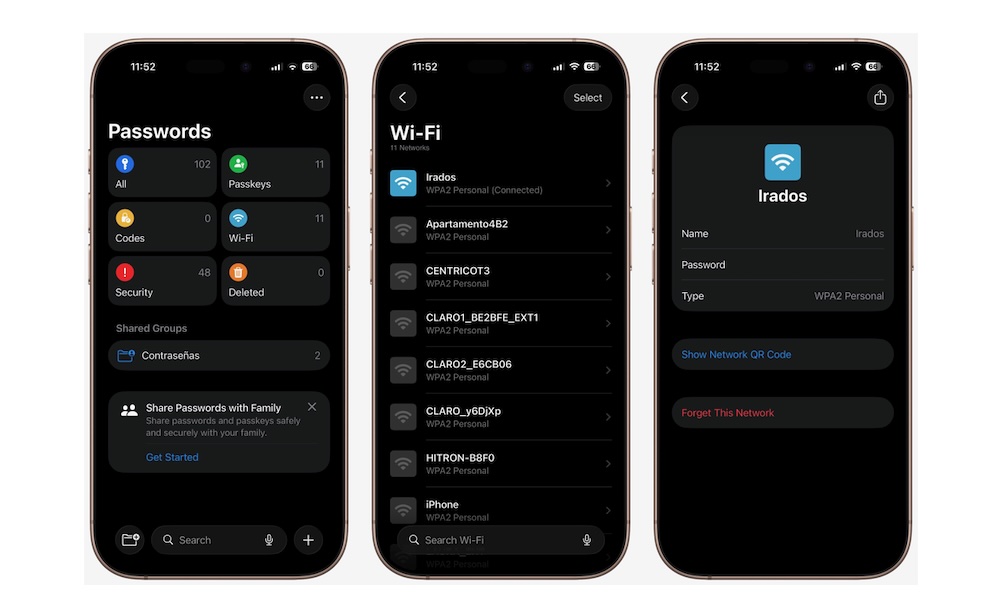
This is one of those iPhone features that feels almost magical the first few times you use it. Instead of spelling out a long Wi-Fi password or letting someone squint at the sticker on your router, your iPhone can automatically offer to share the password with another Apple device nearby.
It’s one of the simplest examples of Apple’s ecosystem working in a way that feels extremely helpful. Guests, family members, or friends with Apple devices can get connected without all the hassle we’ve all already experienced.
There are a couple of ways to do this. First, you can share it from your Passwords app. Don’t worry; you won’t have to give them access to all your passwords; you can share them with a QR code instead. Simply open the Passwords app, tap on Wi-Fi, find your network on the list, and then tap on Show QR Code. The other person can scan the code and join immediately.
The other method is also fairly quick. The only real requirement is that both iPhones have their Wi-Fi and Bluetooth turned on. Also, make sure that Hotspot is turned off. Also, both iPhones will need each other’s Apple account saved in your contacts.
Once that’s done, the iPhone that wants to connect needs to go to the Settings app and then go to Wi-Fi. From there, have them tap your Wi-Fi network. Your iPhone will get a pop-up screen asking if you want to share your Wi-Fi. If you agree, they’ll be connected in no time. Definitely has a few more requirements, but it’ll be way faster.