
Copy Text Directly From Photos
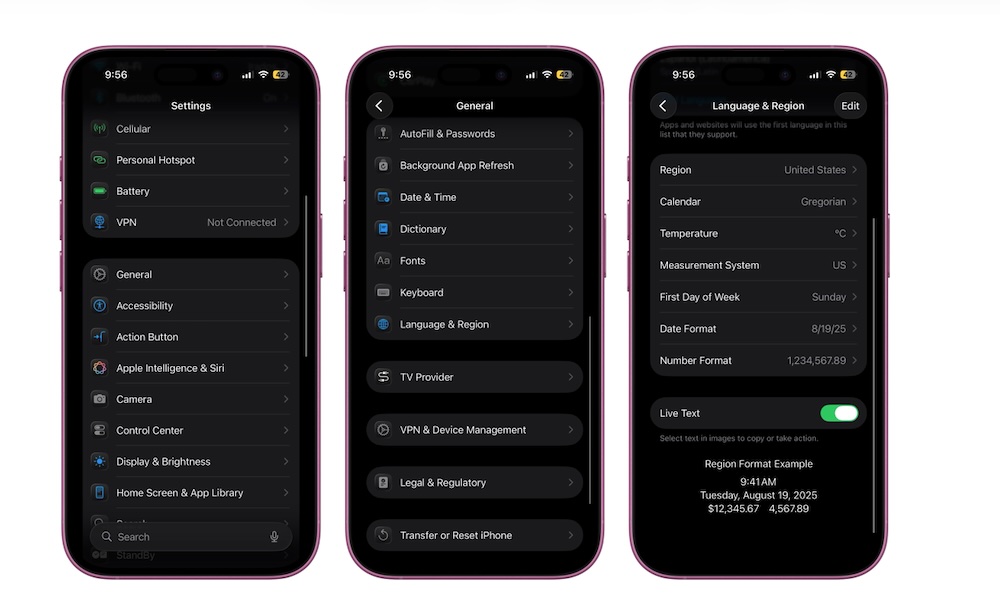
Live Text is one of those features that you never knew how much you wanted until you start using it. It lets you copy text from photos, screenshots, and anything else your iPhone can recognize inside an image. That means you can even Google an image and copy the text directly from it.
This is especially handy for things like phone numbers, addresses, passwords from setup cards, notes from whiteboards, and random text from screenshots. Live Text should be turned on by default. If not, you can go to Settings > General > Language & Region and turn it on manually.
Afterwards, simply open an image anywhere you want. Tap and hold the text from the image, as if it were regular text (you can adjust it to grab as much or as little text as you need), and then tap on Copy, Look Up, Share, or any of the other options.