
Lock Apps if You’re Using Them Too Much
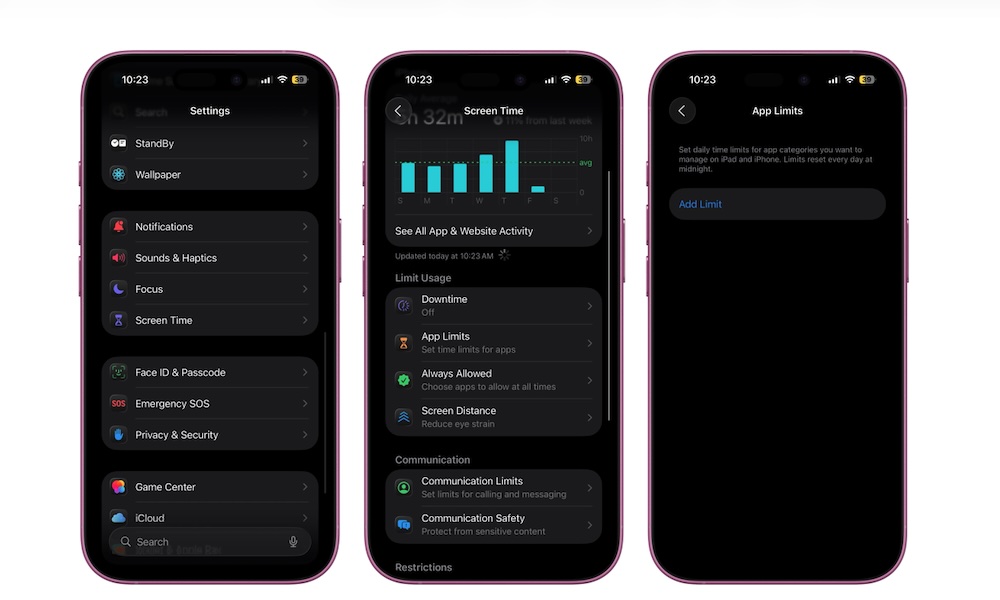
A lot of people think Screen Time is just a report card that shows you how long you’ve been staring at your iPhone during the week, but it can do a lot more than that.
One of the most useful features is called App Limits, which lets you set a daily time limit for specific apps or app categories. Once you hit that limit, the app locks, and you can’t use it anymore. Of course, you can always bypass this lock, but it will be a nice constant reminder that you probably need to be doing something more productive.
That makes it one of the easiest ways to cut down on distractions without deleting apps entirely. Social media, games, or anything else that quietly eats your time can be kept in check with a boundary that feels firm without being extreme. This is how you can set up your own app limits:
- Open the Settings app.
- Scroll down and tap on Screen Time.
- Go to App Limits.
- Tap on Add Limit.
- Choose one app or a whole category and then tap on Next.
- Set a daily time limit.