
Customize Your Action Button For Something You Actually Use
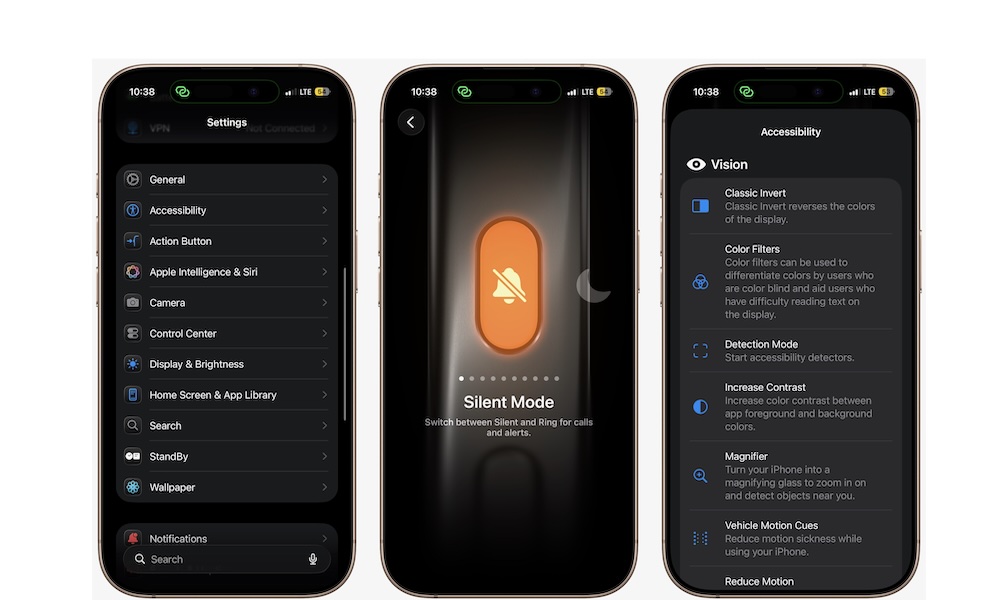
If your iPhone has an Action button (15 Pro Series, 16 and 17 Series), don’t waste it on something you barely care about. Apple gives you several built-in options, including Camera, Flashlight, Focus, Voice Memo, Accessibility, and Shortcuts, which means the button can be much more useful than a simple mute-switch replacement.
The best part is that thanks to the Shortcuts app, you can even have multiple uses for the same Action button. As long as you can get creative, you can create a setup that actually feels useful and personal.
Here’s how to customize your Action button:
- Open the Settings app.
- Scroll down and tap Action Button.
- Swipe through the options available and choose the action you want.
You can then exit the Settings app. Press and hold the Action button and see what it can now do. You can always customize it again by following the same steps.