
Drag and Drop Items Between Apps
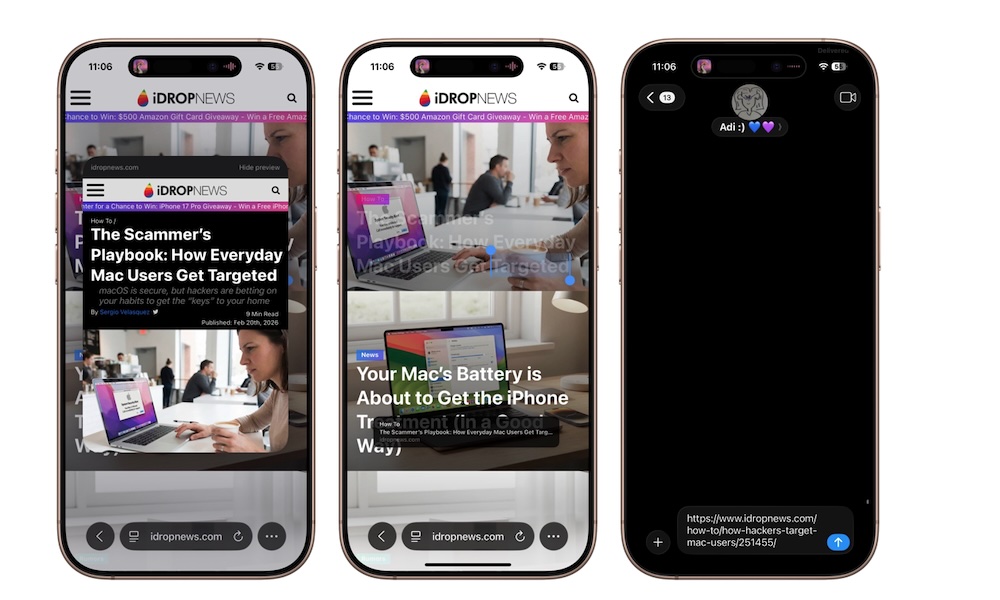
This is one of the most underused iPhone tricks because it feels more like something you’d expect from an iPad or Mac. But on iPhone, you can still drag photos, files, and even email messages from one app to another without relying on sharing items the old-fashioned way. It takes a little practice, but once it clicks, it’s much faster than people expect.
This is especially helpful when you’re multitasking. Moving an image from Photos into Messages or shifting a file into another app feels faster and more direct than sharing and then switching to the app where you want to share the file or photo. It’s one of those little features that make the iPhone feel more powerful.
- Tap and hold a photo or file.
- While holding it, drag it slightly to the left or right until you feel a haptic response and see the item move around with your finger.
- Keep holding it.
- Use another finger to switch apps.
- Drop it where you want.
Again, it might take a while, but it’ll be quicker than sharing files the way you do now.