
Turn Off Automatic Downloads
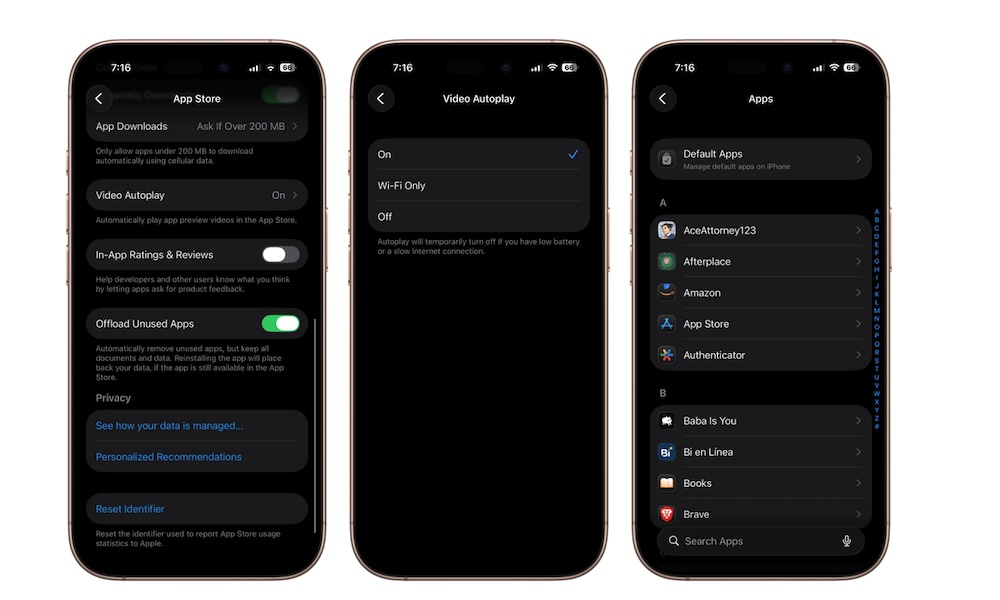
Automatic Downloads allow apps, app updates, and purchases to download across all your Apple devices automatically. While this can be convenient, it also means apps may install or update without you noticing.
Over time, automatic downloads can quietly consume storage space, mobile data, and even battery life, especially if your iPhone is a bit older. Some users also prefer manually deciding when apps update instead of having everything happen in the background.
Here’s how to disable Automatic Downloads:
- Open the Settings app.
- Scroll down to the bottom and tap on Apps.
- Go to the App Store.
- Under Automatic Downloads, turn off App Downloads, App Updates, and In-App Content. You can do the same thing under the Cellular Data section, so you don’t burn through your data plan accidentally.
Just remember to manually update apps occasionally so you still receive important bug fixes and security patches.