
Turn Off App Tracking Requests
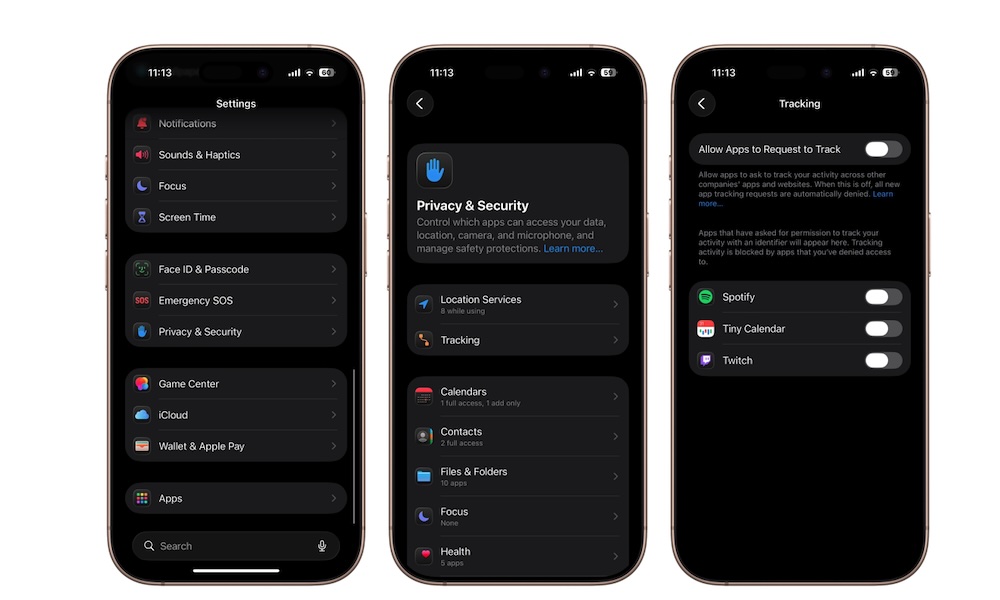
App Tracking Transparency was introduced a few years ago as a way to give you more control over how apps track your activity across other apps and websites. When this feature is enabled, apps can ask permission to track your behavior for advertising purposes.
While Apple deserves credit for making tracking opt-in instead of automatic, those permission pop-ups can get annoying pretty quickly. Not only that, but many of us also prefer to stop tracking requests entirely instead of denying them one app at a time. Fortunately, you can do exactly that.
Disabling this feature prevents new tracking requests from appearing and automatically denies future requests behind the scenes. You stay private, and you don’t have to worry about annoying pop-ups every time you open a new app.
Here’s how to turn it off:
- Open the Settings app.
- Scroll down and tap on Privacy & Security.
- Select Tracking.
- Turn off Allow Apps to Request to Track.
Below this option, you can also see all the apps that have asked for permission; you can disable them, too, if you accidentally allowed one to track you. After disabling it, apps can no longer ask for permission to track your activity across other apps and websites.