
Turn Off Precise Location For Most Apps
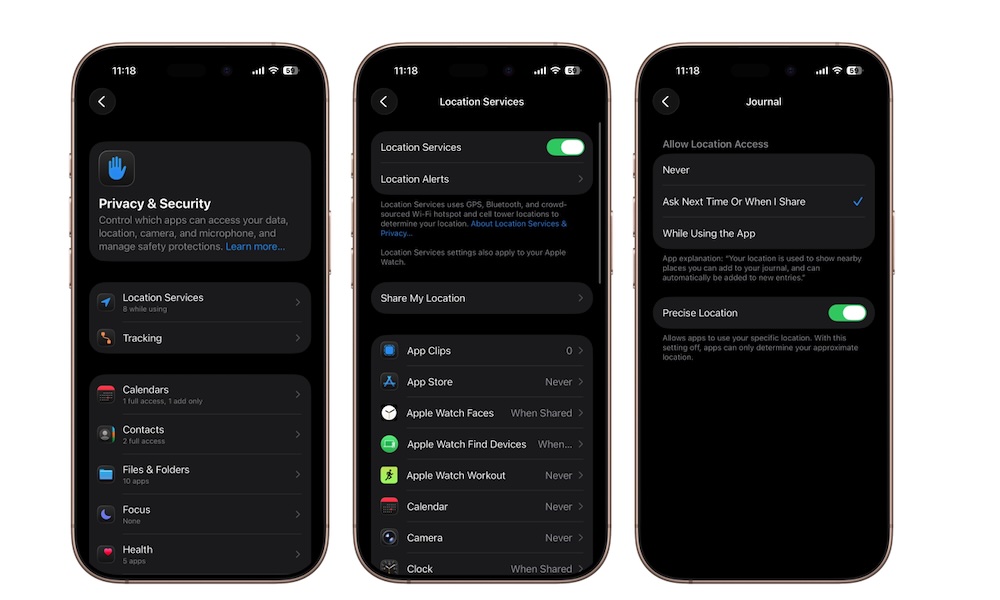
Many apps request access to your exact location even when they don’t truly need it. Weather apps, shopping apps, restaurant apps, and social media apps often work just fine with a general location rather than precise GPS-level accuracy. Some of them don’t even need your location at all, and you’d be better off without sharing that information.
Allowing exact location access for every app creates unnecessary privacy concerns and can even slightly increase battery drain over time due to extra GPS usage. Thankfully, Apple lets you control this individually for each app.
To disable Precise Location:
- Open the Settings app.
- Scroll down and tap on Privacy & Security.
- Tap on Location Services.
- Scroll down and choose any app.
- Turn off Precise Location.
Navigation apps like Google Maps or Apple Maps will usually still benefit from precise location access, but most other apps don’t need it enabled all the time.