
Turn Off Personalized Ads
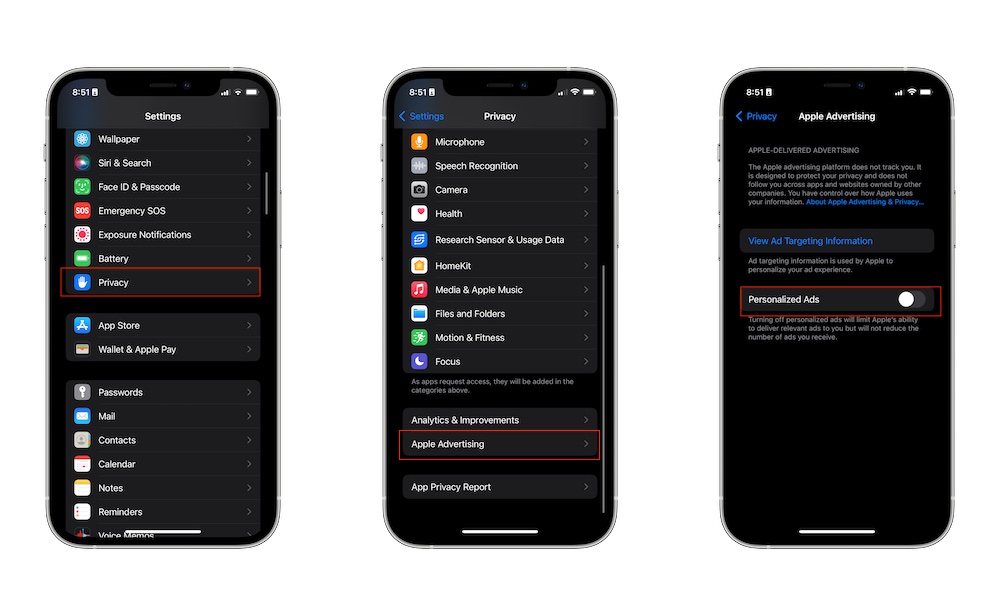
Apple uses some of your activity inside Apple services to personalize ads shown in places like the App Store, Apple News, and Stocks (and likely Apple Maps very soon). The company doesn’t track users the same way many third-party advertisers do, but some people still prefer not to have their activity used for ads.
Disabling Personalized Ads limits how Apple personalizes advertising based on your behavior. Of course, you’ll still see ads in Apple services, but they won’t be customized using your data.
This only takes a few seconds to switch off. Here’s how:
- Open the Settings app.
- Scroll down and tap on Privacy & Security.
- Scroll down again and go to Apple Advertising.
- Turn off Personalized Ads.
You can also tap on Ad Targeting Information to see the information that Apple may use to show you personalized ads.