
Disable Share iPhone Analytics
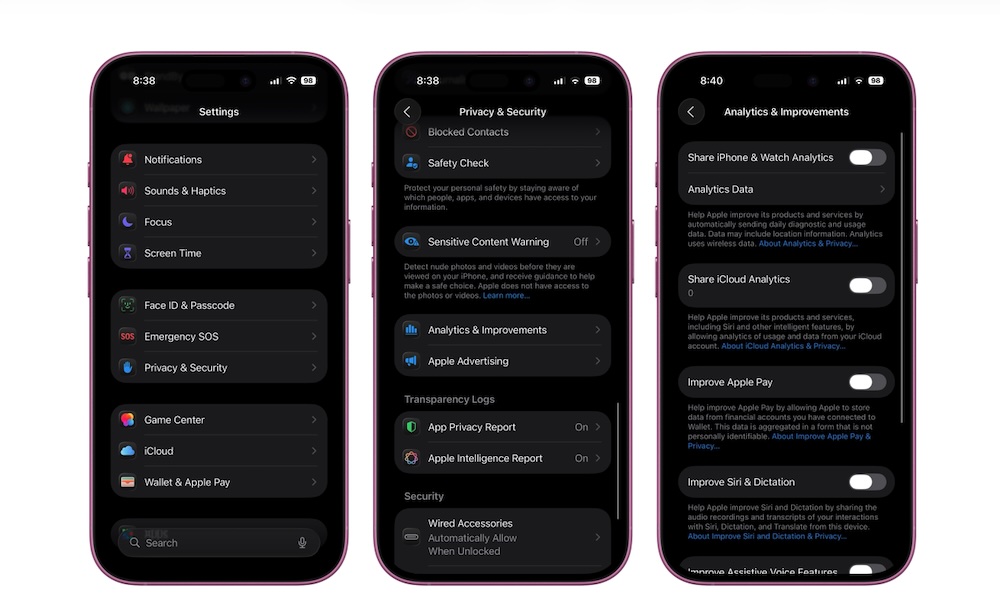
Third-party apps aren’t the only ones tracking you; your iPhone also collects diagnostic data, crash reports, and usage information that can be shared with Apple. The Cupertino company says this information helps improve iOS, but not everyone feels comfortable sending device analytics to a company — even if that data is anonymized.
Besides privacy, this setting also enables minor background activity that many users would rather avoid altogether. While you probably won’t notice a massive battery difference, if your iPhone is old enough, turning off every unnecessary activity is useful. Plus, turning off unnecessary tracking is still a reasonable privacy move.
Here’s how to stop sharing analytics with Apple:
- Open the Settings app.
- Scroll down and tap on Privacy & Security.
- Scroll down to the bottom and go to Analytics & Improvements.
- You can choose what to keep turned on, but we recommend that you disable everything.