
Disable Background App Refresh
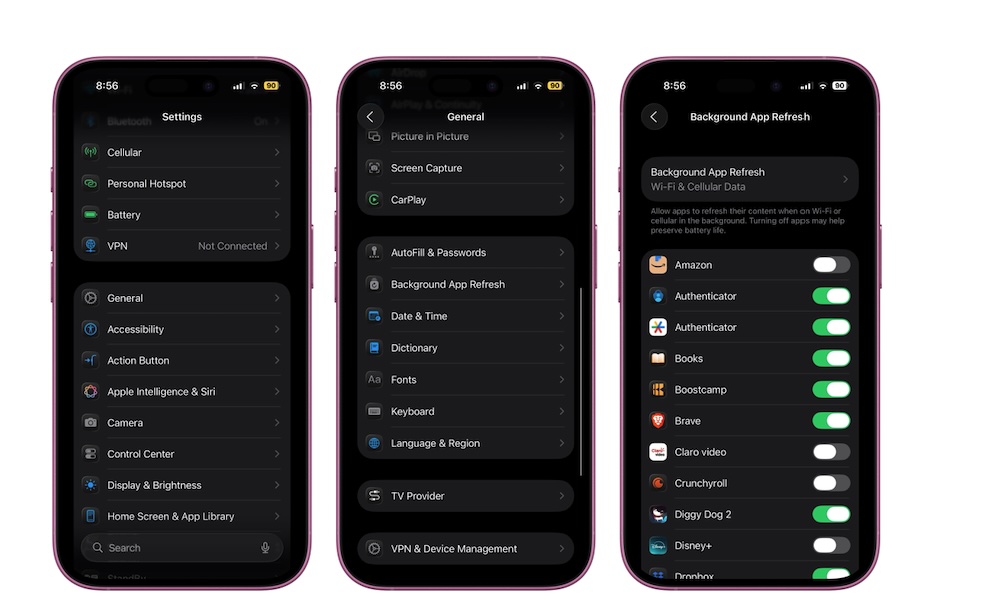
Background App Refresh allows apps to update content even when you aren’t actively using them. Social media apps refresh feeds, shopping apps update information, and news apps pull new stories in the background.
The problem is that many apps abuse this feature. Some constantly refresh data you may never even look at, which can slowly drain battery life, consume mobile data throughout the day, and might even slow down your iPhone over time.
Disabling Background App Refresh won’t break most apps. In fact, your iPhone does it automatically if you turn on Low Power Mode. Messages still arrive, notifications still appear, and apps still update once you open them manually. Most apps don’t actually need this to function, so you can probably live without it. Here’s how to turn it off:
- Open the Settings app.
- Scroll down and tap on General.
- Tap on Background App Refresh.
From there, you have two options. You can turn off Background App Refresh completely, or just turn this feature off for any app that doesn’t need it. If you feel like it’s important, you can just let a handful of your most important apps use Background App Refresh and get rid of the rest.