Hidden iOS 27 Code Points to a Secret Widget Column for the iPhone Duo
Toggle Dark Mode
While Apple’s new iPhone Duo still technically runs the same iOS software as every other current iPhone model, the foldable design gives it a few unique quirks that set it apart from a user interface perspective.
Chief among these is the much “squarer” 1.4:1 aspect ratio of the cover screen. That’s less rectangular than even the early iPhone models, which all had a 1.5:1 ratio (or 3:2) until Apple elongated the screen with the iPhone 5 (and was famously mocked for doing so at the time).
However, it’s a massive departure from today’s iPhone models, which have a 2.17:1 aspect ratio — and that’s naturally required Apple to do a few things differently from a usability perspective.

That includes moving the traditional Dock to the right-hand side of the outer screen, and making the icons slightly smaller in the process. The traditional status bar has also been eliminated in favor of a new circular icon that combines signal strength and battery life. Meanwhile, that squarer outer display creates a more unusual space for widgets and other controls.
New code found in iOS 27.1 and later versions shows that Apple considered at least one possible way to deal with that — and it would have involved borrowing yet another page out of the Apple Watch playbook.
As the very name suggests, the StandBy faces on the iPhone Duo (which will come to other iPhones in iOS 27.3) already have a lot in common with the Apple Watch. But it seems that Apple also considered embracing watch-style complications for the iPhone Duo cover screen.
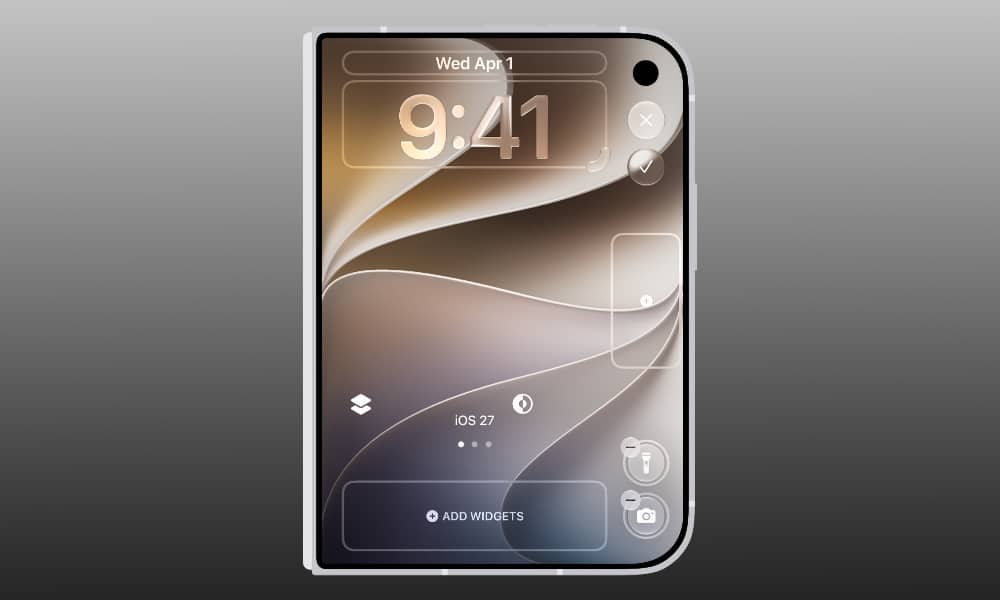
Code sleuth pdfu discovered a disabled internal feature flag (“SpringBoard/Ionic”) showing Apple built the foundation for a “complication column” on the Lock Screen that fits two circular widgets along the right edge — tucked above the customizable flashlight and camera shortcuts and below the top-right status indicators.
Unfortunately, as things stand now, the code is disabled. It’s remained unchanged since iOS 27.1, including into the second beta of iOS 27.3, so it’s not clear if it’s merely an artifact of something Apple abandoned or if the company still plans to activate it at some point.
From what we know so far, it appears the widgets would be similar to the single-tile widgets that can be added to a standard iPhone Lock Screen. That said, the customizable iPhone Duo Lock Screen does offer a standard widget tray at the bottom, so it’s not entirely clear how the complication column differs beyond the ability to put widgets in a different spot — effectively adding room for two more.
What’s even more interesting is that the section on customizing the iPhone Lock Screen in Apple’s iPhone User Guide actually includes the “complication column” in an image of the iPhone Duo (which replaced a standard iPhone image around the time the newer foldable was released). The guide doesn’t refer to it by that name, saying only that you can add or change the widgets without any specifics about where they can be placed, as it uses broad language that applies to all iPhone models.
In a reply to pdfu on X, Bloomberg’s Mark Gurman speculates that this was a scrapped addition that somehow got left in a screenshot in the user guide, although he acknowledges it may return. In a subsequent reply, pdfu agrees, noting that the page was updated around the October 26 release of iOS 27.2 — just days after the Duo launched — while an October 20 Wayback Machine snapshot reportedly still showed the older images.
Nevertheless, the iPhone Duo software experience continues to evolve, so we wouldn’t be surprised if this is something yet to come. Last week, the second beta of iOS 27.3 brought facial unlocking to the iPhone Duo — a feature that nobody was expecting after it had become clear that Touch ID would be the sole built-in biometric authentication method. While this camera-based face unlock is nowhere near as versatile or secure as actual Face ID, since it’s solely a software solution, it’s an interesting step toward making the iPhone Duo user experience more seamless.