
Visual Intelligence Finds Its True Home in the iOS 27 Camera App
Toggle Dark Mode
Although most of the rumors of what was coming in iOS 27 turned out to be remarkably prescient, there was one pretty big miss: the iPhone isn’t getting a customizable Camera app in iOS 27 — at least not yet.
That was one of several predictions Bloomberg’s Mark Gurman made last month, and while most of what his sources revealed was uncannily accurate, this just goes to prove you can’t win ‘em all. Perhaps Apple was considering this for iOS 27 and abandoned it at the last minute, or perhaps it’s a longer-term project.
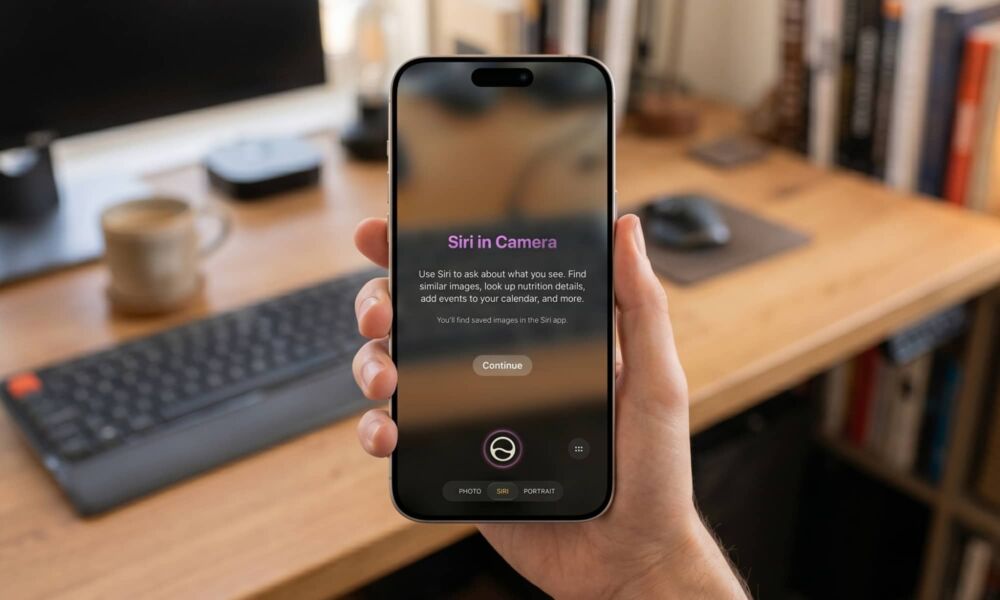
For now, the only significant thing coming to the Camera app in iOS 27 isn’t technically a new feature so much as the consolidation of Apple Intelligence’s image recognition capabilities. As Gurman also predicted, the Camera app is getting a new Siri mode, but it’s really just a rebranded version of the visual intelligence feature Apple introduced with the iPhone 16 nearly two years ago.

It’s arguably a logical move as Apple embraces the new Siri AI era. The original visual intelligence feature, which allowed users to point their iPhone camera at real-world objects to identify, search, or ask questions about them, always felt sort of bolted on. Despite the iPhone 15 Pro fully supporting every other Apple Intelligence feature, visual intelligence started out exclusively for the iPhone 16 family as it could only be trigger by the new Camera Control. Apple later expanded it to the Action button and the Control Center when the iPhone 16e showed up sans Camera Control, after which it really couldn’t justify excluding the iPhone 15 Pro and iPhone 15 Pro Max.
Still, visual intelligence (which Apple conspicuously named in lowercase in those days) opened its own dedicated app for the camera, which actually made things a bit awkward when it came to the Camera Control. Short press on that button and you got the real Camera app, but long-press by accident and you’d end up stuck in visual intelligence mode, with no way back except to swipe up to return to the Home Screen or press the side button to put your iPhone back to sleep, since pressing the Camera Control while visual intelligence was active would simply capture a photo for visual intelligence.
Siri in Camera
With iOS 27, Apple is promoting Visual Intelligence into a branded, title-cased feature while also bringing it under the umbrella of the new Siri AI. If that sounds confusing, it’s because it sort of is, but bear with us as it will all make sense in a few minutes.
When Apple unveiled Apple Intelligence in iOS 18, it offered a suite of features like Writing Tools, Image Playground, Genmoji, Image Wand, visual intelligence (yes, in lower case), along with more core features like summaries for notifications, emails, and web pages, and natural language search in apps like Photos. This mishmash of Apple Intelligence features was eventually to be joined by a more personalized Siri, but as we all know, that hasn’t happened until now.
However, the new Siri AI is much more than a simple voice assistant. Apple has turned it into a full chatbot, complete with its own standalone app. It’s still more of a professional assistant than a virtual friend, but the mechanics of how you interact with it are conceptually identical to ChatGPT and Gemini.
That leaves room for many more things to come under the Siri umbrella. Basically, anything that should fit into a conversation in the Siri app is now considered part of Siri. That includes Writing Tools and Visual Intelligence, although it notably still excludes Image Playground, as Apple is treating image generation as its own sandbox that uses specific natural language prompts similar to Google’s Flow rather than a chat-based tool like Google’s Nano Banana.
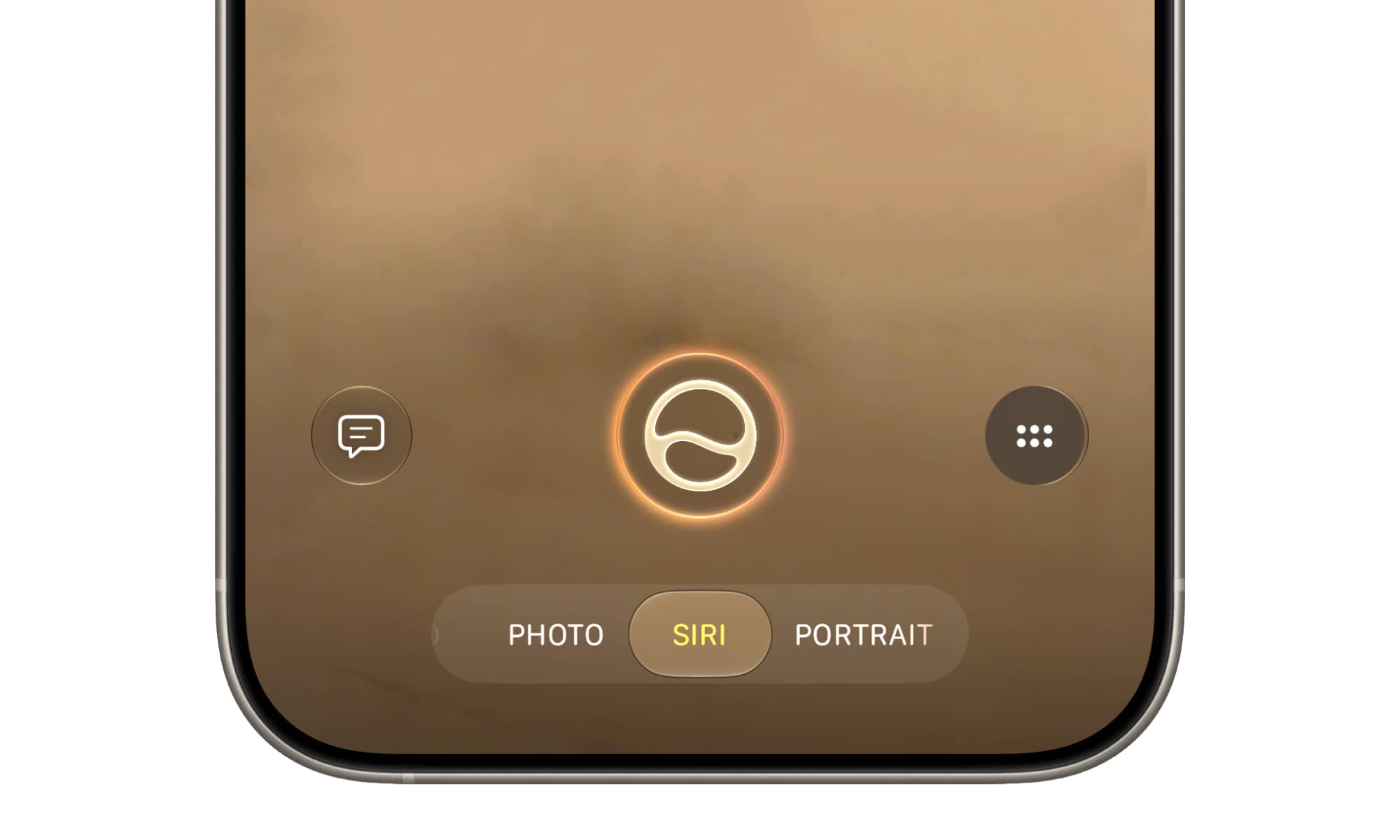
There’s still going to be a transition phase for now, as the old visual intelligence will continue to work the way it has since iOS 18 until the new Siri AI is up and running. However, that changes once you’ve opted into “New Siri” and cleared the waitlist. At that point, a new Siri shooting mode will appear in the Camera app, tucked in between Photo and Portrait. You can select this like any other camera mode, and when you do you’ll basically be looking at a screen very similar to the old standalone visual intelligence app, with the main visual difference being the Siri logo on the shutter button.
More Than Just a Google Lookup Clone
Other than this, the new Visual Intelligence remains virtually identical to the original in function, with the obvious change being the Ask button now calls up Siri directly, rather than handing the request over to ChatGPT. Apple has also upgraded the old Google lookup button to support third-party apps, and I was surprised to see QuickBooks, HelloFresh, and Pinterest already popping up in the first developer beta. However, it turns out Apple is leveraging the existing App Intents framework that these apps already implemented in iOS 26 to tie in for things like receipts, recipes, or visual styles; Visual Intelligence is simply hooking into that existing API. The integration doesn’t appear to be fully baked yet, so it’s not clear how it will actually work, but it’s promising to see them in there at all.
However, the real reason Visual Intelligence is coming into Siri’s domain is that anything you capture and ask Siri about will become part of a new conversation in the Siri app. This not only includes the specific questions you ask, but even simple one-tap things like looking up a type of plant, laundry labels, or nutrition information from a dish (which is also a new feature in iOS 27).
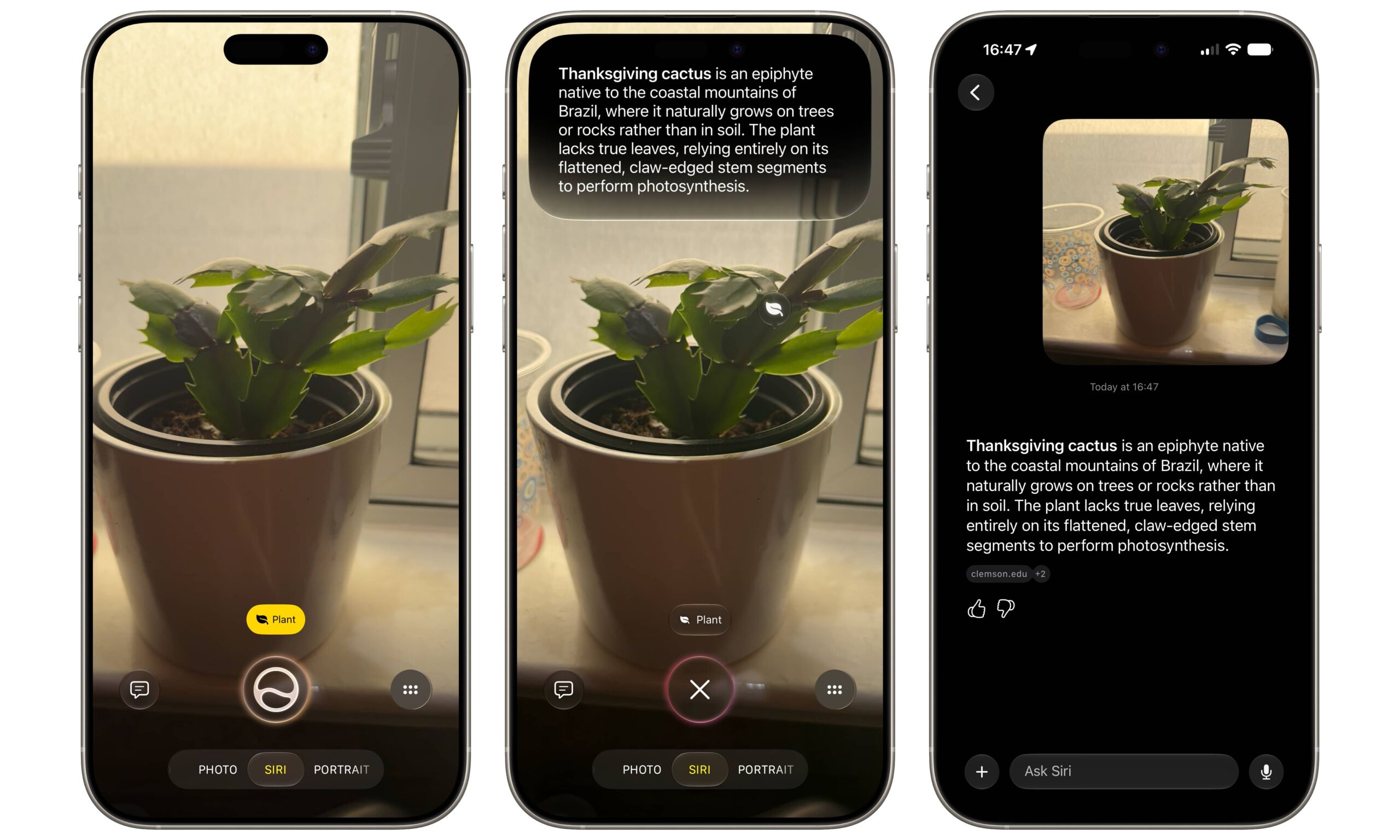
Granted, this could cause the Siri app to get a bit cluttered, but at least it ensures you’ll have a record of whatever you’ve identified with Visual Intelligence, and you can delete anything you don’t want to keep.
While the new Siri mode in the Camera app makes Visual Intelligence much more accessible, it also improves the Camera Control in a subtle but useful way. Now, you’ll be dumped into the same Camera app whether you give the Camera Control a short press or a long one, with the only difference being the mode it starts in. If you accidentally triggered Siri mode with a long press when you only wanted to take a quick snapshot, the standard Camera modes are all a swipe away.






