
Consider Using Low Power Mode
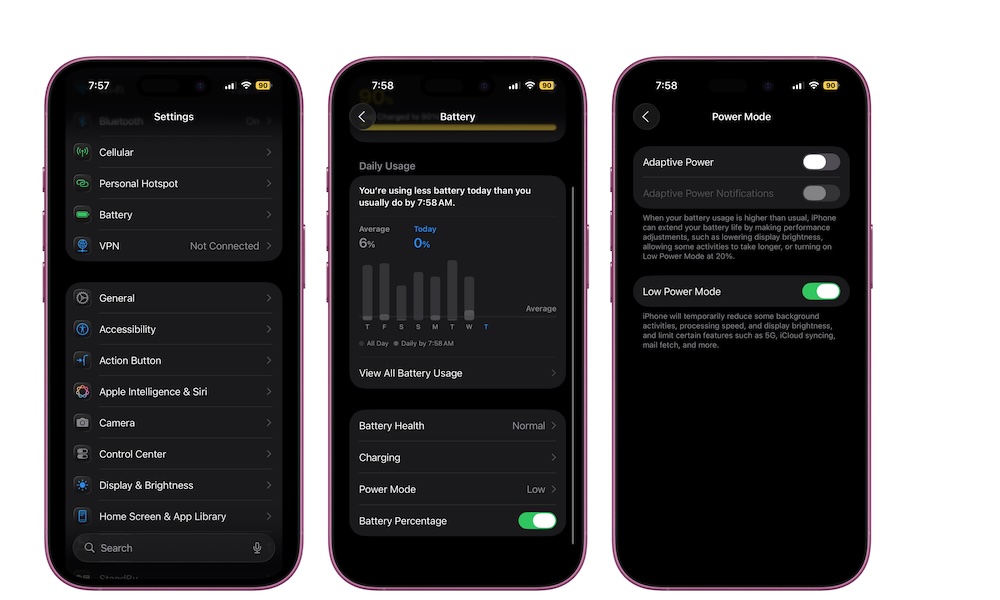
Low Power Mode is usually seen as a battery-saving feature, but it can also help with your iPhone’s performance if it’s feeling a little too slow.
That’s because, among other things, Low Power Mode reduces certain background tasks and system activity so your phone can focus on the more essential tasks.
This won’t permanently fix a slow iPhone, and it’s not something you need to have turned on all the time. But if your phone is running hot, your battery is dropping fast, or you just need it to stay functional through the rest of the day, Low Power Mode can help calm things down a bit. Here’s how to turn it on:
- Open the Settings app.
- Tap on Battery.
- Select Power Mode (on iPhone 15 or later)
- Switch on Low Power Mode.
You can also add a Low Power Mode control to Control Center if you want to turn it on faster.