
Reduce Motion to Get Rid of Certain Animations
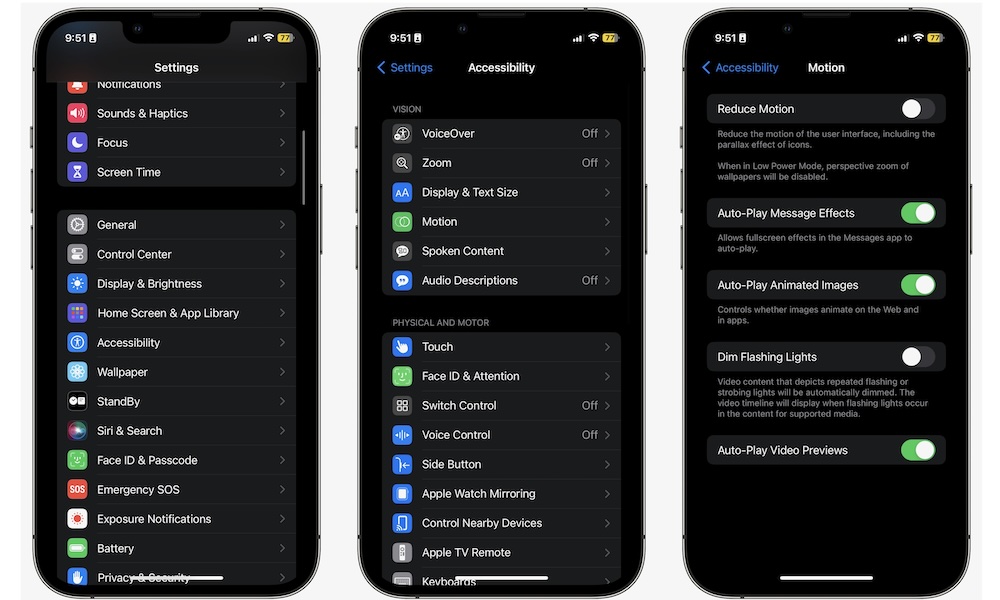
This tip won’t fix deep performance problems, but it can make your iPhone feel quicker overall. iOS uses motion and animation effects throughout the system, which are tiny details that make it stand out.
And while these animations look and feel good, they can also make transitions feel heavier than they need to.
If you prefer a snappier visual experience, reducing those effects can help your phone work more quickly. Again, it won’t be a big difference, but if your device is starting to slow down for real, this might be a quick fix.
To turn it on:
- Open the Settings app.
- Scroll down and tap on Accessibility.
- Tap Motion.
- Turn on Reduce Motion.