
Turn Off Background App Refresh For Apps That Don’t Need It
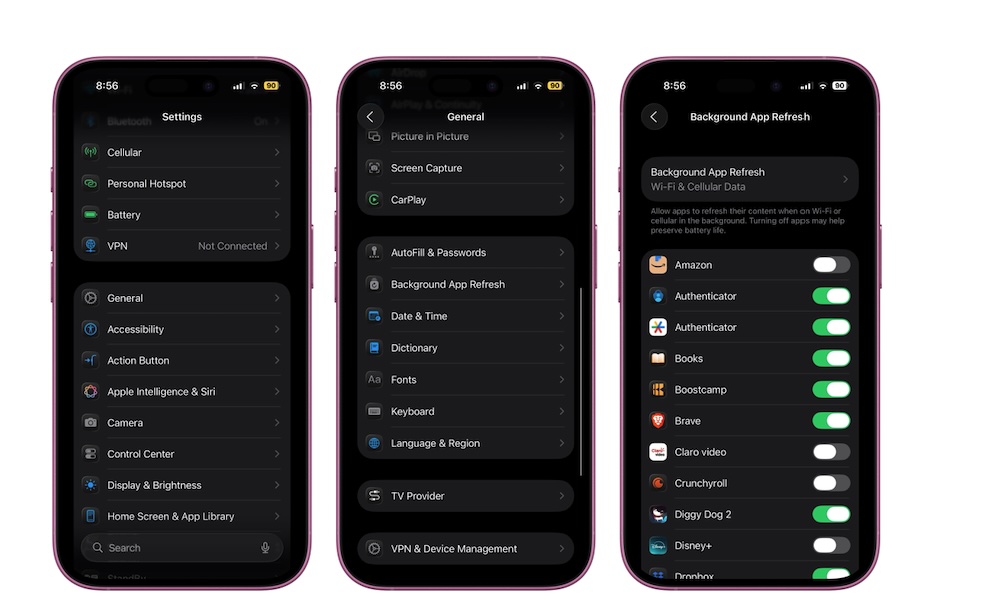
Background App Refresh lets apps update content while you’re not actively using them. That can be helpful for some apps, but if you have a lot of social apps, shopping apps, and delivery apps all doing background work, your iPhone is probably working harder than it needs to.
Not every app that is allowed to update in the background by default really needs it, and cutting down on that background activity can make your iPhone feel a little less overloaded.
Here’s how to manage your iPhone’s Background App Refresh:
- Open the Settings app.
- Scroll down and tap on General.
- Go to Background App Refresh.
From there, you can turn it off entirely or leave it on and disable it only for nonessential apps. If you’re trying to lighten the load while still letting your iPhone work in the background, the second option is better for you.