
Set Up Focus Modes
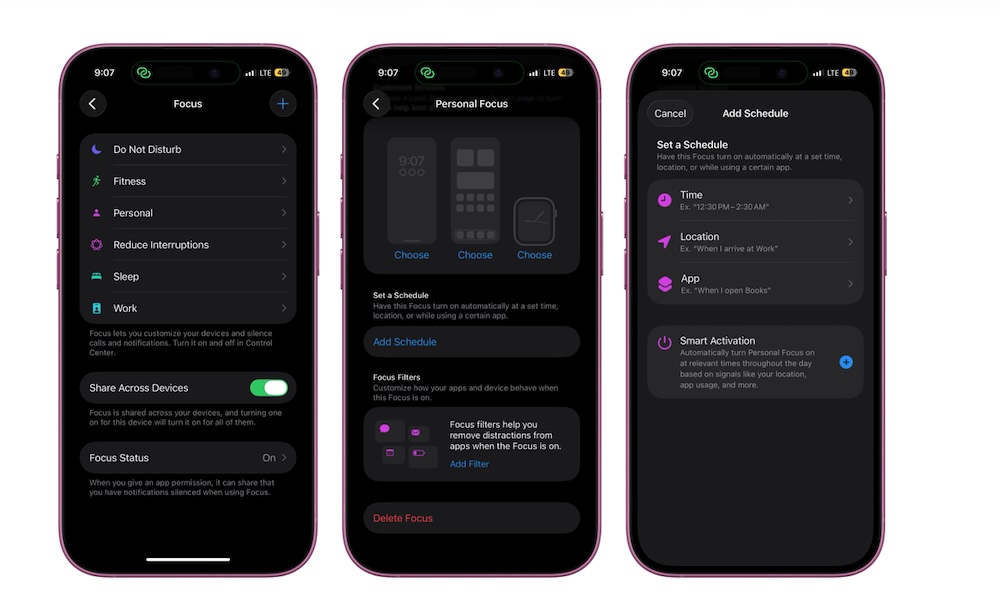
Focus modes are one of the best places to start if your iPhone constantly distracts you. They let you decide which people and apps can notify you depending on what you’re doing, whether you’re working, sleeping, driving, exercising, or just spending time away from work.
As we know, most notifications don’t need your attention right away. A random app alert, group chat, sale notification, or social media ping aren’t really important, but they can distract you for more than just one second. Focus lets you create boundaries without turning your iPhone off completely.
You can also connect a Focus mode to a specific Lock Screen or Home Screen. For example, your Work Focus can show a clean Home Screen with Calendar, Reminders, Notes, and Mail while hiding entertainment apps.
To create a new Focus mode:
- Open the Settings app.
- Scroll down and tap Focus.
- Choose an existing Focus mode or tap the + button and follow the instructions on your screen.
- Pick which people can notify you and which apps can send alerts.
- Customize your Lock Screen or Home Screen if you want.
Now you have a new Focus mode. You can create a schedule so it turns on automatically, or turn it on manually from your Control Center. Once it’s set, your iPhone becomes much easier to manage during the parts of the day when you need fewer interruptions.