
Use Quick Notes for Fast Ideas
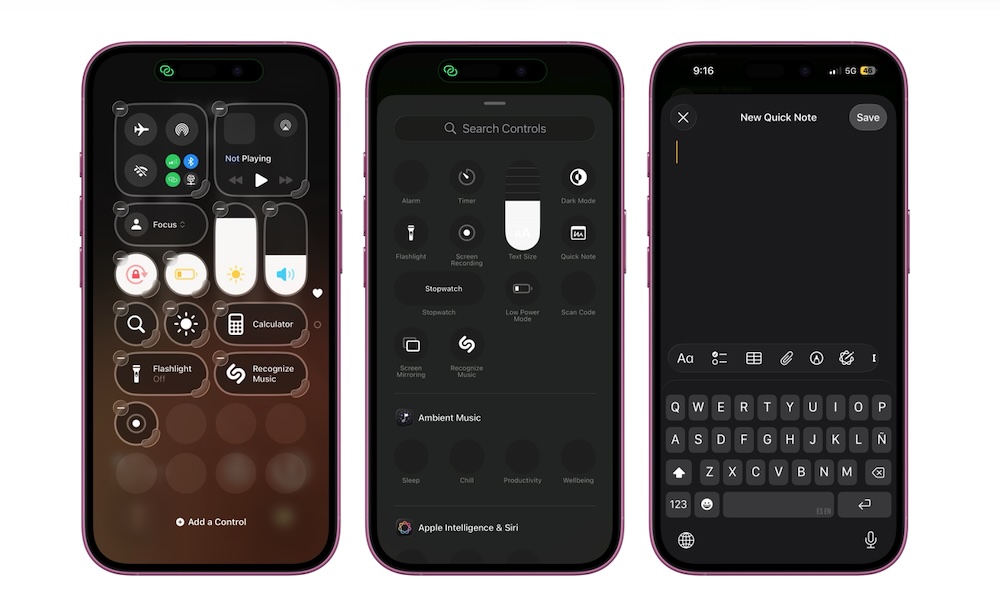
Quick Notes are perfect for capturing ideas or thoughts before they disappear. Instead of unlocking your iPhone, finding Notes, opening the right folder, and creating a new note, you can add Quick Note control to Control Center and start writing faster.
This is useful for the things you need to do but know you’ll forget, or for an important idea you want to explore a bit more later. You can organize the note later, but the important thing is to capture your idea before it’s too late.
So first, start by adding the Quick Note control to your Control Center. To do that, simply open the Control Center and tap the + button in the top left corner of your screen. Next, tap Add a Control and search for Quick Note.
After you add it to your Control Center, you can pop up a note whenever you want, save it, and know that your iPhone will keep it in its own special folder for when you need it.