
Schedule Notification Summaries
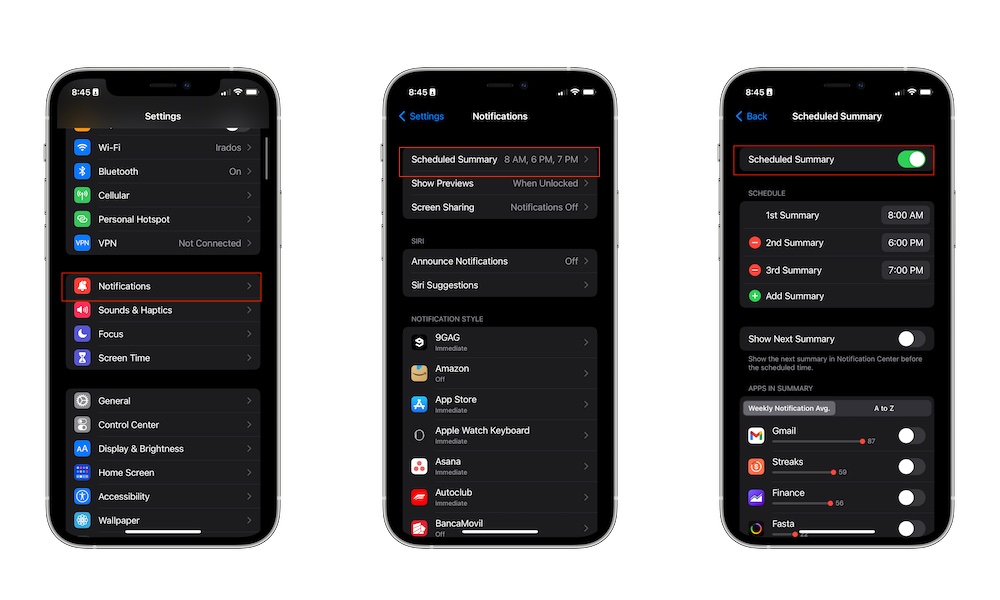
Scheduled Summary groups less important notifications and delivers them at specific times during the day. Instead of getting alerts constantly from apps that don’t need immediate attention, you can receive them in a summary later.
With this feature, you’ll reduce interruptions without having to turn off every notification completely. You can still get important calls, messages, and time-sensitive notifications right away while saving the less urgent notifications, like news and social media, for later.
You can add any app you want, and even choose how many notification summaries you get during the day, which is perfect if you still don’t want to feel like you’re missing out on your friends and family’s updates. To set up notification summaries, you need to do the following:
- Open the Settings app.
- Scroll down and tap Notifications.
- Tap Scheduled Summary.
- Turn this feature on.
- Tap Add Summary to choose your own schedules.
- Scroll down and choose which apps to include.
If you still want to be in the know, you can turn on Show Next Summary, so you can still see the upcoming notifications whenever you want.