
Three Easy Ways to Re-Watch Apple’s Event – And Why You Absolutely Should
Toggle Dark Mode
Well. That was a lot.
Apple’s “Surprise and Shine” keynote wrapped up this week — and it delivered the one thing Apple watchers have been waiting nearly a decade for: a folding iPhone. The iPhone Duo is real, it’s shipping in October, and it costs $1,999. It shared the stage with the iPhone 18 Pro and iPhone 18 Pro Max, the Apple Watch Series 12 and Ultra 4, and the new AirPods 5.
If you missed it live — or you caught it while half-answering emails, which let’s be honest is how most of us watch these — the full keynote is already available on demand. Here are the three easiest ways to go back and watch it properly.
Apple’s Events Page
The most direct route is Apple’s own site. Head to apple.com/apple-events and the replay is sitting right at the top.
This works on a Mac, an iPhone, an iPad, a Windows PC, a Chromebook, or anything else with a modern browser. No app, no account, no sign-in. Apple also chapters the video, which is genuinely useful when you only want the twelve minutes on the Duo’s hinge and not the opening montage.
YouTube
Apple posts the full keynote to its YouTube channel, and for most people this is the easiest option by a wide margin.
The advantage is reach. YouTube runs on your phone, your tablet, your smart TV, your Roku, your Fire Stick, your game console, your laptop. If you want the keynote on the big screen while you make dinner, this is the path of least resistance. You also get playback speed controls, which matter more than you’d think — 1.25x turns a 90-minute keynote into a very manageable evening.
Bonus: the comments section during an Apple keynote replay is its own form of entertainment.
The Apple TV App
Apple retired its standalone Apple Events app back in 2020 and folded event streams into the Apple TV app instead. The keynote gets a prominent placement there for the next several days.
You can watch it on an Apple TV box, an iPhone, an iPad, a Mac, or any of the smart TVs, streaming devices, and consoles where the Apple TV app is available. If you own an Apple TV, this is the best-looking version of the three. Clean playback, no comment section, no ads, and the product photography looks the way Apple intended it to look on a big panel.
Why You Absolutely Should
Normally I’d tell you a keynote recap article covers 90% of what you need. Not this year. Here’s why the replay is worth your time.
The Duo has to be seen, not read about
Apple’s first foldable opens from a 5.4-inch outer display into a 7.6-inch inner one, wrapped in grade 5 titanium, running the same A20 Pro chip as the iPhone 18 Pro. Those are numbers. What the numbers don’t tell you is how Apple thinks you’re supposed to hold the thing, how the software transitions between the two screens, or what the crease looks like in motion.
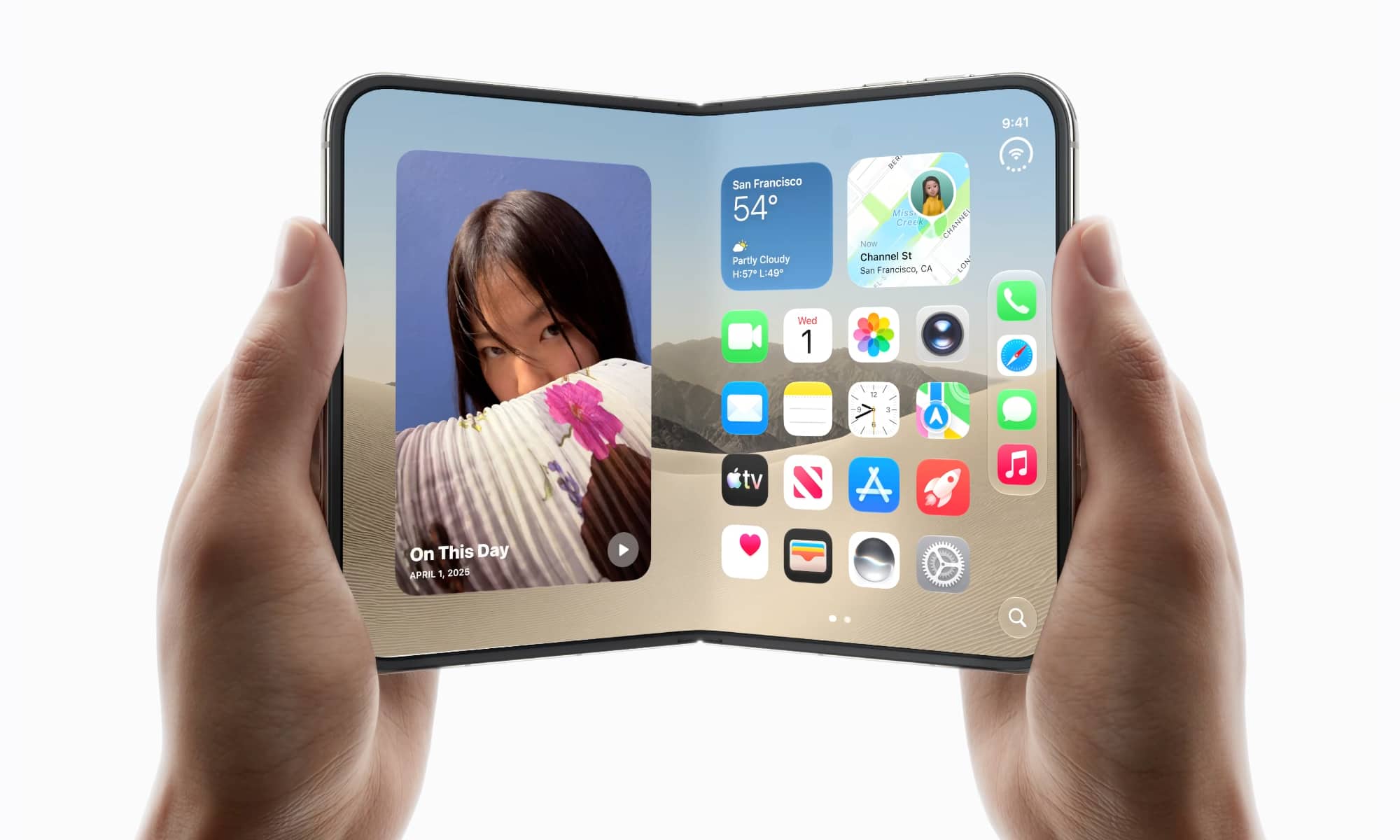
Apple spent a significant chunk of the keynote on exactly that, and no amount of spec-sheet coverage substitutes for watching it unfold on screen. If you’re seriously considering a $1,999 phone, watch the segment before you decide.
The Watch health story is bigger than it sounds
The Apple Watch Series 12 and Ultra 4 got a new Health Sensing System with a larger electrode surface and more efficient LEDs, which lets the watch read your heart rate every five seconds all day and take heart rate variability measurements dramatically more often. That feeds a new Readiness score — a 0 to 10 rating built from sleep, recent training load, and vitals that tells you whether to push or back off each day.
Apple also introduced Audio Intelligence on the wrist, including Siri Recap and Live Recap. Every audio feature is opt-in, and Apple was explicit on stage about not retaining recordings. That’s a meaningful thing to hear stated directly rather than read paraphrased.
The pre-order calendar is unusual this year
This is the practical reason. The dates are not what you’re used to:
| Product | Pre-order | In stores |
|---|---|---|
| Apple Watch Series 12 ($399) | Now | Sept. 18 |
| Apple Watch Ultra 4 ($799) | Now | Sept. 18 |
| AirPods 5 ($129 / $149) | Now | Sept. 18 |
| iPhone 18 Pro ($1,199) | Sat., Sept. 12, 5 a.m. PT | Sept. 18 |
| iPhone 18 Pro Max ($1,299) | Sat., Sept. 12, 5 a.m. PT | Sept. 18 |
| iPhone Duo ($1,999) | Oct. 16, 5 a.m. PT | Oct. 23 |
Apple moved iPhone pre-orders to a Saturday this year instead of the usual Friday. The Duo is on a completely separate track, more than a month behind everything else. If you were planning to set an alarm based on habit, set it based on this table instead.
Worth noting: iPhone prices went up this year, and Apple pointed at memory costs. The iPhone 18 Pro now starts at 256 GB, the jump to 512 GB runs an extra $200, and there’s a 2 TB option for the first time.
iOS 27 Lands Monday
The software dates got announced too, and they’re close. iOS 27 and watchOS 27 arrive as free updates on September 14 — four days before any of the new hardware ships. That means most of the features demoed this week are coming to the iPhone and Watch already in your pocket next week, whether you buy anything or not. That segment alone is worth the replay.
And it was a first

This was John Ternus’s first keynote as CEO. Whatever you think of the products, the tone-setting matters, and it’s the kind of thing that only happens once.
Grab a coffee, put it on the big screen, and give it the hour. We’ll have full breakdowns of every product throughout the week.






