
How to Unlock the AirPods Custom EQ in the iOS 27 Public Beta
Toggle Dark Mode
Earlier this week, Apple released the first public betas for iOS 27 and the rest of its big 2026 software releases. While these are still very much in development, meaning you will encounter at least small bugs and glitches, the “public” nature of the beta cycle is enough to encourage more folks to jump in.
For the most part, installing a public beta isn’t much different from any other software update. New public beta testers will need to visit Apple’s Beta Software Program website to enroll their Apple Account, but you’re still covered if you signed up for public betas in the past.
In either case, once you’re enrolled, accessing the public beta is as simple as changing the Beta Updates setting that’s found on the standard software update screen (found at Settings > General > Software Update). Choose “iOS 27 Public Beta” for your iPhone, and the standard Software Update process will fetch the appropriate public beta instead of waiting for the final release.
Once that’s installed, you’ll be able to try out nearly everything new in iOS 27 — with one important exception.

How to Install Beta Firmware for AirPods
While iOS 27 brings several new features for modern AirPods, there’s one more component required to unlock these beyond the iPhone Software Update. You also need to ensure your AirPods are running the latest beta firmware release.
That doesn’t come down when you’re installing iOS 27 on your iPhone. Instead, your iPhone needs to go out and fetch it separately for your AirPods. This will only happen if you’ve also toggled a separate switch that controls beta updates for your AirPods. Here’s where to find it:
- Ensure your iPhone is updated to the iOS 27 Public Beta.
- Connect your AirPods to your iPhone by opening their case or taking your AirPods Max out of the case.
- Go to the Settings app on your iPhone.
- Locate your AirPods, which should be listed above the Airplane Mode section. Tap on this setting.
- Scroll to the bottom and tap on AirPods Beta Updates. Note that this will only appear if you’re enrolled in the developer or public beta programs and there’s an beta available for your particular model of AirPods.
- Turn on AirPods Beta Updates.
- Wait.
As with standard AirPods firmware updates, these install when they’re good and ready, and there’s no way to force it. All you can do is ensure that your AirPods remain within range of your iPhone. According to Apple’s support documentation, the iPhone must also be connected to Wi-Fi and the AirPods must also be charging.
You can go back and check the current firmware version on the AirPods settings screen to see what’s installed. As of this writing, the most current firmware is 9A314b, but as a rule, you’re looking for anything that starts with a “9” to support the new features in iOS 27. Apple increments these numbers with each major OS update, and the 8-series firmware versions are for iOS 26.
What’s New for AirPods in iOS 27
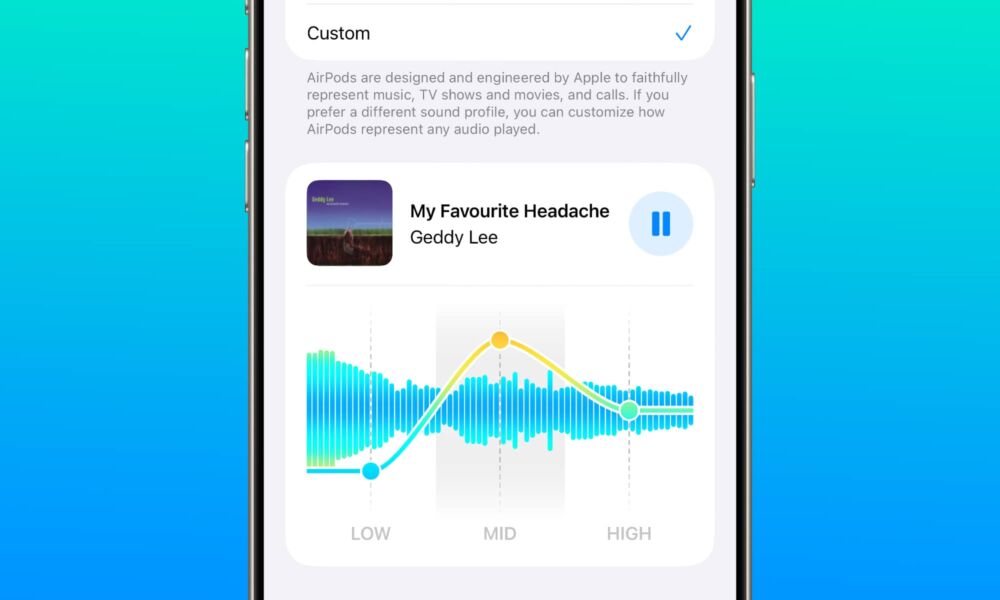
To be fair, you won’t be missing out on much if you choose to skip the AirPods beta firmware. The only significant new AirPods features this year are a new configuration screen on the iPhone and a custom equalizer that’s a bit underwhelming with only three bands to play with.
It’s also worth noting that only the most current AirPods with the H2 chip will be getting this feature. The official list includes the AirPods Max 2, AirPods Pro 3, and AirPods 4. However, we’ve confirmed the AirPods Pro 2 are also included, as the requirement seems to be the H2 chip inside. Apple likely just failed to list these as they’re no longer a current product.






