
FaceTime, Maps, and Messages Are Getting Secret iOS 27 Upgrades — See Them Here

Toggle Dark Mode
Even though the public release of iOS 27 is still a couple months away, we already have a pretty good idea of everything it has in store for us.
And as you can expect in 2026, there are a lot of AI features that many of us didn’t ask for. The good news is that there are also other cool new features coming to Apple’s most-used apps, including FaceTime, Maps, and Messages.

These apps are all getting some cool new features that make use of both Apple Intelligence and the iPhone’s hardware and software capabilities.
Many of these features are already available, but if you haven’t tried the developer beta, here’s what you have to look forward to once iOS 27 arrives in September (or sooner if you’re willing to jump into the public beta when it arrives later this month).
FaceTime Borrows a Clever Camera Trick

Out of the three apps we’re talking about today, FaceTime is the one that’s getting the least amount of love — at least for now. Still, the updates that are here aren’t bad.
The biggest upgrade is that Dual Capture is coming from the Camera app right into FaceTime. Introduced last year in iOS 26, this initially let anyone with an iPhone 17 or iPhone Air create recordings from both the front and rear cameras at the same time.
As you can probably guess, this will do something similar in FaceTime, letting you send video from both your front and rear cameras on a call, so you can show whatever is in front of you while others can still see your face. It’s a small upgrade, but a really cool addition as well. Unfortunately, this feature won’t be available for everyone, as just like the Camera feature you’ll need an iPhone 17 model or iPhone Air to use it, and the other parties in the call will also need to be on supported devices to receive the Dual Capture video.
Another small upgrade is the addition of a new language to the Live Captions feature. Traditional Chinese is available now, which is great for those who can and want to speak that language with their friends and family.
Last but not least, Apple is also improving the quality of the calls, even in situations with a poor internet connection. Again, not a huge upgrade, but a much-needed one.
Apple Maps Is Getting Better at Recommending Places

In iOS 27, Apple Maps is getting a couple of good upgrades — and one that’s not so good. For starters, there’s the Flyover View from Apple Maps. This feature lets you see what certain cities and important places look like. Thanks to Apple’s AI, these images will be much more detailed. Unfortunately, it won’t be available for every place in the world, so only expect to use it properly if you live in a big city.
Additionally, Apple is also adding Local Lists, where you can see recommendations for places near you or spots you might be interested in based on your search history. The downside is that Apple is also using this to introduce ads to Apple Maps, but it’s still a nice feature to see some popular places like restaurants that you haven’t visited before.
Speaking of location-based features, the Find My app is getting a couple of big changes as well. Sure, this isn’t the Maps app, but it’s still kind of Maps-adjacent, so it’s worth mentioning. First, you’ll be able to pause location sharing with specific people until the end of the day — without letting them know you’ve done so. Apple is also letting you more precisely choose how long you want to temporarily share your location with someone.
The Messages App Will Be More Fun to Use
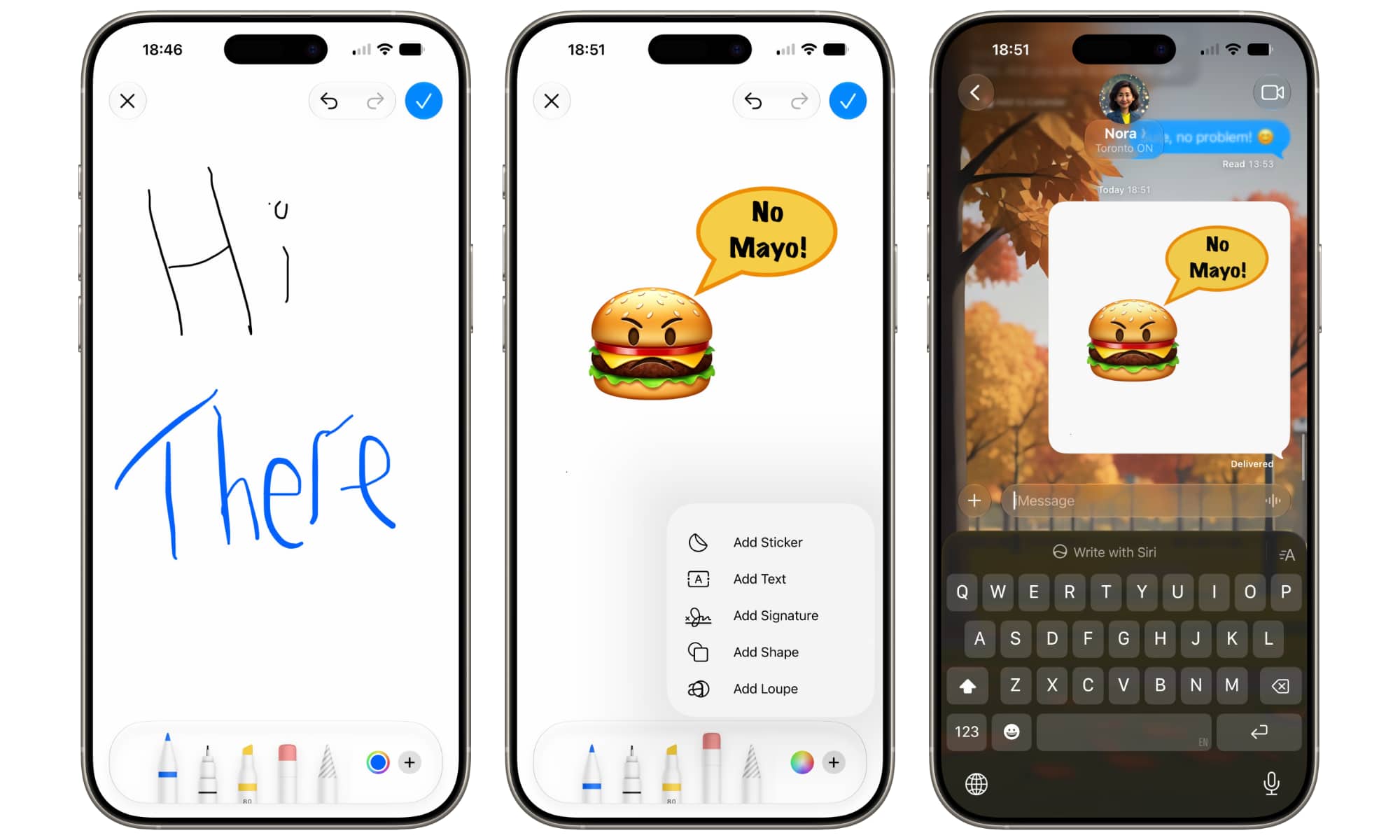
Out of the three, the Messages app is easily getting the best new features. The coolest one is probably the drawing app. Tapping the plus (+) button In iOS 27 will show you a new “Drawing” option. This will let you freely draw with your finger whatever you want. It’s no Photoshop, but it still offers several tools — the same ones you’ll find when sketching in Notes or marking up documents in Preview — and it’s cool to be able to create drawings and share them with friends and family on the fly. Instead of just sending an emoji or asking AI to make one for you, you can let your creativity run wild.
The Messages app will also feature one-tap suggestions. This feature uses Apple Intelligence to understand the messages you receive and give you suggestions that it thinks are helpful. For instance, if you get a message from a friend inviting you to a party, a suggestion will pop up asking if you want to add it to your calendar or as a reminder. Or, if a friend asks you for a specific picture, your iPhone should be able to understand and help you search for the picture based on the people, places, or specific keywords mentioned in the message.
Another cool upgrade is that Apple Intelligence’s Smart Reply feature will now be able to create responses using your own writing style — or at least try to imitate it. This will make responses feel more human and real than before. Of course, we’ll have to really test it to see if it works the way Apple says it does.
Another couple of noteworthy updates are the ability to disable the recording button, so you no longer have to worry about sending a voice message by mistake, and children’s accounts now automatically block violent and gory content.
Get Ready for iOS 27
The full version of iOS 27 is expected to launch in September alongside the new iPhone 18 lineup, and the public beta is expected to be released this month. So you have more than enough time to get your iPhone ready for the upcoming update.
These are just some of the features coming later this year. Apple Intelligence and Siri are also getting smarter, while other apps are getting some useful features that you probably will not want to miss.






