
How To Prepare Your iPhone for iOS 27 Right Now
Toggle Dark Mode
While Apple hasn’t announced an official release date for iOS 27, if it sticks to tradition we’ll likely see it show up in the next three weeks. Apple is holding its ‘Surprise and Shine’ iPhone Event on September 9, which means we’ll probably see iOS 27 drop around September 14–16, as it typically comes a week after new iPhones are unveiled but before they actually arrive in stores.
One of the biggest new features in iOS 27 is a completely revamped Siri, dubbed Siri AI. While there’s a good chance new users will have to join a waitlist after updating to iOS 27, there’s no indication of how long folks will actually need to wait.

However, the waitlist won’t be the only thing that could stop you from using Siri AI to its full potential. Your iPhone also needs to spend some time building semantic indexes so that Siri can properly — and quickly — access personal data such as messages, emails, and calendar appointments to be able to use them in its responses.
While that process can take anywhere from a few hours to a few days depending on how much data you have on your iPhone — and it may continue running even after you’re off the waitlist — there are still some things you can do to speed up the process and ensure the new Siri is fully ready to roll once you clear the waitlist.
The first of these is to install iOS 26.6 or later on your iPhone. While that update doesn’t have a ton of new features, Apple has enabled the indexing feature in advance to give folks a head start. Aside from that, iOS 26.6 fixes dozens of security holes, so you should really install it even if you don’t care about the new Siri (or have an older iPhone that won’t run it anyway — as with other Apple Intelligence features it will be limited to the iPhone 15 Pro and newer models).
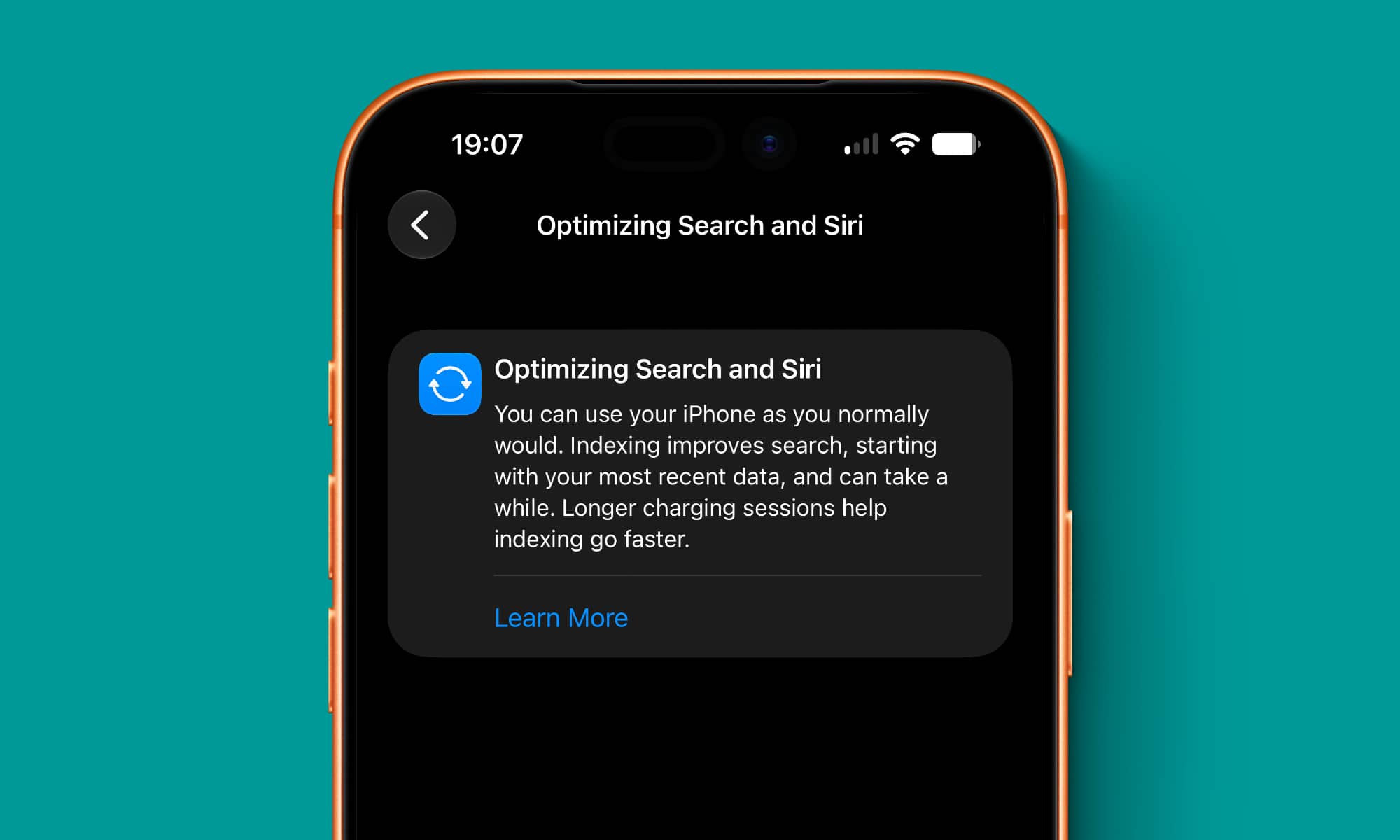
After installing iOS 26.6, you should see an Optimizing Search & Siri section in the Settings app that will let you know this process is running. This will disappear once the indexing finishes, although in my own experience, every new software update seems to want to spend some time updating the index. So, there’s a good chance iOS 27 will require some indexing, but it should run much faster if iOS 26.6 has already done the heavy lifting.
Apple explains the indexing process in a support article titled ”About Spotlight indexing and search results on Apple devices.” This week, it updated that article to provide some tips on how to accelerate the process, noting that “indexing completes more quickly” when:
- Your device is not in use.
- Your device is connected to power.
- Your device is connected to the internet via Wi-Fi or Ethernet, in case email or other data needs to be downloaded for indexing.
Apple also confirms that Spotlight indexing “can take hours or even days,” while adding that “incremental updates after that are much faster.”
It’s also worth noting that, once it’s activated, Siri AI will still work in iOS 27 even while the indexing is in process — the waitlist is not tied to the indexing in any way — but you won’t be able to get accurate personal context search results until the index has been fully built.






