
Apple Cash Is Adding ID Checks for Balance Reloads
 Jesse Hollington
Toggle Dark Mode
Apple and its financial partner are tightening security on Apple Cash accounts, requiring users to verify their identity in order to transfer money into their accounts.
Apple Cash users began receiving emails this week notifying them of changes to the terms and conditions for the service and explaining that as of November 9, Green Dot Bank will require identity verification when loading money into an Apple Cash account.

Based on the new terms, it appears this will be the case whether the money is coming from your own payment card or via a P2P transfer:
If we have not verified your identity to register your Apple Cash Account, you may not, in one or more transactions […] (iv) starting November 9, 2026, and on a rolling basis thereafter, load your Apple Cash Balance with a Supported Payment Card or receive a P2P Transfer if you have already received a P2P Transfer or added funds to your Apple Cash Balance with a Supported Payment Card.
The terms also reference new “Externally-Initiated Funding Transactions” as a future feature that Green Dot Bank “may enable,” teasing the possibility of letting users draw money directly from a bank rather than using a debit card.
Apple Cash has always required users to verify their identity in order to send or receive more than $500 through P2P transfers, but until now, the additional verification wasn’t required to send or receive smaller amounts, or to top up your Apple Cash balance from a debit card.
To be clear, this doesn’t mean that you’ll need to verify your identity every time you want to reload your balance; it just means you’ll need to have a “verified” account — which is a good idea anyway.
Green Dot calls this “Registering your Apple Cash Account with Bank,” and it’s a requirement to be eligible for FDIC insurance on your balance and to transfer funds between your Savings and your Apple Cash Account, or even make purchases outside the United States. You also need to verify your identity to use Apple Cash Family.
How to Check if Your Apple Cash Account is Verified
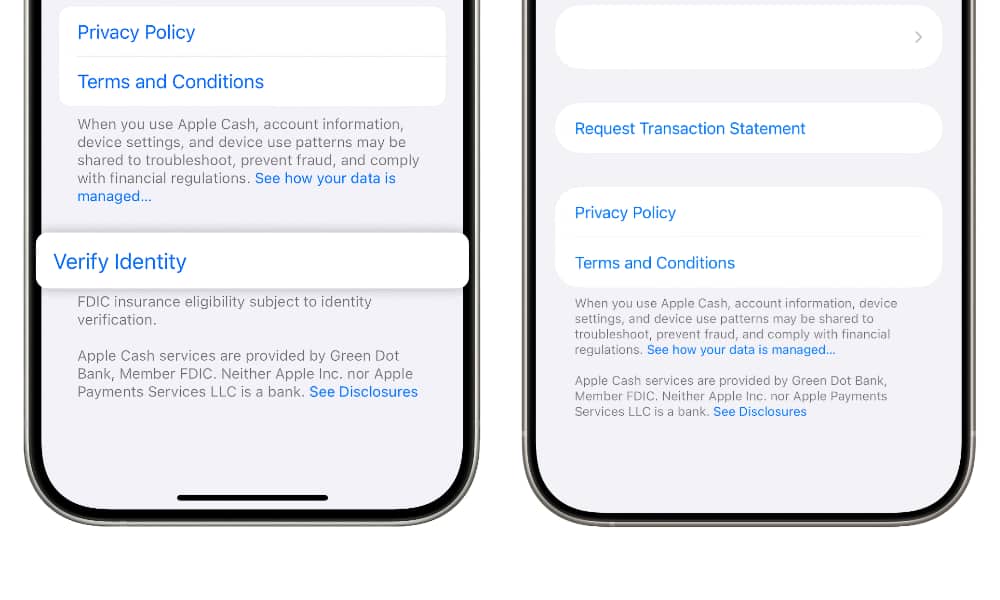
If you have an Apple Card, your Apple Cash account may already be verified, as Apple ties both of those together during the application process to send your Daily Cash into your Apple Cash account.
Regardless, you can easily check this and initiate the verification process right from your iPhone:
- Open the Wallet app.
- Select your Apple Cash card.
- Tap on the three-dot menu in the top-right corner.
- Choose Card Details.
- Scroll to the bottom and look for Verify Identity.
This will only appear if your identity has not been verified already, so if you see nothing down there except Privacy Policy, Terms and Conditions, and the two paragraphs that explain Apple Cash, then you’re already verified and there’s nothing more you need to do here.
If not, tap Verify Identity and follow the on-screen steps to enter the required details and submit your identification. If you already have a digital driver’s license or Digital ID in Wallet, you’ll be able to use this instead; otherwise, you’ll be asked to use the iPhone camera to scan your driver’s license and take a selfie to confirm your identity.






