
Siri’s Massive AI Brain Upgrade Finally Lands on the Apple Watch
Toggle Dark Mode
It’s been two weeks since Apple released its second round of OS 27 developer betas, and that can mean only one thing: the third betas have landed.
This time around, we’re getting all six on day one: iOS 27, iPadOS 27, macOS 27 Golden Gate, watchOS 27, visionOS 27, and tvOS 27.
That’s a refreshing switch from last time, when the second watchOS 27 developer beta came a day late. The delay stoked hopes that Apple might be prepping the Siri AI app for its wearable OS — a feature that was specifically skipped in the first beta — but alas it was nowhere to be found.
At the time, we mused that the delay may have been a result of a failed plan to have it working in the second beta, but we’ll probably never know. Regardless, the good news is that we didn’t have to wait too long, as the third watchOS 27 beta finally introduces the new Siri to the Apple Watch (or is that the other way around?)

Siri AI on Apple Watch
The third watchOS 27 beta is accompanied by a corresponding iOS 27 beta, and as usual, you’ll need to update your iPhone first. This may not be merely a semantic distinction, either; there are some Siri changes on the iPhone side that might tie into the new Apple Watch feature.
While my iPhone 17 Pro Max smoothly updated to iOS 27 DB3 without any problems, we’ve already seen reports of some folks having to wait for a new Apple Intelligence download before Siri AI comes back online. In either case, it seems the Apple Watch will need to do its own Siri download before it’s ready to go.
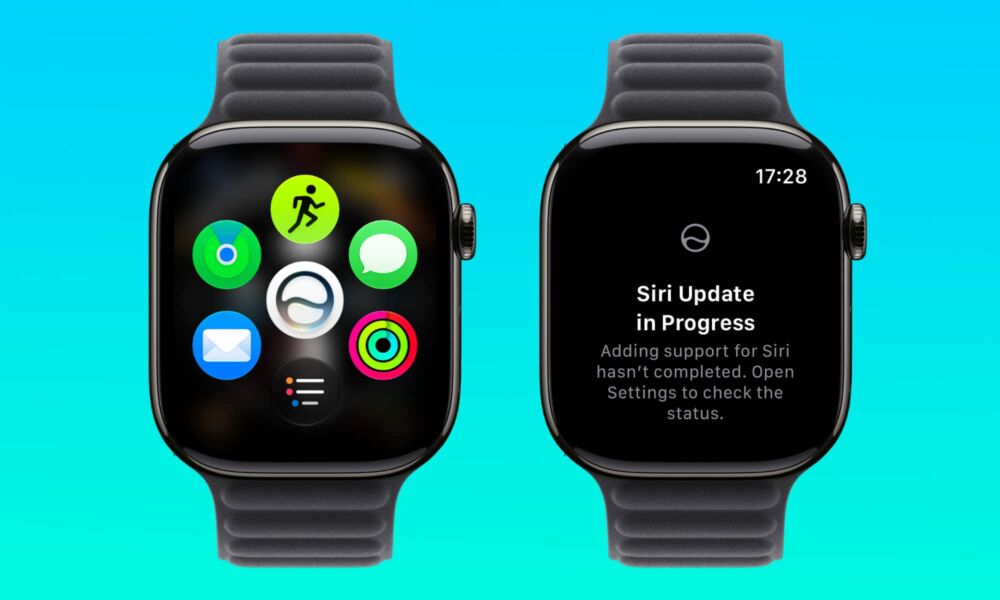
There’s no word yet on how long we can expect this to take — as of this writing, it was still in progress for me after nearly an hour — but it doesn’t appear to be a waitlist like we saw with the initial iOS 27 beta; rather, opening the Siri app simply says it needs to download support for Siri.
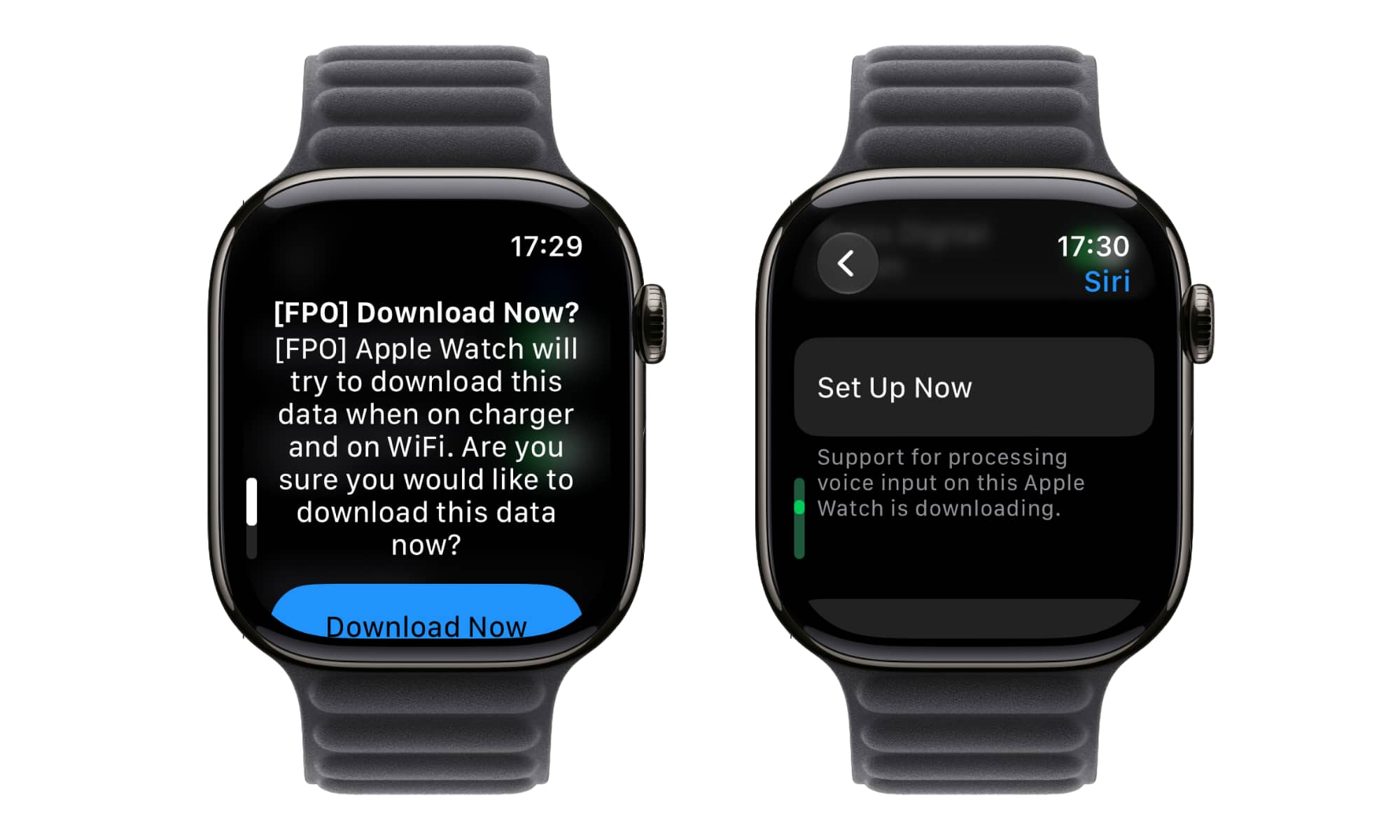
The message directs users to the Settings app to check the status. There’s no progress indicator, per se, although a new “Set up Now” option under Siri settings lets you force the data download without waiting for your Apple Watch to be back on the charger.
Optimizing Search and Siri on iPhone
The third beta of iOS 27 consolidates Siri-related optimization tasks into a section labeled “Optimizing Search and Siri.” So far, only one card appears here, explaining that users can continue using their iPhone normally and explaining what the indexing process is doing.
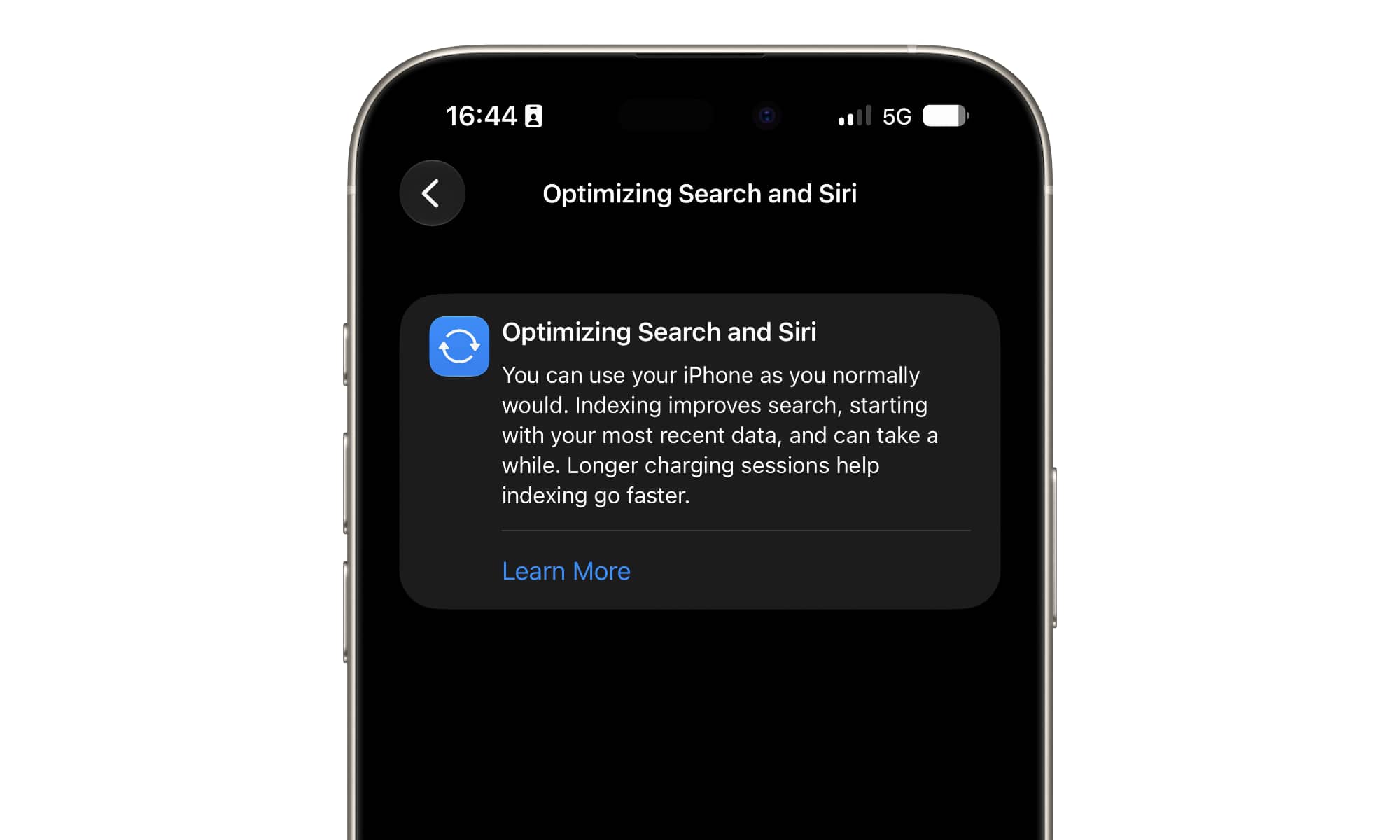
The wording is similar to what we saw in the first developer beta, but the move into its own section suggests Apple plans to eventually show more information here. As is the norm for betas, the “Learn More” button currently goes to a webpage that doesn’t yet exist.
However, the key point here is that iOS 27 DB3 appears to have kicked off some further optimization. That’s not too surprising, as we’re still in the early stages. It’s unclear whether this is merely polishing up the indexes after an update or if it’s somehow also related to the appearance of Siri AI on the Apple Watch.
Expressive Voices for Siri
Even though Siri AI had an impressive start in beta one, Apple has been slow-walking some of the more advanced features. In addition to waiting to bring Siri to the Apple Watch, it’s also been gradually phasing in Siri’s more conversational and expressive voices.
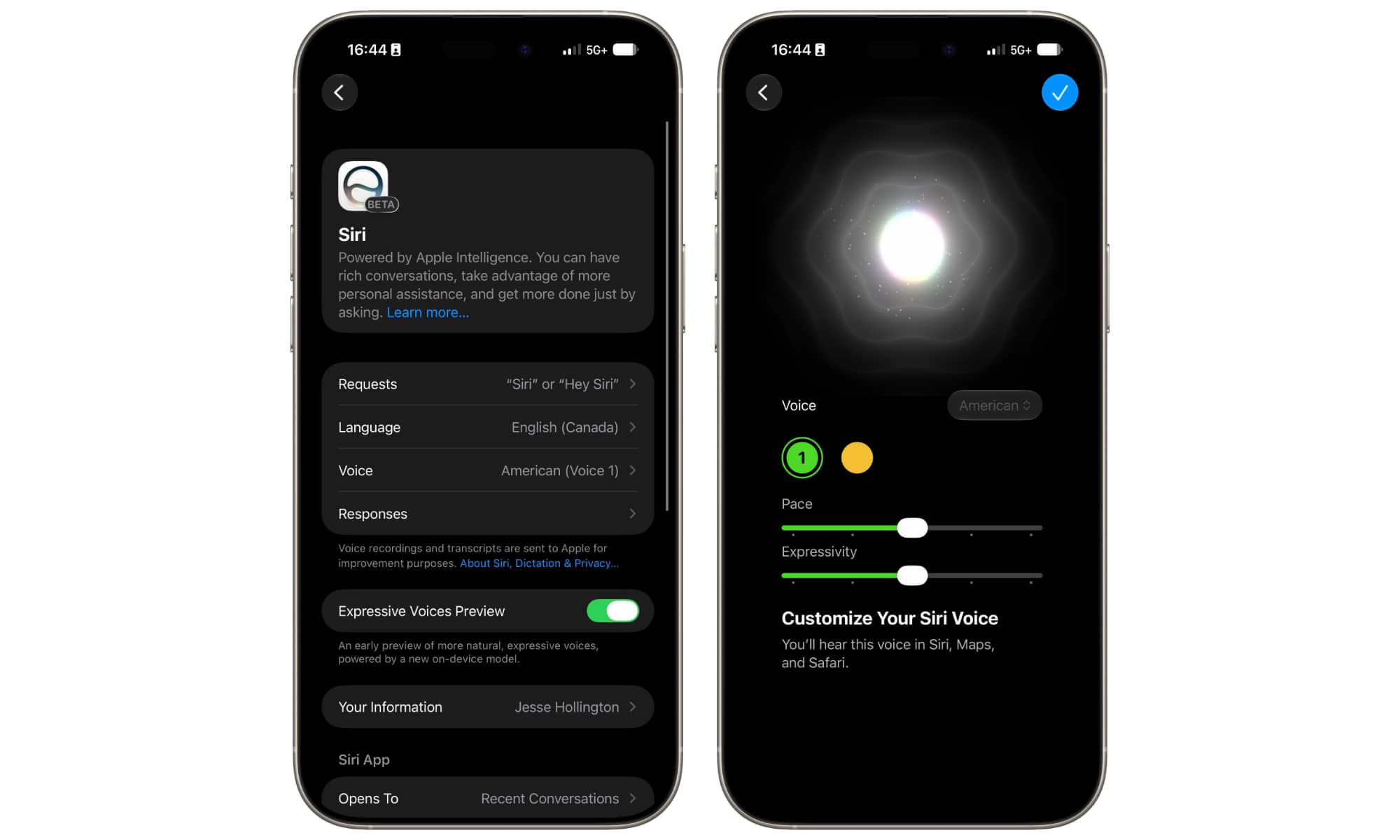
The first developer beta offered an “Expressive Voices Preview” toggle that opened a static screen with every option grayed out. Beta two brought the ability to preview two expressive voices, but lacked the ability to adjust the Pace and Expressivity sliders.
While today’s latest beta doesn’t add any new voices — only one American female and one American male are available — the customization options have now been unlocked, giving us an idea of what we can expect from them:
- Pace is pretty self-explanatory. Five positions let you choose how fast Siri talks, from a relatively normal pace in the middle, a slow play-by-play on the left to something bordering on a hyperactive squirrel on the extreme right.
- Expressivity is a bit more interesting. Contrary to what some assumed, this doesn’t have any impact on how much Siri says. It’s not about terseness versus wordiness, but rather intonation. Move the slider to the extreme left and Siri sounds as monotone as Ben Stein in Ferris Bueller’s Day Off (“Bueller? Bueller?”); at the other end you get a Siri voice that as lively as a children’s storyteller.
Selecting a voice from the colored circles will immediately begin playing some sample statements, including an announcement for new messages and timers, providing directions in Apple Maps, explaining some facts about otters, and reading a recipe:
Hi, let’s find the right voice for you. I’ll practice some things I like to say while you listen. Let me try this one out: You have one new message. Here’s another one: your timer is set for one minute. Now for some directions: at the next stop sign, turn right. How about some facts: otters have been known to hold hands while sleeping, so they don’t drift apart. I’ll give a recipe a go: add one tablespoon of something to three ounces of something else. There’s probably some sort of dicing involved, and then you add a pinch of… another thing. Delicious!
Other Changes in the Third OS 27 Developer Betas
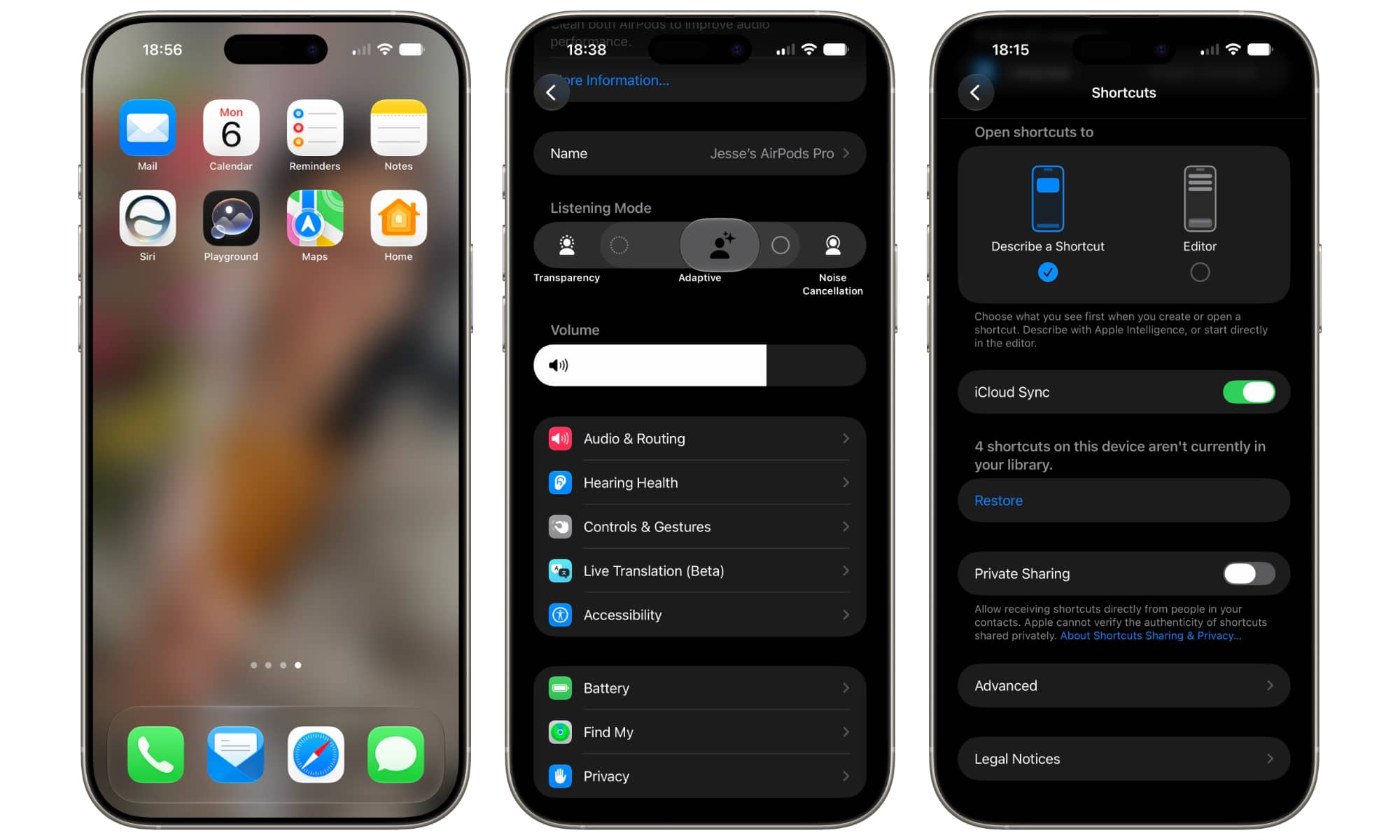
There are a handful of other smaller changes that have been found in the third betas:
- The Reminders app gets a new icon with circles instead of dots for the colored bullets.
- The standalone Adaptive Audio slider in AirPods settings has been integrated into the main Listening Mode options; after tapping Adaptive, you can tap and hold to drag the slider left or right to customize your Adaptive Audio levels.
- A new option in Settings > Apps > Shortcuts lets you choose between using natural language to describe a shortcut or going to the traditional editor found in iOS 26 when creating or editing a shortcut. The previous betas forced users into the new Apple Intelligence interface, requiring you to switch manually to the editor every single time.
- The Control Center now persistently shows the cellular network type (e.g., 5G or LTE), even when you’re connected to Wi-Fi.
- macOS 27 Golden Gate adds two new wallpapers to match its name: Golden Gate Sunset, and Golden Gate Night, with corresponding screen saver options. These join the more abstract “27” wallpaper that shipped with the first beta.
- According to the macOS 27 developer release notes, “Apple Intelligence for Home requires an iCloud+ subscription starting at 2TB.” While Apple doesn’t spell out which features will be gated behind this, it almost certainly includes the more detailed and descriptive video analysis.
Are Public Betas Around the Corner?
The arrival of the third OS 27 developer betas means that we could see the first public betas appear any day now. Apple hasn’t committed to a specific release for it beyond “July,” so it could just as easily be three weeks from now as tomorrow.
However, the public betas traditionally follow either the third or fourth developer betas, as that’s the stage at which Apple believes they’re ready for broader consumption.
Even though many more folks have been jumping on the early developer betas after Apple opened them up to any registered developer three years ago, that doesn’t mean it’s a good idea. Developer betas are intended for app developers to install on test devices so they can get an early start on preparing their apps for all the new iOS 27 features that will come to the public in the fall. They’ve gotten remarkably stable in recent years, but they’re not without their problems, and you install a developer beta at your own risk.
By contrast, while a public beta is still far from perfect, Apple has usually ironed out any show-stopping bugs by the time it clears a major iOS beta for the public. It still recommends against installing a public beta on any device you rely on for anything important, but you’re less likely to find your iPhone battery mysteriously dying before the day’s end or getting unexpected crashes and reboots.
It’s also worth mentioning that when the public betas do arrive, they’re almost always identical to the developer betas that typically precede them, so there’s no real advantage to being on the developer beta track. Sure, you’ll get the new releases a day or two sooner, but you’ll also be taking greater risks, as Apple releases the developer betas earlier to test the waters before rolling it out onto the public beta track.






