
How to Get ‘Siri AI’ on My iPhone Today?
Toggle Dark Mode
Siri AI is the next evolution of Apple’s virtual assistant. What started as a basic feature on the iPhone fifteen years ago has now turned into a powerful app powered by Apple Intelligence that’s smarter than ever.
Weirdly enough, Siri AI isn’t turned on by default. For starters, you need to have the right iPhone. The good news is that if your iPhone already supports Apple Intelligence, you can get Siri AI right away.

This means that, as long as you have an iPhone 15 Pro or a later model, you’ll be able to turn on this feature.
The second step is to set it up. Here’s how you can do that.
How to Get Siri AI on Your iPhone
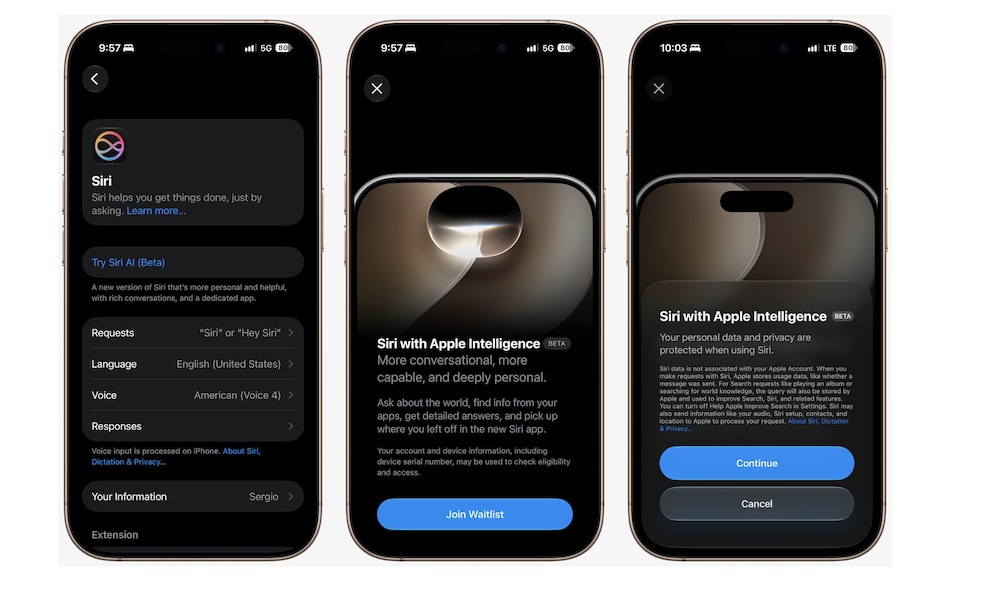
As we mentioned, Apple doesn’t add Siri AI to your iPhone by default, even if you’ve already installed iOS 27. Instead, you’ll have to turn it on yourself, as it’s still in beta.
With all that said, to get started with Siri AI, you need to do the following:
- Open the Settings app.
- Scroll down and go to Siri.
- If Siri is turned off, turn it on beforehand.
- Tap on Try Siri AI (Beta).
- Follow the instructions on your screen.
And that’s it. You should be able to test Siri AI yourself.
Make the Most Out of Siri
Even though it’s still in beta, Siri AI is still a lot better than the original Siri. Now it’s smarter, understands personal context, and it’s a much better virtual assistant.
If you can’t access Siri AI, you can only join a waitlist. Unfortunately, there’s not much you can do except wait for it to become available to you. Right now, Siri AI isn’t available in the EU, and it’s only available in English.






