
Create Shortcuts By Describing What You Want
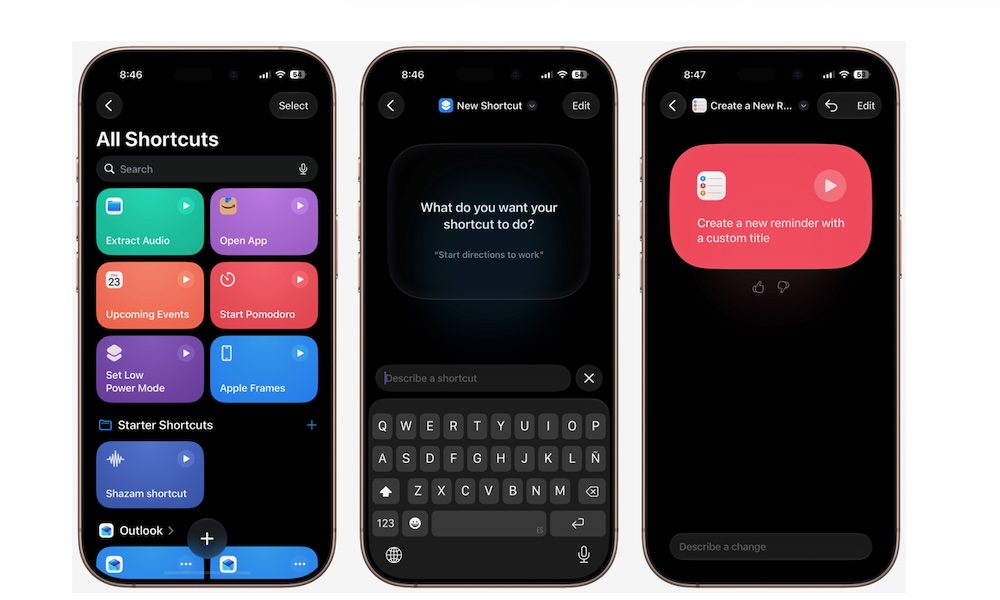
This is one of the coolest changes in iOS 27. Granted, it’s not perfect, but it’s got a ton of potential.
Shortcuts is one of the most powerful apps Apple includes on the iPhone. You can literally create any type of tool you want. Unfortunately, creating a complicated workflow can be intimidating if you don’t understand how its actions fit together.
The good news is that iOS 27 now lets you describe the shortcut you want in normal language. Apple Intelligence can then assemble the necessary actions from supported apps. You can review the proposed workflow and make changes before saving it.
You might ask for a shortcut that starts a timer and opens your writing app. Another request could save selected photographs to a folder. Or, ask your iPhone to send a message when you arrive at home or work.
To create a shortcut with a description:
- Open the Shortcuts app.
- Tap the option to create a new shortcut at the bottom.
- At the top, you can tap New Shortcut to rename your shortcut or choose a specific icon.
- You can also tap Edit to create the shortcut yourself.
- Explain what you want your shortcut to do.
- Give it a few moments, and the shortcut will be generated.
- Save and test it.
As we mentioned, this is far from perfect yet, but Apple will surely improve it over time to make it more powerful.