
Monitor Webpages With Safari’s Notify Me
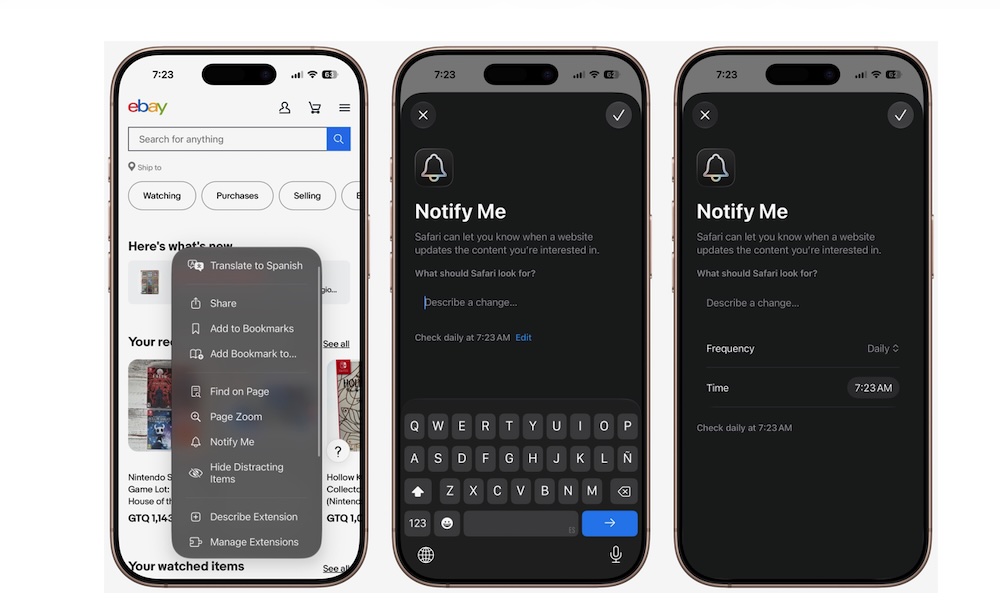
How many times have you been endlessly refreshing a web page to get something you want? Maybe it’s tickets to a concert, or a limited item you just need to have. Well, constantly monitoring a website can be tiring, but iOS 27 can now help you with that.
Safari’s Notify Me feature can monitor supported pages and alert you when a relevant change occurs. This saves you from reopening the page several times each day.
Keep in mind that Notify Me is still in beta, so it might not work perfectly. Additionally, the feature won’t necessarily work with every website. When Safari recognizes a supported page, you should see an option to receive a notification in Safari’s menu. Here’s how you can create an alert.
- Open a web page in the Safari app.
- Open the Page Menu button on the left side of the address bar.
- Tap on Notify Me.
- Select the change you want Safari to watch for.
- If needed, you can tap on Edit to change the Frequency and Time so Safari checks the web page more often.
- Allow notifications if needed.
And that’s it; now you just need to wait for when Safari detects the update you want.