
Let the Passwords App Fix Unsafe Passwords Automatically
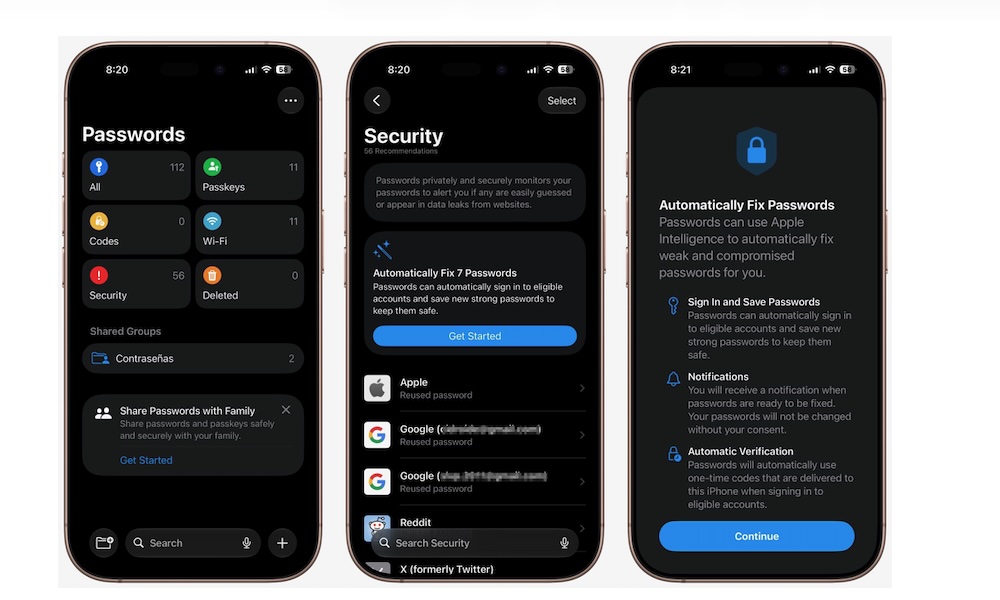
The Passwords app already warns you about weak or compromised credentials. The problem is that acting on those warnings is very time-consuming, as it usually requires visiting each website and going through its password-change process. As a result, many of us simply say that we’ll do it later (even though we already know that’s not true).
Luckily, in iOS 27, Passwords can update supported credentials for you. You can choose an unsafe password and allow the app to handle the change. The new password should then be stored automatically for you to use whenever you need.
This could make security recommendations much easier to address. Instead of ignoring a long list of warnings, you may be able to repair several accounts with literally just one tap.
The downside, of course, is that you’ll give even more control to Apple. Now you won’t even know your own password; you’ll depend on Apple to keep track of everything. If you’re planning on leaving the whole Apple ecosystem, or using Android devices or Windows computers, this is a feature you probably don’t want to start using.
Still, if you want Apple to handle all the heavy lifting for you, here’s how you can automatically change your weak passwords.
- Open the Passwords app.
- Authenticate with Face ID, Touch ID, or your passcode.
- Tap on Security.
- You’ll see a security recommendation to automatically fix your passwords. Tap on Get Started.
- Tap on Fix Passwords.
Keep in mind that automatic changes will only work with supported websites. For the non-supported accounts, you will still get an alert, but you’ll have to change it manually.