
Visual Intelligence
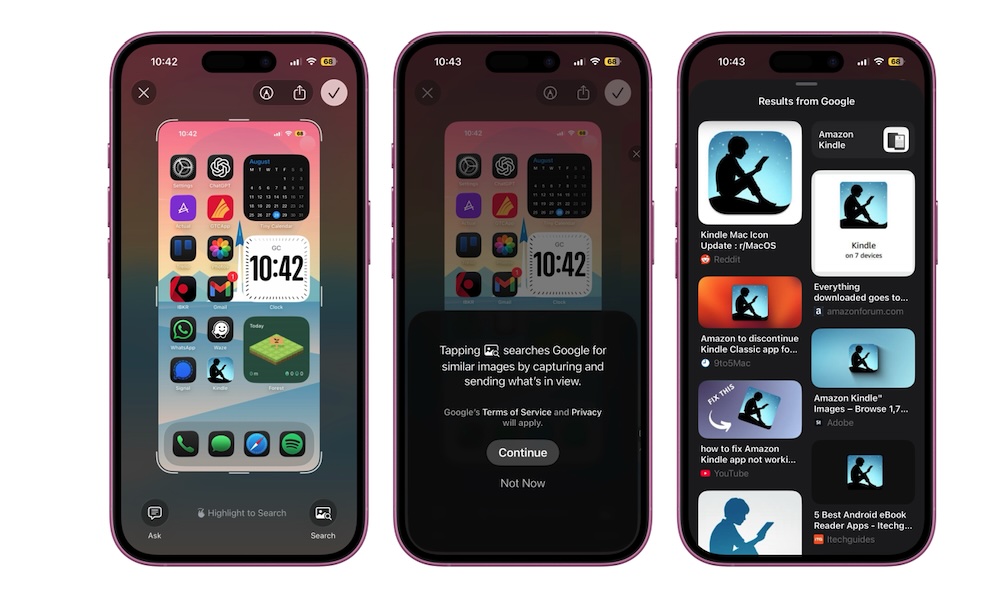
Apple Intelligence is far from the best AI system out there, but Apple did add one feature that’s actually useful in many everyday situations.
A lot of people take screenshots just to quickly pull information from them, not because they want to keep a growing album of random images in the Photos app. With iOS 26, you can start making screenshots more useful right away. Instead of saving everything first and searching for something manually later, you can interact with it from the screenshot preview itself.
That’s thanks to expanded visual intelligence support. While Apple brought this to the camera in iOS 18.2, it’s been extended to screenshots in iOS 26. After you capture your screen, you can now go to the preview, highlight any relevant subject in the image and Google it, search for it in a shopping app to see how much it costs, or talk to ChatGPT to get more information right then and there.
This feature works extremely well, and it can save you time and storage from the get-go. Of course, the downside is that not every iPhone that supports iOS 26 can use this feature; your iPhone has to support Apple Intelligence, which means you’ll need an iPhone 15 Pro or later model.