
Call Screening
Calls from unknown numbers are one of the biggest annoyances of modern times, especially if you’re trying to avoid spam calls without missing something important.
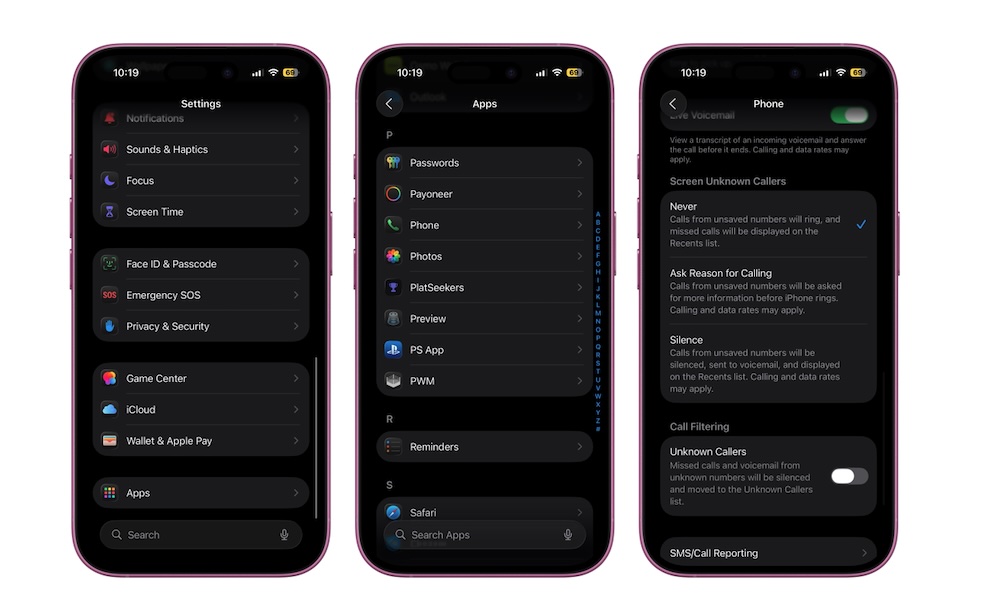
Fortunately, iOS 26 improves this with better Call Screening. Now, you can set up additional filters, like including an Ask Reason for Calling option. When this is turned on, your iPhone asks unknown callers to explain their reason for calling before ringing it through.
This way, instead of constantly seeing a random number and having to guess whether it’s worth answering, you get a little bit of context, which is great if you’re waiting for a call from work, or a doctor’s appointment you can’t miss. Plus, robocalls, telemarketers, and other spam callers aren’t likely to respond to the prompt at all, saving you from pointless interruptions.
To turn on call screening, go to Settings > Apps > Phone and then tap on Ask Reason for Calling under the Screen Unknown Callers section.