
Hold Assist
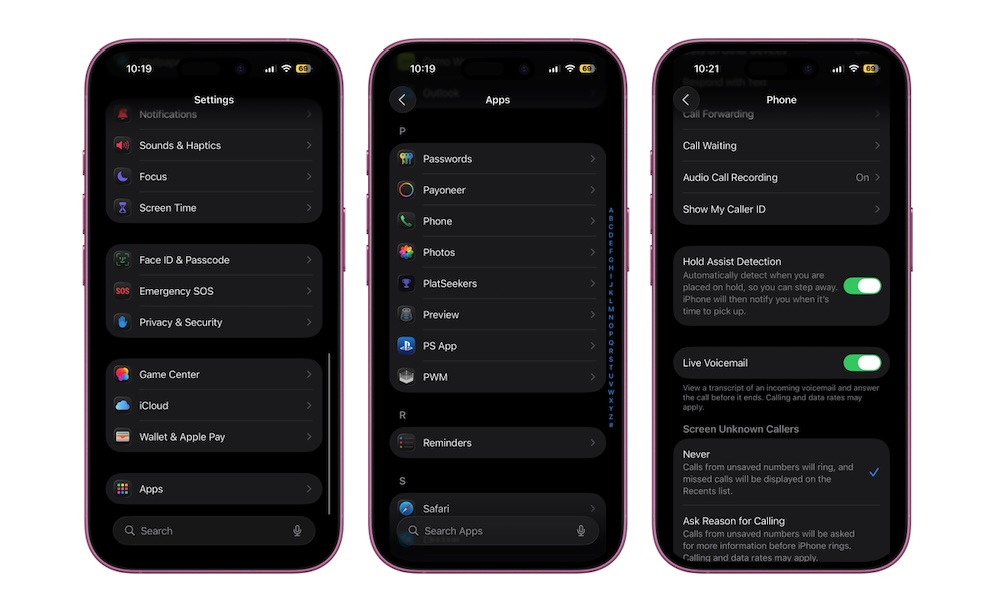
Hold Assist is one of the best new features in iOS 26 because it solves a problem almost everyone has — and hates. When you call a business and get stuck listening to elevator music, your iPhone can now wait for you and let you know when a real person comes back on the line. Apple built this into the Phone app, and it even works with FaceTime audio calls in supported regions.
This is the kind of small feature that improves a lot of things. It doesn’t change the world, but it does make one of the most frustrating parts of customer service calls much less annoying. You don’t have to keep your full attention on the call the whole time, and that alone makes it a feature a lot of people will actually use.
You can manually turn on Hold Assist when someone puts you on hold. Just tap the More button and then tap the option to turn it on. Or you can go to Settings > Apps > Phone and turn on Hold Assist Detection, so your iPhone automatically detects that annoying music and asks you if you want to put it on hold, too.