
Use Live Captions for Spoken Audio
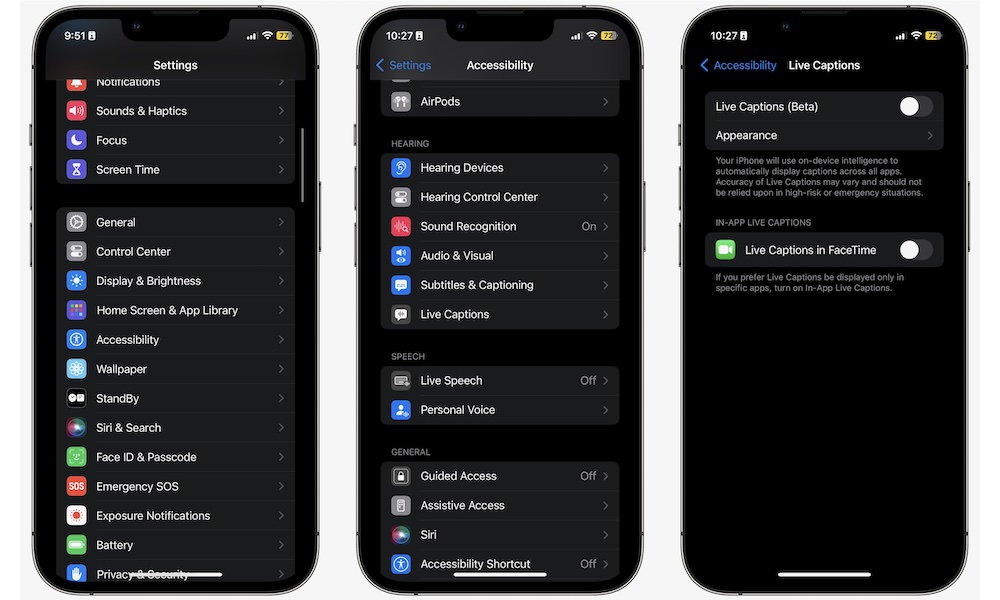
Live Captions can turn spoken audio into text right on your screen, which can be extremely helpful when audio is hard to follow. If you watch videos, use FaceTime, listen to podcasts, or struggle to hear speech clearly in noisy environments, this feature can make content easier to understand without forcing you to keep replaying things.
Audio issues are an especially common problem with today’s shows and movies. The audio levels aren’t even throughout a show, and when you add in background noise, it can be hard to understand what people are talking about. For many people, reading speech while hearing it at the same time makes a huge difference. Here’s how to start using Live Captions:
- Open the Settings app.
- Scroll down and tap on Accessibility.
- Scroll down and, under the Hearing section, tap Live Captions.
- Turn on Live Captions and adjust the appearance if available.
What’s great about this feature is that it works for both audio that’s coming from your iPhone, as well as audio that’s coming from anywhere else, so you can use it every day, even if you don’t want to watch a show or movie.