
Make Your iPhone Listen for Important Sounds
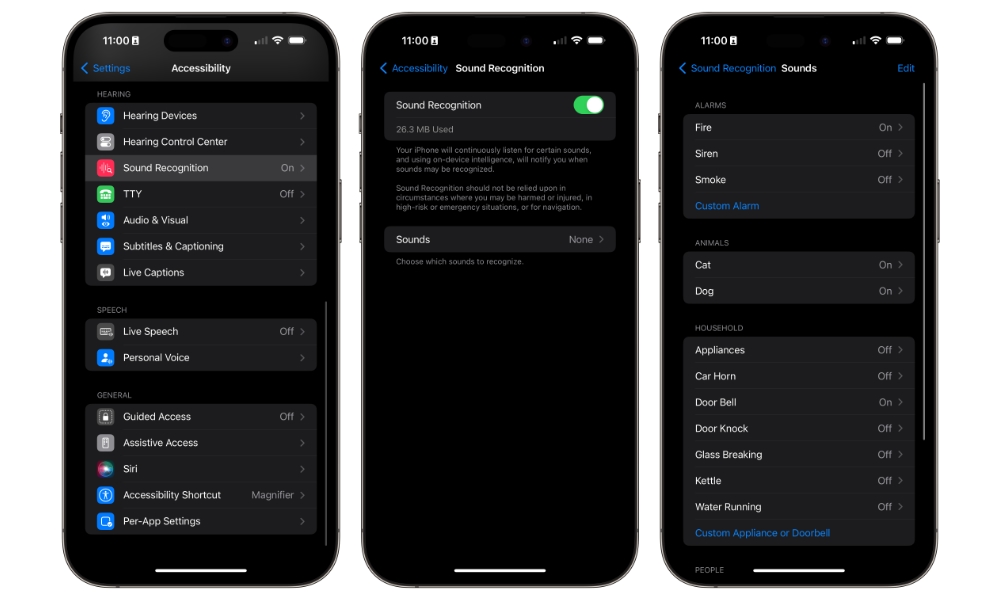
Sound Recognition is a very helpful feature if you’re worried about missing important sounds. When enabled, your iPhone can listen for alarms, doorbells, sirens, and other sounds and send you an alert when it hears them. It’s especially useful if your hearing isn’t as sharp as it used to be or if you simply want another layer of awareness while at home.
What’s great about this feature is that it happens offline. Your iPhone will download the sounds you want it to be alert to, so you can rest assured that no one (not even Apple) is listening to your surroundings without your consent.
This is also more practical than it sounds at first. A lot of people worry about missing the doorbell or simply not hearing when something happens around them. Having your iPhone help with that can add some peace of mind, especially if it’s usually within reach on a table or nearby chair. Here’s how to get started with Sound Recognition:
- Open the Settings app.
- Scroll down and tap on Accessibility.
- Scroll down and, under Hearing, tap on Sound & Name Recognition.
- Tap Sound Recognition.
- Turn Sound Recognition on.
- Tap Sounds and choose the sounds you want your iPhone to recognize.
Give it a few seconds to download all the sounds, and then it’ll be ready to go. Whenever it detects a sound nearby, you’ll get a notification from your iPhone.
Pro Tip: You can also enable Sound Recognition in the CarPlay Settings app to alert you to specific sounds like a siren, car horn, or a crying baby while you’re driving.