
Share Notes and Collaborate With Others in Real Time
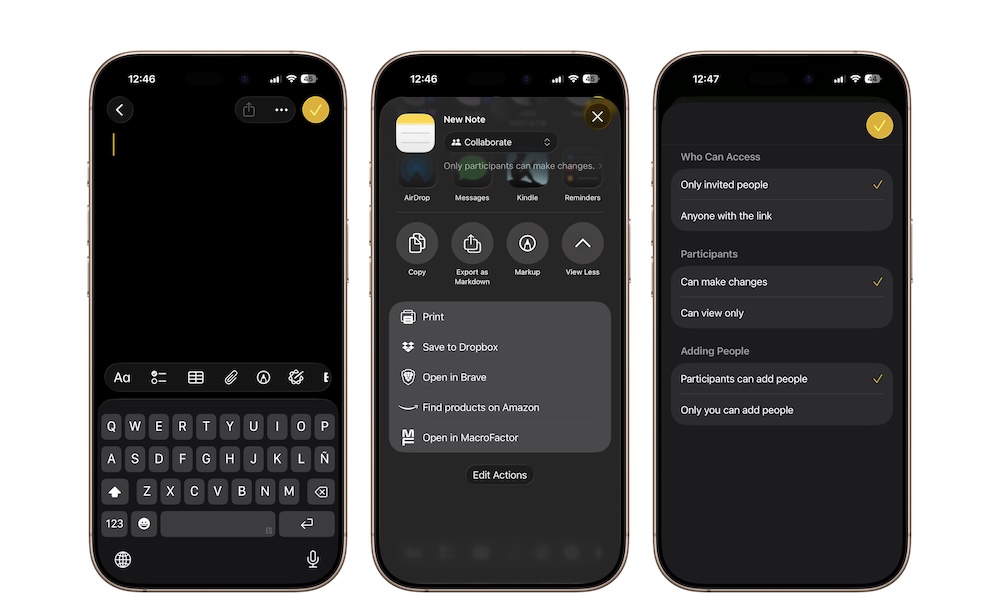
Believe it or not, the Notes app can also be a genuinely useful collaboration tool. You can send a static copy of a note if you just want to share information, or you can invite someone to collaborate on the note or even a whole folder. Once they join, everyone sees updates in real time.
This works really well for shared grocery lists, family planning, trip notes, event planning, or simple team coordination. It’s one of the most handy features in the Notes app that not many people know about or use.
To share a note or folder:
- Open the note or folder you want to share.
- Tap the Share button in the top right corner of your screen.
- Tap below the note’s name and choose between Collaborate or Send Copy.
- Pick how you want to send the invite.
- Let the other person join and edit.
For folders, you’ll have a couple of extra options. If you tap below the folder’s name, you can choose things like who can access your folder, who can be a participant, and who is allowed to add more people.