
Lock Your Private Notes
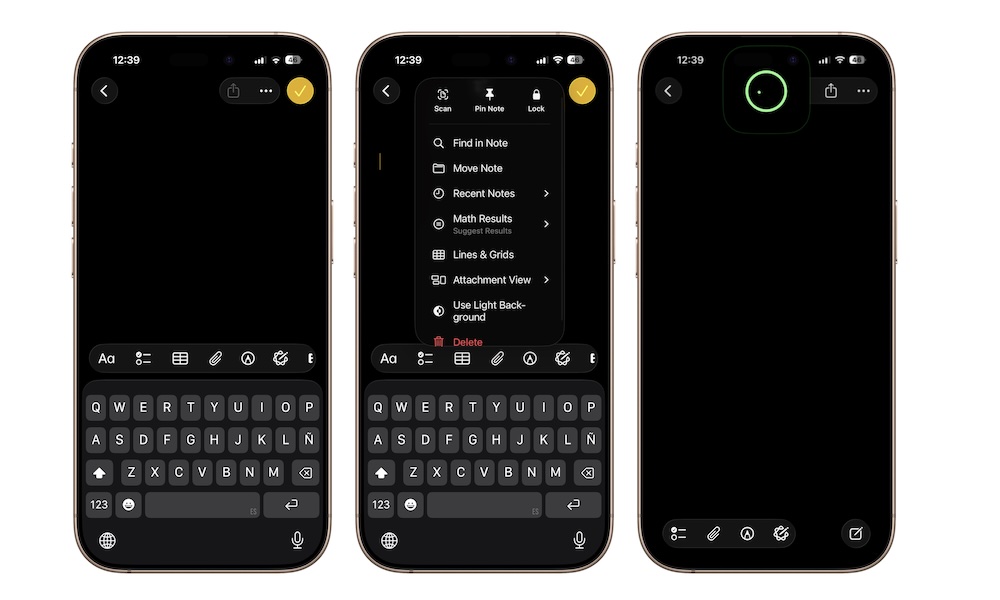
Not every note belongs wide open in your note list. If you keep travel details, private planning notes, personal reminders, or sensitive information in the Notes app, locking certain notes adds an extra layer of privacy. Apple lets you lock supported notes using Face ID, Touch ID, or your passcode.
Of course, you really shouldn’t save really sensitive information in the Notes app. It’s not safe enough for us to recommend it. However, for the things you want to keep private, you still get the convenience of having the note on your phone, but with more protection when someone else is using your device or looking over your shoulder.
Locking a note is pretty easy. Here’s how:
- Open the note you want to lock.
- Tap the three-dot button in the top right corner.
- Tap on Lock.
- Use Face ID to verify your identity.
And that’s it. Your note will be locked automatically. You can unlock it with Face ID or your passcode. Every time you close the app or go back to your Home Screen, the note will be locked. Sure, it might be annoying at first, but it also means it’ll be harder for anyone to snoop into your private notes.