
Build Smart Folders That Sort Notes For You
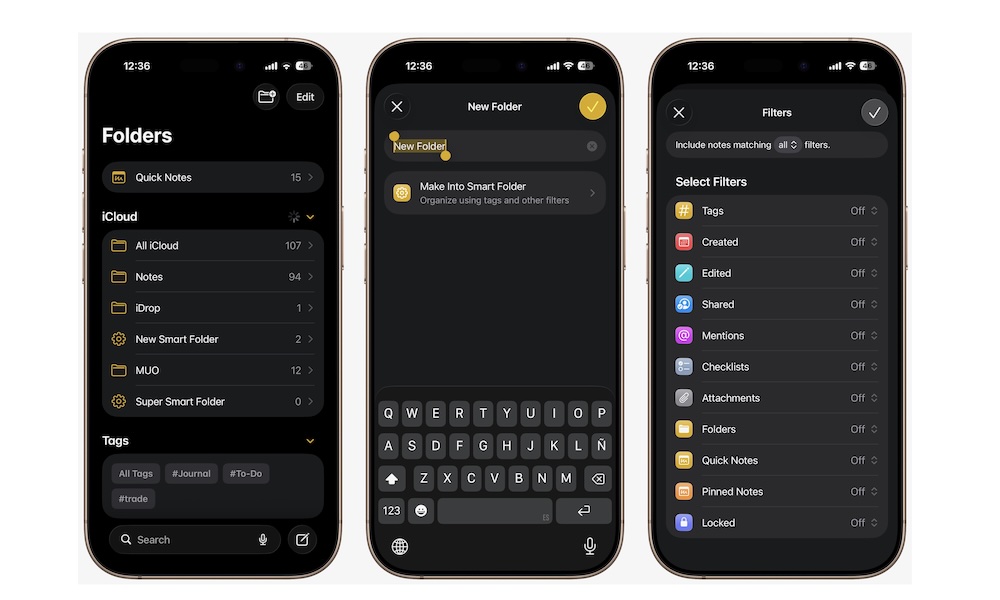
Smart Folders make tags even more powerful. Instead of manually moving notes around, you can create a Smart Folder that automatically gathers notes based on specific rules you set when you create it. So if you make a Smart Folder for #work, Notes can keep filling that folder for you as new tagged notes appear.
Notes will be automatically added to your Smart Folder when they meet the exact criteria, so you won’t ever have to worry about organizing them manually.
This is one of the most useful organizational tools in the whole app because it keeps things tidy without adding more work. Once the structure is in place, Notes does the sorting for you. That makes the app feel much smarter and less manual.
Here’s how to create your own Smart Folder in Notes:
- Open the Notes app.
- Go to the Folders view in Notes. You might need to tap the back button to get there.
- Tap the New Folder button in the top right corner.
- Tap on Make into Smart Folder.
- Set the rules you want and, when you’re done, tap on the check mark in the top right corner of your screen.