
Scan Paper Documents Straight Into a Note
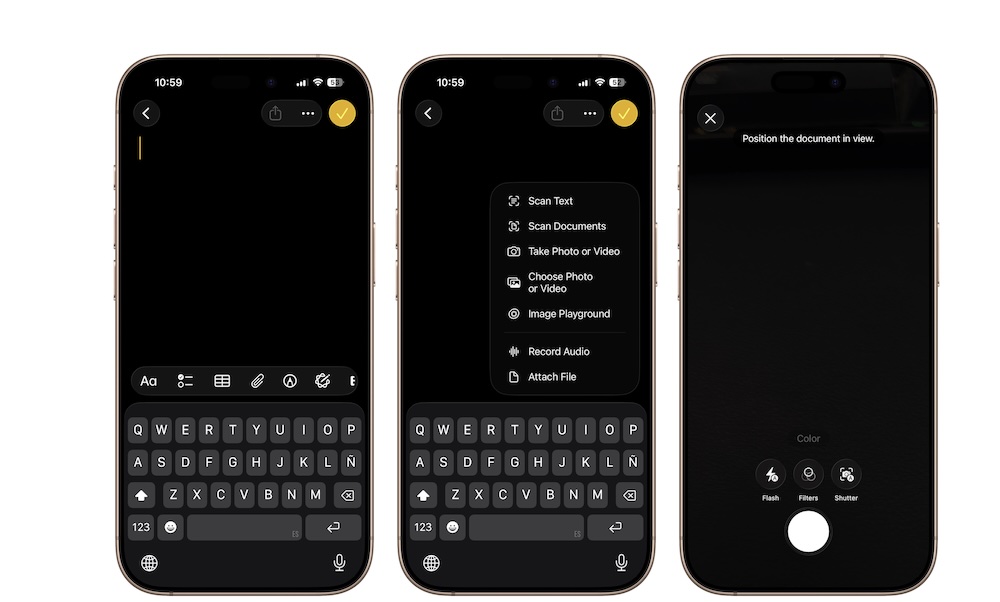
One of the most underrated things Apple Notes can do is scan paper documents right from your iPhone.
If you need to save a receipt, bill, letter, signed page, or printed form, you don’t necessarily need a separate scanner app; Notes can handle the job surprisingly well, and it makes the result easy to store alongside any other information in your note.
So, whether you want to scan an important receipt or a doctor’s prescription, here’s how:
- Open Notes and create a new note or open an existing one.
- Tap the Attachments button (the paper clip icon near the bottom of your screen).
- Tap on Scan Documents.
- Point your iPhone at the document.
- Let it scan automatically, or press the shutter button yourself.
- Adjust the edges if needed and save it.