
Organize Notes With Tags
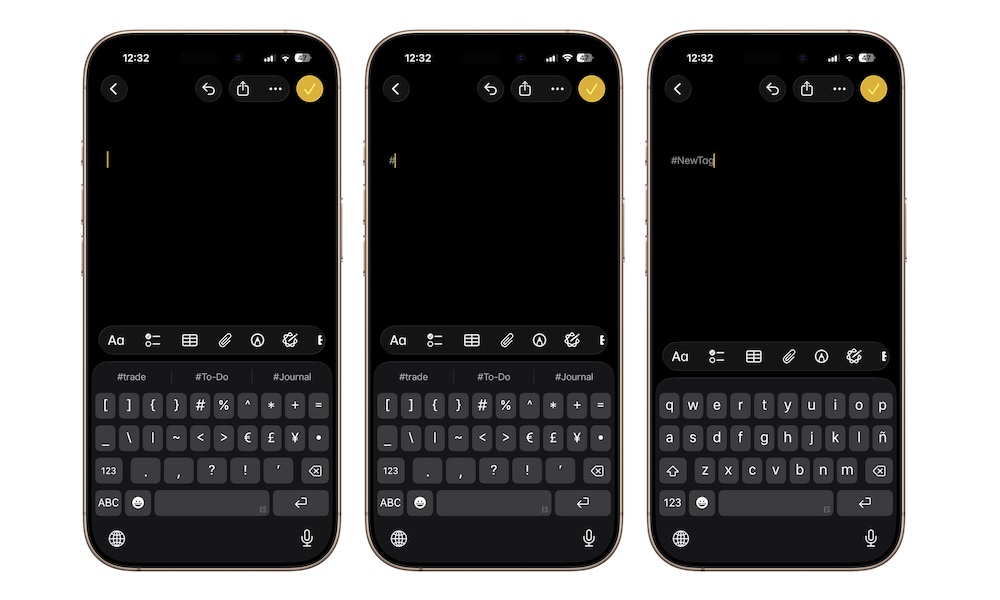
Tags are one of the best tools in Notes if you want more organization without creating tons of different folders. You can add tags like #work, #recipes, #travel, or #ideas anywhere in a note, then use those tags later to filter and group all of your related notes.
All notes can belong to more than one category without forcing you to choose one folder and ignore the rest. That means that a single note could be tagged #travel and #budget, or #work and #meeting. That makes Notes easier to organize without becoming rigid. Follow these steps to get started with tags:
- Open a note.
- Type a hashtag. You’ll notice that your iPhone will give you suggestions right above the keyboard. You can use those, or write down any word #shopping.
- Save the note normally.
- Tap tags later or use the Tag Browser to find related notes.
Tags can’t have spaces, so you can’t have a “#work stuff” tag. This would be saved simply as #work. So try using capital letters or dashes to add extra words to your tags.