
Make Shortcuts With Apple Intelligence
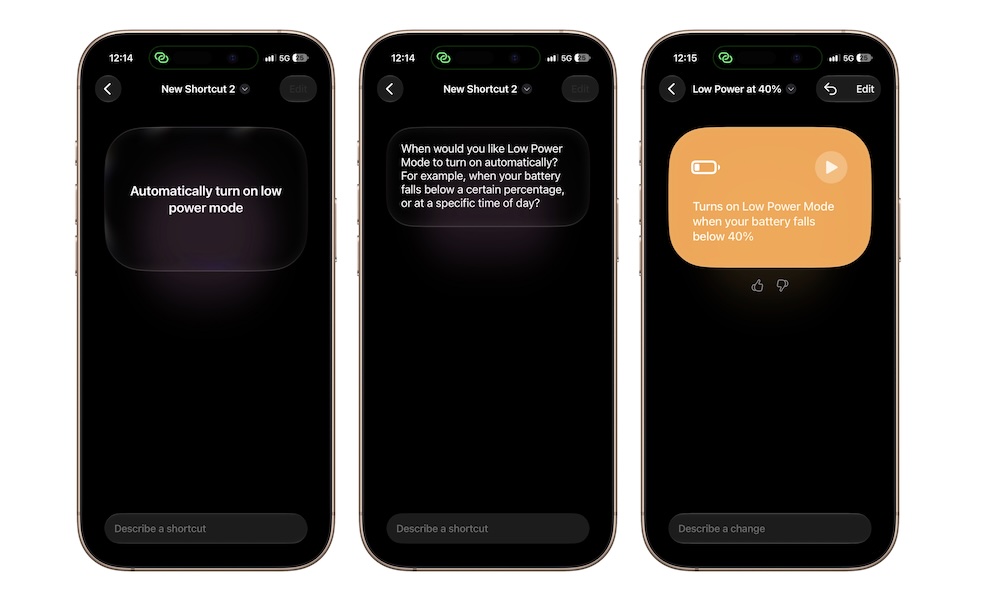
Shortcuts has always been one of the most powerful apps on the iPhone, because it basically lets you create anything. Of course, you need to know how to make them. Or at least you did before iOS 27.
Now, Apple Intelligence will create shortcuts for you. The only thing you need to do is describe them. Apple currently lets Shortcuts use different models for different tasks. Simple requests can run through an on-device model, while more complicated requests can use Apple’s Private Cloud Compute.
The result will be the same: you’ll get a brand-new shortcut you didn’t have to work at all to get.
To try it out, open the Shortcuts app and create a new shortcut by tapping the plus icon. Then you can start describing your shortcut. Granted, the more complicated it is, the harder it’ll be for Apple Intelligence to pull it off, but it’s a great starting point for most people.