
Fix Distracting Things in Your Photos
Now, you don’t even need to open an advanced photo editor every time someone accidentally walks into the background of your picture.
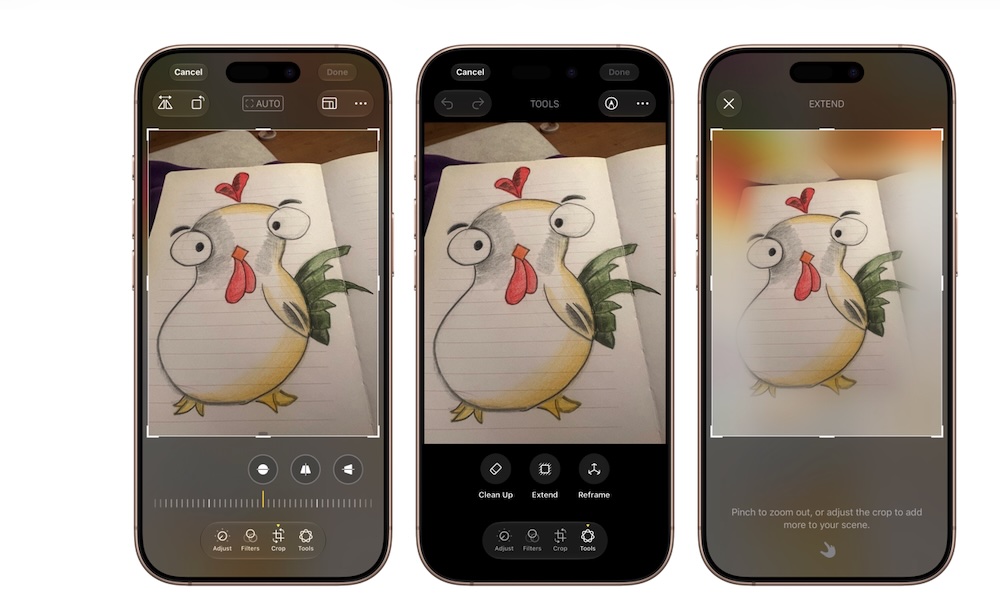
Apple Intelligence introduced a useful feature called Clean Up, which can identify and remove distracting objects in your photos. You can select them, and your iPhone will make sure to delete them and create a background that blends in with the rest of the photo.
iOS 27 expands Apple’s intelligent photo-editing tools further with the Extend tool, which can generate parts of the image in case you want to make it larger. There’s also Reframe, which can help you change the angle and composition of a picture with a swipe. Apple Intelligence will make sure to adjust the subjects so it looks like they’re still looking at the camera.
To use all of these features, open Photos and choose the picture you want to change. Tap Edit and select the editing tool you want to use.
Be sure to check the results beforehand, though, as this technology is still far from perfect.