
Record Anything and Get a Transcription Automatically
Taking notes throughout an entire meeting or a class can make it harder to concentrate on the actual conversation. Not only will you feel lost afterward, but chances are your notes aren’t that good either.
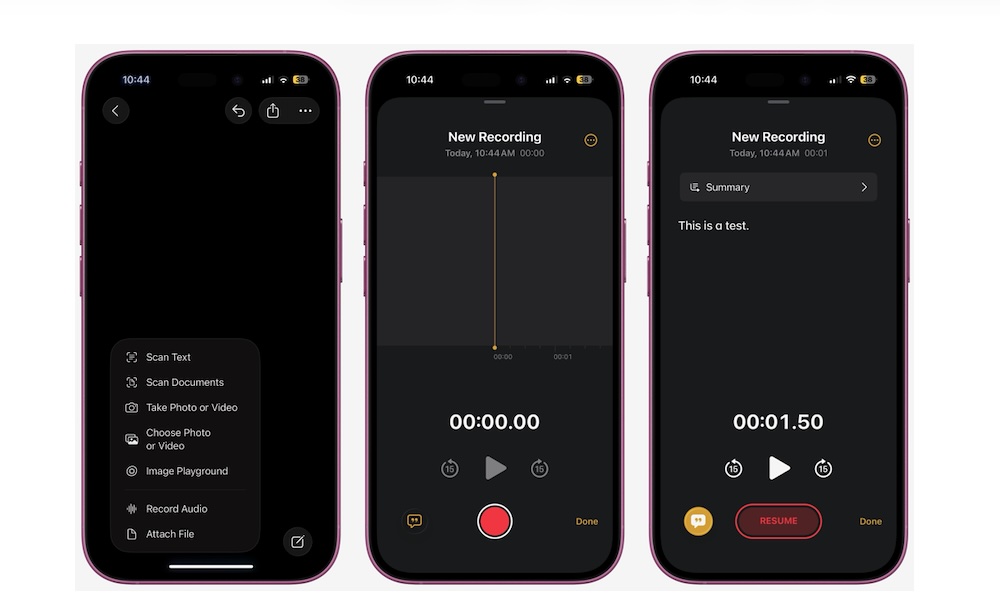
The good news is that the Notes app can record audio and generate a transcript automatically. And with the help of Apple Intelligence, you can also generate a summary of that transcript.
Open the Notes app, open a new note, and tap the Attachment button (the one that looks like a paper clip). Select Record Audio and start recording your meeting or conversation. When you’re done, you can tap the Transcription button in the bottom left corner to read the whole conversation. You can also tap Summarize at the top to get a brief explanation of whatever you recorded.