
Use Visual Intelligence to Learn More About Your Screenshots
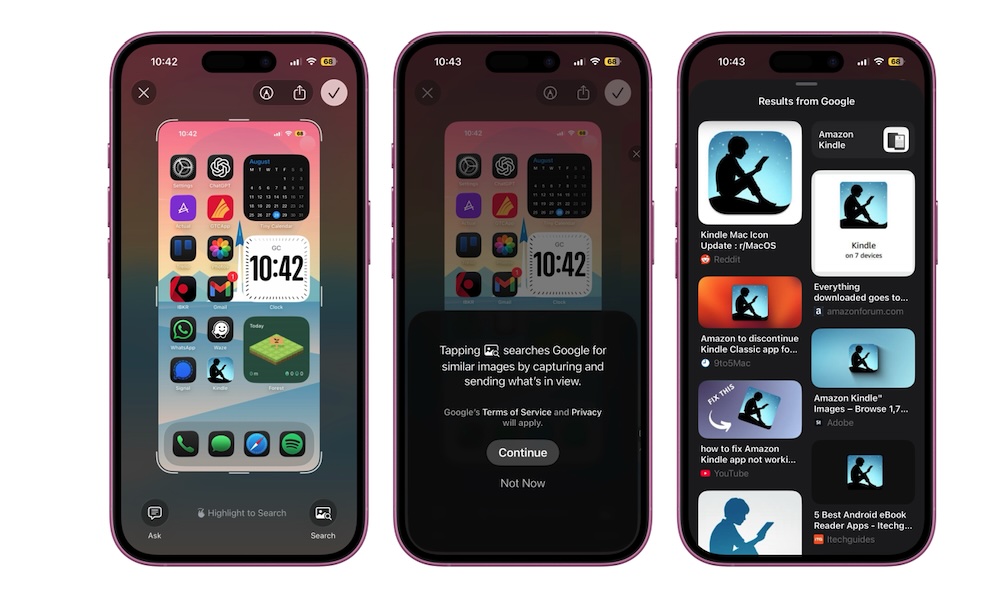
Visual Intelligence is a pretty useful tool that can show you more about any screenshot you take. It can show you data from Google, or show you the price of a product on Amazon or eBay.
Take a screenshot by pressing the Side button and Volume Up button together. Tap the preview image in the bottom left corner, and then you should see Visual Intelligence options appear at the bottom of the screen.
If you don’t want information about the whole screenshot, you can drag your finger on what you want to search to highlight it, and Visual Intelligence will show the results it can find.
Weirdly enough, this doesn’t work after you save the image in the Photos app. So if you accidentally didn’t open the preview, you’ll have to take another screenshot.