
Talk Through Your AirPods: How to Use Conversation Awareness

Toggle Dark Mode
Apple has quietly improved its entire AirPods lineup over the past few years, steadily rolling out hardware and software upgrades that have made its earbuds the gold standard for listening to music and seamless communication.
Today, we have mainstream capabilities like Active Noise Cancellation and Transparency Mode, but there are many other features in your AirPods you might not even know about.
Perhaps at the top of this list is Conversation Awareness. This is one of the coolest AirPods features that makes talking to other people without taking off your AirPods easier than ever. Here’s everything you need to know.

What Is Apple’s Conversation Awareness?

As you might guess by its name, Conversation Awareness helps you speak to others while wearing your AirPods.
When this feature is enabled, your AirPods use their microphones to listen to your voice. If the AirPods detect that you’re talking to someone, they’ll automatically lower the volume of the song, podcast, or other media you’re listening to and enhance the voice in front of you, making it easier to hear the other person instantly.
Once your AirPods “think” you’ve stopped talking, they’ll raise the volume again so you can continue listening to your favorite tunes without moving a finger. Conversation Awareness will automaticlaly restore your previous noise control settings, whether you were using active noise cancellation or transparency mode.
This all happens automatically, but you can also end a Conversation Awareness session by pressing and holding the stem of your AirPods.
What Do You Need to Use Conversation Awareness?
Conversation Awareness is a really cool feature, but you’ll need an H2-equipped pair of AirPods with ANC to use it — the AirPods Pro 2, AirPods Pro 3, or AirPods 4 with Active Noise Cancellation — but not the AirPods Max, which still lack the latest silicon.
How to Turn On Conversation Awareness on Your iPhone
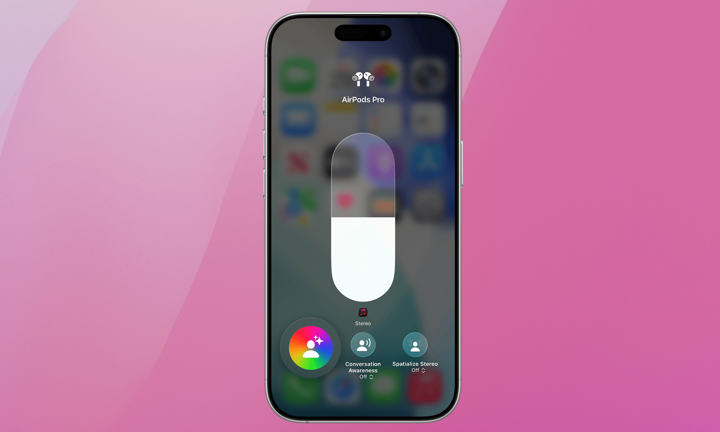
To get started with Conversation Awareness, all you need to do is connect your AirPods to your iPhone and then follow these steps:
- Open the Control Center by swiping down from the top right corner of your screen.
- Long-press the volume slider.
- Tap the Conversation Awareness button near the bottom of your screen.
And that’s it. Now, try having a conversation with someone, and your AirPods will tone down your music while you speak.
Pro Tip: You can also ask Siri to “Turn on Conversation Awareness” while you’re on the go.
Never Miss a Conversation
As you can see, having a conversation with your AirPods on isn’t impossible. You can clearly listen to the other person talking entirely hands-free.
Of course, there will be times when you’re not in a talkative mood, and it’s also important to note that Conversation Awareness may also kick in when you’re humming along to a song or even coughing or clearing your throat. However, you can simply follow the steps above to disable Conversation Awareness whenever you find it’s not as helpful.






