
iOS 27 Is Hiding a Powerful Anti-Scam Tool — Here’s How to Turn It On
 Christophe / Adobe Stock
Toggle Dark Mode
Scammers don’t need to hack your accounts if they can convince you to do the dirty work for them. With AI voices, deepfaked video calls, and realistic phishing messages, these schemes are getting harder to spot. The FBI’s latest Internet Crime Report puts 2025 financial losses to social engineering at almost $8 billion.
The good news is that Apple is fighting back against social engineering in iOS 27 with a feature called Impersonation Risk Detection. It’s designed to recognize the telltale signs of a scam in progress at the exact moment you’re about to do something risky, like sending money or changing a password.

There’s one catch, though: it’s switched off by default and tucked deeply away in Settings where you’re unlikely to find it without some help.
What Is Impersonation Risk Detection?
Impersonation Risk Detection targets social engineering scams, where a criminal poses as or represents themselves as someone you can trust, then pressures you into an action against your own interest. Think of a phony bank fraud department agent urging you to move your savings into a “safe account,” a bogus IRS agent politely requesting payment of back taxes, or even a panicked “grandchild” who needs money right away.
These scams are becoming more dangerous and widespread because of their ability to slip past the obvious security tools we rely on like Face ID, passkeys, and two-factor authentication. These safeguards verify that you are the one taking an action.
But in a social engineering scam, you really are the one taking action — you’ve just been tricked into doing so. As far as your bank and grandmother are concerned, everything looks legitimate.
Impersonation Risk Detection tries to narrow this gap by looking for signs that something is off around the action, not just who is performing it.
How It Works
Impersonation Risk Detection isn’t a constant watchdog. You won’t receive numerous pop-up warnings. Instead, it works behind the scenes with apps that support it, like a banking or payment app.
When you’re about to do something that scammers typically push victims towards, like sending a payment, changing a password, or updating account details, the app can ask iOS for a risk assessment. If it does, your iPhone then looks at signals like interaction patterns, timing, context, and sensor data, alongside information about your Apple Account, to judge whether or not the situation looks like an active scam.
iOS 27 will then hand the app back one of three risk levels.
- Unknown: No signs of suspicious activity were found. Apple stresses this doesn’t mean the action is confirmed as safe.
- Medium: Some signs of suspicious activity were detected.
- High: Significant signs of suspicious activity were detected.
What happens next depends entirely on the app. Apple doesn’t block a transaction or display its own alert. For example, a bank may ask you to verify your identity again, impose a waiting period before a larger transfer, or show a warning asking if someone is pressuring you.
Again, this part is up to the specific app, not Apple. So, two apps could handle the same risk level differently.
It also goes without saying that developers must also implement this feature in their apps.
What About Privacy?
Naturally, an iPhone feature watching for scams may raise the question about what information Apple is accessing — which is probably why Apple has left it off by default.
However, Apple explains that it built this feature with privacy in mind:
- On-device analysis: Apple never receives the data used to calculate risk level.
- No access to personal content: Apple says Photos, Messages, and Mail are never analyzed.
- Apps only receive the risk verdict: A participating app receives the risk level, not the signals behind Apple’s analysis.
- Apple learns one thing: When an app requests an assessment, Apple learns the type of action you were attempting, like sending a payment.
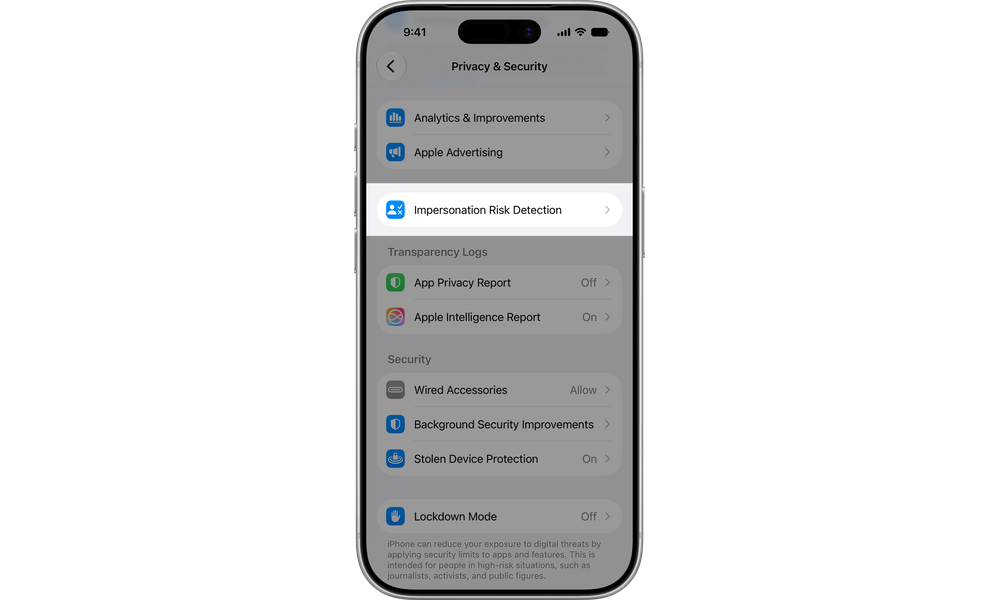
How to Turn On Impersonation Risk Detection
You’ll need an iPhone running iOS 27 or an iPad running iPadOS 27. If you haven’t updated yet, go to Settings > General > Software Update and install the latest update first. Once you’ve done that:
- Open the Settings app.
- Tap Privacy & Security.
- Scroll to the bottom and tap Impersonation Risk Detection.
- Turn on the toggle labeled Share with App Developers. You may be asked to sign in to the App Store with your Apple Account.
Remember, Share with App Developers means participating apps are allowed to request a risk level assessment. They will not see your underlying data.
Once enabled, that same screen becomes your control panel for Impersonation Risk Detection. You’ll be able to see Recent Activity (which apps have requested a risk assessment), and Reasons for Access (what action triggered each request). You can cut off an app’s access to Impersonation Risk Detection by tapping on it from that screen.
Apple also added in a clever safeguard. Changes to Impersonation Risk Detection can take up to 24 hours to kick in. Scammers sometimes coach victims to disable security features. If someone coaches you to disable this feature, you may be getting scammed.
Since the feature is so new, the number of third-party apps that support this right now is likely close to zero. We expect coverage to grow as developers roll out app updates over the coming months, but just because an app gets updated for iOS 27, that doesn’t mean Impersonation Risk Detection comes along with it. This is something developers have to specifically choose to implement.
There’s no list of which apps support Impersonation Risk Detection, and it’s unclear if there will ever be one. It’s more likely you’ll have to check the release notes for individual apps or head back into the Settings app to see if they appear there.
Since Impersonation Risk Detection is off by default, we recommend taking the 30 seconds each for your own iPhones and iPads as well as those of your kids and grandparents. It costs nothing. Once more apps are on board, it could be the very feature that protects you or your loved ones from a drained bank account.






