
Will Your iPad Run iPadOS 27?
Toggle Dark Mode
Just yesterday, Apple revealed the next software updates for its most popular products, which, of course, include the iPad.
The good news is that iOS 27 and iPadOS 27 are both bringing many cool new features and updates that will literally change the way you interact with your iPhone and iPad, especially once the smarter Siri AI is available.

What’s more, iPhone users will be happy to know that, contrary to previous rumors, all iPhones that support iOS 26 will also support iOS 27. Sadly, iPad users won’t be so lucky.
Not every iPad that currently runs iPadOS 26 will support iPadOS 27. Some of the older, less capable models will be left out. But will yours support iPadOS 27? Let’s find out!
Here Are the Only iPads That Will Support iPadOS 27

Luckily, iPadOS 27 will be supported by a bunch of iPads, even many older models. However, not every device will make the cut. These are the iPads that will support Apple’s next software update:
- iPad Pro (M4 or a later model)
- iPad Pro 12.9-inch (4th generation and later)
- iPad Pro 11-inch (2nd generation and later)
- iPad Air 13-inch (M2 and later)
- iPad Air 11-inch (M2, M3, and M4)
- iPad Air 11-inch (4th generation and later)
- iPad (A16)
- iPad (9th generation and later)
- iPad mini (A17 Pro)
- iPad mini (6th generation and later)
As you can see, there are a ton of options available. Basically, every iPad released since 2021 will support iPadOS 27, although some of the oldest ones in each family are being left behind on iPadOS 26. These include the 2018 iPad Pro models (the first ones to adopt the new design with Face ID), the 2019 iPad Air and fifth-generation iPad mini, and the 2020 iPad (8th generation).
How to Find Out Which iPad Model You Have
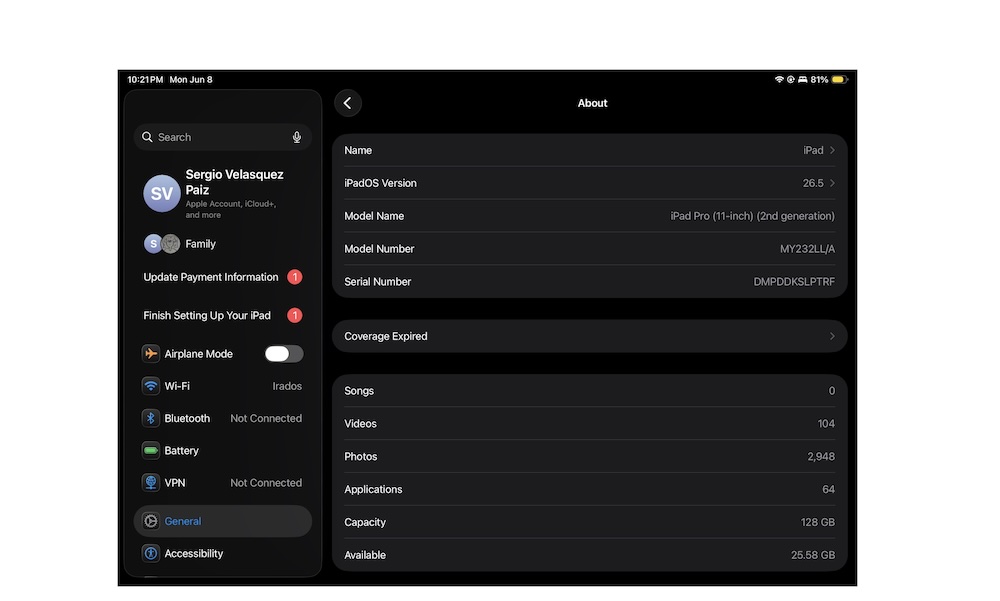
Let’s face it: All iPads look pretty darn similar. Even if you’re a power user, you might not be able to know which iPad you actually have.
The good news is that Apple knows this, which is why it made it incredibly easy to find out which iPad model you have. Here’s what you need to do:
- Open the Settings app.
- Tap General on the left sidebar.
- Select About.
- Near the top of the page, you’ll find your model right next to Model Name.
And that’s it. If your iPad is on the list above, you’ll be able to enjoy iPadOS 27 and all the new features it brings.
Get Your iPad Ready for iPadOS 27
Apple confirmed that the public version of iPadOS 27 will launch this fall, which means there’s plenty of time to get your iPad ready.
Although you can install the developer beta of iPadOS 27 right now, we don’t really recommend this unless you have a spare iPad with data you’re willing to sacrifice if something goes wrong.
Probably the best thing you can do is wait until July. That’s when Apple will launch the first public iPadOS 27 beta. Granted, it might still not be the finished product, but it’ll be more reliable than the first developer beta.






