
Google Maps Finally Matches One of Apple Maps’ Best Features
 keBu.Medien / Adobe Stock
Toggle Dark Mode
While Apple Maps has been around for 13 years, it’s fair to say that it had such a rocky start that most folks wrote it off and few ever looked back. After all, Google was already a dominant player in online mapping, so it had far more accurate data for both locations and navigation.
Still, Apple Maps has come a long way, and while the accuracy of data still varies widely depending on where you live, it may rival or beat Google Maps for accuracy, especially when it comes to things like navigation and traffic. While Google tends to have the edge for business information, Apple Maps boasts a user interface that’s second to none, thanks to its detailed city experiences and enhanced maps in CarPlay.

Despite this, many folks still believe that Google Maps has an edge over Apple Maps in every other way, but the reality is somewhat more complicated. Each app has its pros and cons, and sometimes we’re surprised at how far Apple Maps runs ahead of its major rival.
This week gave us another example of a feature that Apple Maps users may be taking for granted: the ability to automatically save the location of your parked car. Apple added this to iOS 10 in 2016, letting your iPhone automatically drop a pin on your parking spot whenever you walk away from your vehicle.
It’s a feature that’s been conspicuously missing from Google Maps. While Google has offered several ways to manually save your car’s location when parking, plus a sort of “semi-automatic mode” that relied on location and motion sensors to “guess” when you’ve parked, it’s never been fully automatic. Until now, that is.
Google has been rolling out an update over the past few weeks that finally puts it on par with Apple Maps in this specific area. Rio Akasaka, a Google Maps product manager, quietly announced it on LinkedIn last month, but as with many new Google features, it’s a slow rollout that’s taken time to hit everyone’s iPhones. Interestingly, it’s also exclusive to iOS.
Smart Triggers vs. Motion Guesswork
The trick here is that Google Maps is now taking advantage of the same cues that have always been available to Apple Maps to more accurately determine when you’re leaving your car: checking when your iPhone disconnects from Bluetooth, USB, or CarPlay.
Those are the signals that Apple Maps has used for its parking location option from the start. Google Maps tried to replicate the same feature on the iPhone, as shown in this YouTube video, but it wasn’t particularly reliable and could be a drain on your iPhone’s battery. That’s because it required always-on location access and relied on motion sensors to try to detect changes between driving (moving fast) and stopping or walking. This often resulted in false positives when stuck in stop-and-go traffic.
The updated version, which now uses Bluetooth or USB, allows Google Maps to pin your car’s location the same way Apple Maps does — by recognizing when you’ve actually disconnected and walked away from it. However, Google hasn’t entirely retired the old method, which actually gives it an advantage over Apple Maps here; folks who don’t use Bluetooth can still revert to the motion-based detection, but they’ll have to enable that manually by tapping a link in the settings.
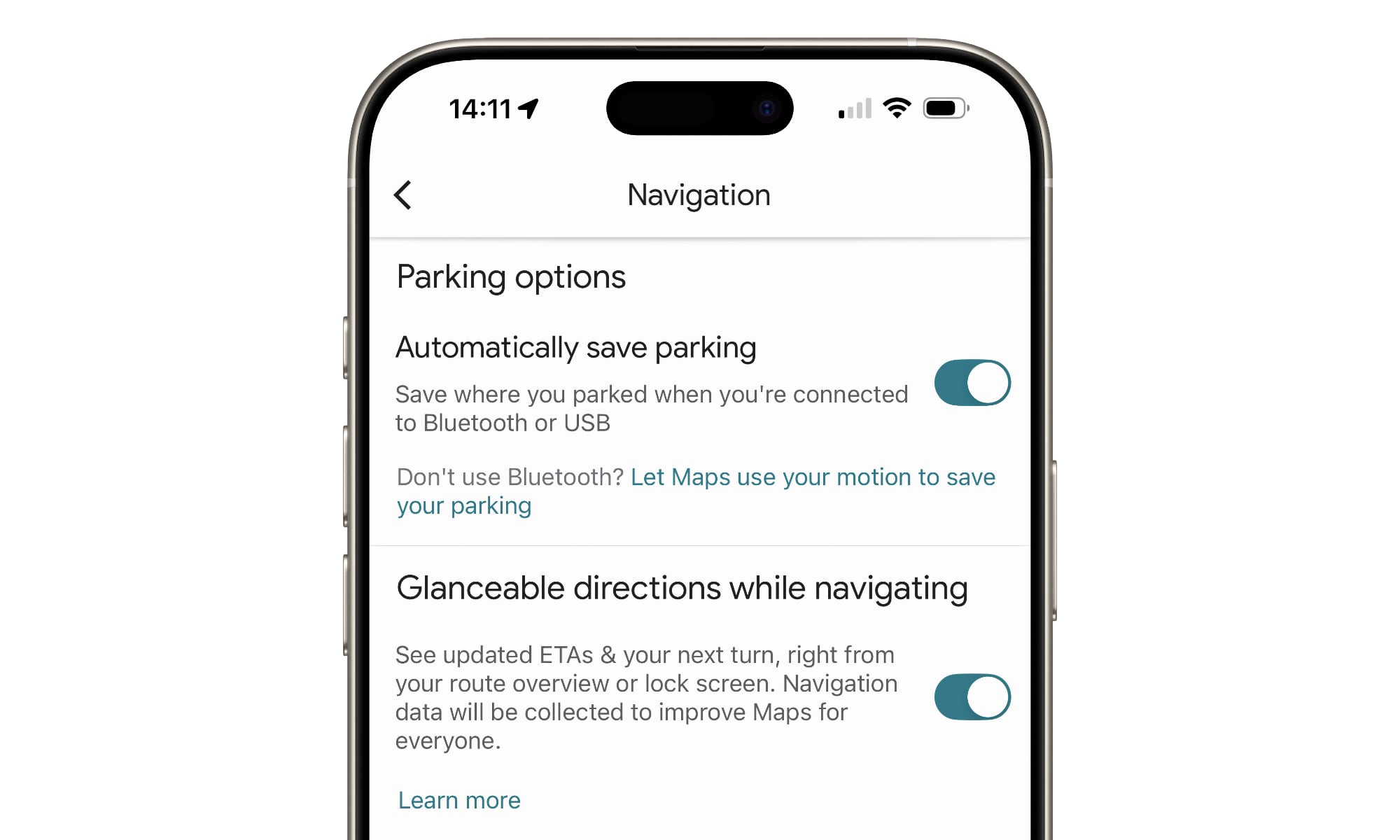
If you’re a Google Maps user, the new feature can be found by going into the app’s settings and looking for the “Parking Options” section under Navigation. Once you’ve updated to the latest version of Google Maps and the feature has rolled out to your account, you should see the reference to “Bluetooth or USB” and an additional option to let it use your motion if you prefer to use that method instead.
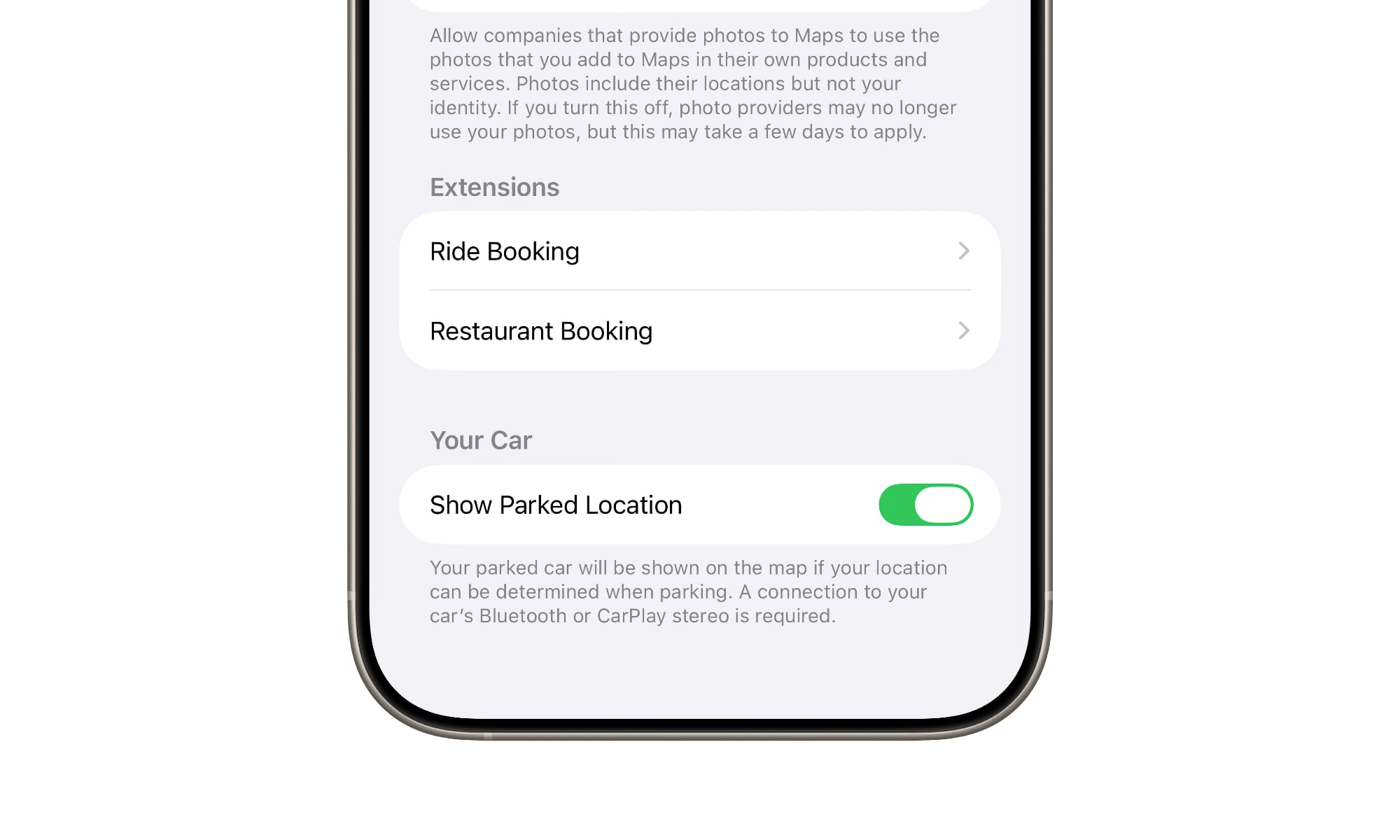
For Apple Maps users, this feature can be found in the main Settings app under Apps > Maps > Show Parked Location (or just Maps > Show Parked Location on iOS 17 and older versions).
It’s unlikely Google was deliberately dragging its heels on adding this capability. The motion sensing was probably the best it could do until recent iOS updates opened up the ability for third-party apps to access the necessary CarPlay and Bluetooth signals — two things that Apple’s own Maps app could access due to its tighter integration into iOS itself.
While there don’t appear to be any explicit APIs for this, Google may have found a way to put new features like extended background processing to work. Plus, as the recent addition of AirDrop to the Pixel 10 shows, Google isn’t shy about engineering more advanced interoperability solutions on its own.
Google also has another treat for users of its Maps app: instead of just dropping a boring pin on your parked car, it can place a custom vehicle icon on the map — the 3D car glyph you choose in the navigation mode. This helps it stand out in a sea of blue pins and other map icons, helping you better spot your vehicle on the map when you’re coming out of the mall after an exhausting holiday shopping excursion.






