
America’s Cyber Defense Agency Issues New Text Message Warning
 oasisamuel / Shutterstock
Toggle Dark Mode
A new discovery in this week’s iOS 26.3 beta revealed that the next iOS update may finally bring end-to-end encryption (E2EE) to cross-platform text messages. As of today, iPhone-to-iPhone use E2EE over iMessage, as do Android-to-Android messages over RCS (in most cases), but text messages between the two do not. This has prompted the US Cybersecurity & Infrastructure Agency (CISA) to issue best practices for sending messages between the platforms until full E2EE is implemented.
For now, this advice encourages users sending messages between platforms to only use E2EE apps like Signal and WhatsApp. More recently, CISA has recommended that users take security a step further. This advice applies to all messaging platforms — third-party apps and Apple’s iMessage and Google Messages — and to iPhone-to-Android communication when Apple adds RCS E2EE support. However, you won’t necessarily be able to follow it on every platform.

CISA says users should use “message expiration features” (aka disappearing messages) to automatically delete sensitive messages after a set period.
Signal, WhatsApp, and Facebook Messenger all support E2EE and include a feature that makes messages disappear. They allow users to set a time period after which sent messages are automatically deleted from both their device and the recipient’s device. However, one problem remains for iPhone users — Apple’s Messages app lacks a similar option.
The iMessage ‘Blunt Instrument’ Workaround
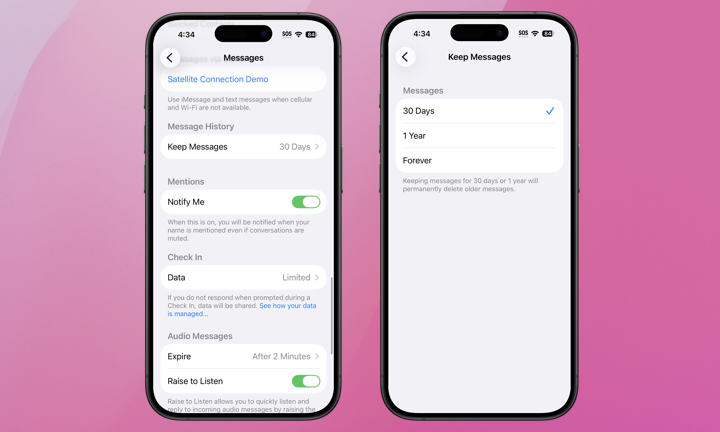
If you’re not interested in using a third-party E2EE app like WhatsApp, there’s an iMessage setting that will get you partway across the finish line by ensuring that sensitive messages can at least be automatically removed from your device after a fixed period, but it won’t do anything for the messages on the recipient’s end unless they also turn on this setting. Here’s where to find it:
- Open Settings on your iPhone.
- Scroll to the bottom and select Apps (on iOS 18 and later).
- Scroll down and choose Messages.
- Scroll down to Message History and select Keep Messages.
- Choose 30 days, 1 Year, or Forever.
Note that this is a global setting that will apply to ALL of your Messages in all conversations, so it’s a much more blunt instrument than the disappearing messages feature in other apps.
In other words, if you set it to 30 days, every message on your iPhone older than 30 days will be permanently deleted — and if you’re syncing your messages in iCloud, this will propagate to your other devices, too, like any Macs and iPads sharing the same Apple Account. Fortunately, if you’re changing this to a shorter time period, you’ll be warned that you’ll lose any older messages and asked to confirm. Unlike disappearing messages, which are designed to protect privacy during a specific conversation, this is more of a tool for cleaning up your digital storage that also offers security benefits.
You may be wondering what qualifies as a “sensitive message,” but it’s probably not too hard to use your imagination. Things like physical addresses, gate and security system codes, passwords, health-related discussions, and financial details shared with family members all come to mind as common examples of things people regularly share that they may not want to leave lying around in their chat history.
While you might expect that things like one-time passcodes and login links would qualify, they’re typically useless once you’ve used them and typically expire after a few minutes even if you don’t. At the most, they can provide a clue to the services you use, but if somebody has access to your iPhone, the apps you have installed are often a dead giveaway for that anyway
If you’re in doubt, you may want to assume all iMessages are sensitive and adjust your Message History accordingly, erring on the side of brevity. On the plus side, you may free up some precious storage space if you’ve been hoarding iMessages. If you haven’t yet upgraded to iOS 26 and regularly send messages to Android users, you should probably make the leap when iOS 26.3 is released.
Why You Shouldn’t Panic
While these clearing measures will definitely provide the best protection — hackers can’t access what’s not there — before you panic and start deleting all your message history, it’s important to keep in mind that messages stored in Apple’s Messages app can only be accessed by someone with direct access to your devices, device backups, or your iCloud account.
If you’re using a strong passcode with Stolen Device Protection on your iPhone and Advanced Data Protection for your iCloud account — and you really should be using all of these security features — the likelihood of someone getting unauthorized access to your messages is extremely low. Your messages are fully encrypted on your device, and these features will ensure they’re properly encrypted in iCloud as well, along with making it virtually impossible for someone to access your device, even if it’s stolen. These features make your messages so secure that it’s impossible for even Apple to recover them without your passcode or Apple Account password.
The real problem is that this isn’t just about the security of your devices; you can lock down your iPhone with Apple’s best security features, but a sensitive chat will still be vulnerable from the other side if a friend or family member uses an obvious passcode on their iPhone. That’s why CISA’s warning about using message expiration on platforms that support it is so crucial — it erases the message on everyone’s devices in one fell swoop.
The Hidden Risks of Disappearing Messages
We can certainly hope Apple eventually releases its own version of disappearing messages, but we’re also not holding our breath, as this can be a double-edged sword. When Apple added the ability to edit and unsend iMessages in iOS 16 for the first 15 minutes after they were sent, advocates for victims of domestic violence made a strong case on how this could be used by abusers to gaslight and harass their victims by sending abusive messages and destroying the evidence as soon as their target sees them.
This controversy erupted while the feature was still in beta, and by the time iOS 16 was released to the public, Apple had refined the setting, reducing the time to unsend a message to 2 minutes and adding a version history for edited messages so recipients could flip back to the original. Disappearing messages create the same problem, and Apple tends to be sensitive to the concerns of safety and privacy advocates.
This creates a complex tension for Apple. While CISA advocates for disappearing messages as a security best practice to protect users from external hackers, safety advocates warn that these same features can be weaponized in domestic abuse cases to erase evidence of harassment, leaving victims feeling trapped and helpless. Apple is walking a fine line here, and its hesitation to implement a “disappearing” feature likely stems from this delicate balance between digital security and personal safety.






