
Your Apple Watch Series 12 Is Listening — But Here’s Why You Shouldn’t Panic
Toggle Dark Mode
One of the most interesting — and potentially scary — new features in the Apple Watch Series 12 and Apple Watch Ultra 4 is a new set of Audio Intelligence features that promise to help you keep track of the conversations you have throughout the day.
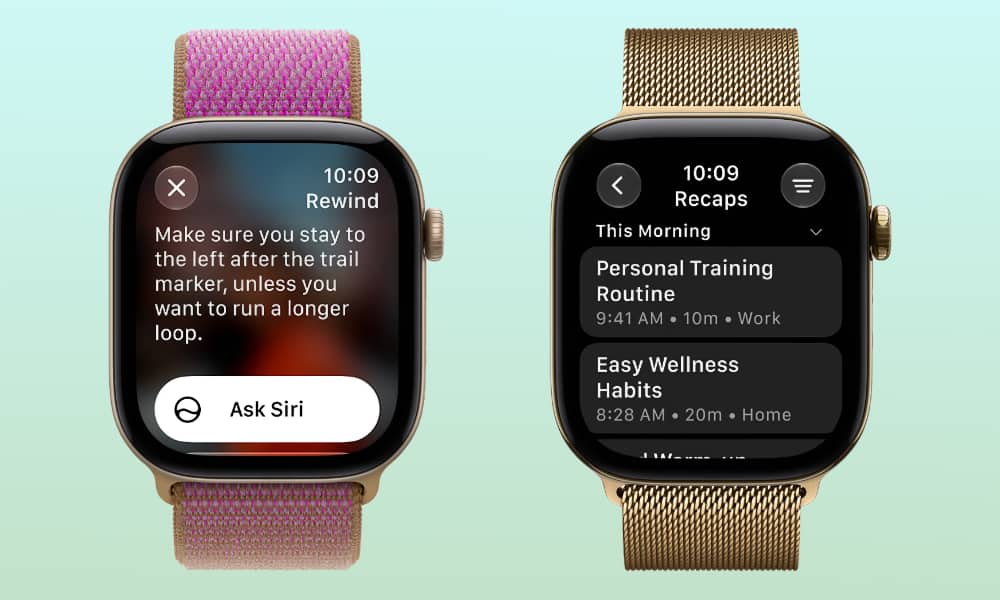
While Apple will likely bring more features under the Audio Intelligence umbrella in the future, for now this refers to two specific tools: Siri Recap, which summarizes your conversations throughout the day, and Live Rewind which is designed to catch something you may have missed when someone is speaking to you.

As the name suggests, you can think of Live Rewind as a real-world equivalent of skipping back in a show you’re watching on the Apple TV to read the subtitles. Live Rewind does more or less the same thing, giving you a written transcript on your wrist of whatever your watch has heard in the last 15 seconds.
Live Rewind
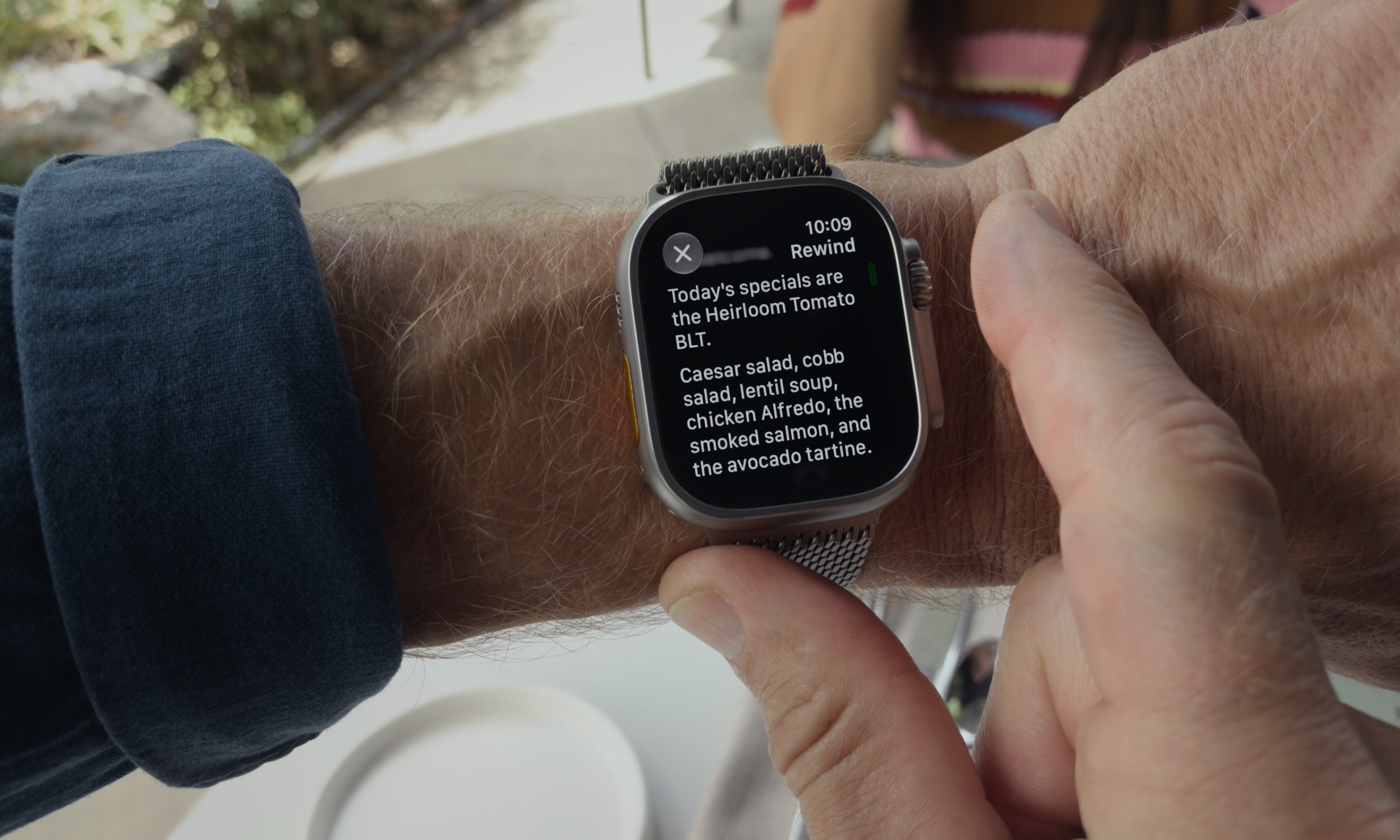
Live Rewind can be activated at any time by double-clicking the Digital Crown. You’ll immediately see what was said in the last 15 seconds, and you can simply swipe or scroll through it or use the “Ask Siri” button to get more information or save it for later.
Live Rewind is always available, which means it’s always listening. While the feature is optional overall — you have to opt in to use it, and can opt back out at any time — there’s no toggle for it. Once you’ve enabled Live Rewind, your Apple Watch is always listening to the world around it.
While that may sound a bit creepy on the surface, Apple has published a new Audio Intelligence Privacy Overview guide that explains the steps it’s taken to ensure that nobody else — not even Apple — gets access to your audio. Here’s a quick rundown:
- The Secure Exclave. The new S11 chip on the Apple Watch Series 12 and Ultra 4 has a dedicated hardware-isolated section that processes audio data separately from the rest of the system. The Secure Exclave cannot be accessed by watchOS, third-party apps, the user, or even Apple.
- Recordings don’t accumulate. The S11 chip uses a continuous rolling buffer that stores only a limited amount of audio. The Apple Watch may be listening all the time, but old audio in the Secure Exclave is automatically being overwritten by new audio.
- The hardware trigger. Much like Apple hardwires the side button to the Secure Enclave for Apple Pay, the Digital Crown is the hardware trigger to release audio from the Secure Exclave. There’s no software-level method to do this; the Digital Crown must be physically pressed to activate Live Rewind, which releases the immediately preceding 15 seconds of buffered audio for processing.
- The iPhone connection. The S11 chip isn’t powerful enough to transcribe the audio, so Live Rewind relies on the paired iPhone. The buffered audio isn’t processed on the watch, but securely transferred to the Secure Exclave of the iPhone, where the on-device speech recognition creates a text transcript and immediately discards the raw audio. The text is then sent back to the Apple Watch to be displayed. This also means that Live Rewind won’t work when your iPhone isn’t within wireless range.
- Visual and audible alerts. You can’t use Live Rewind surreptitiously. The only way to get the audio out of it is to activate it using the Digital Crown, and as soon as you do that, your Apple Watch will play an audible chime that will always come from the speaker on the watch, even if you’re wearing headphones. A full-display animation and microphone indicator will also show up on the Apple Watch screen.
If you choose to save a Live Rewind transcript to the Siri app, then it will be handled in the same way as any other Siri request in that app: stored as text and synced via iCloud using end-to-end encryption — even if you haven’t enabled Advanced Data Protection.
So, if you opt in to Live Rewind, your Apple Watch Series 12 or Ultra 4 will always be listening, but it’s never storing more than about 15 seconds of audio, and that audio is just as inaccessible as your credit cards are until you double-tap the Digital Crown to physically release them.
Siri Recap
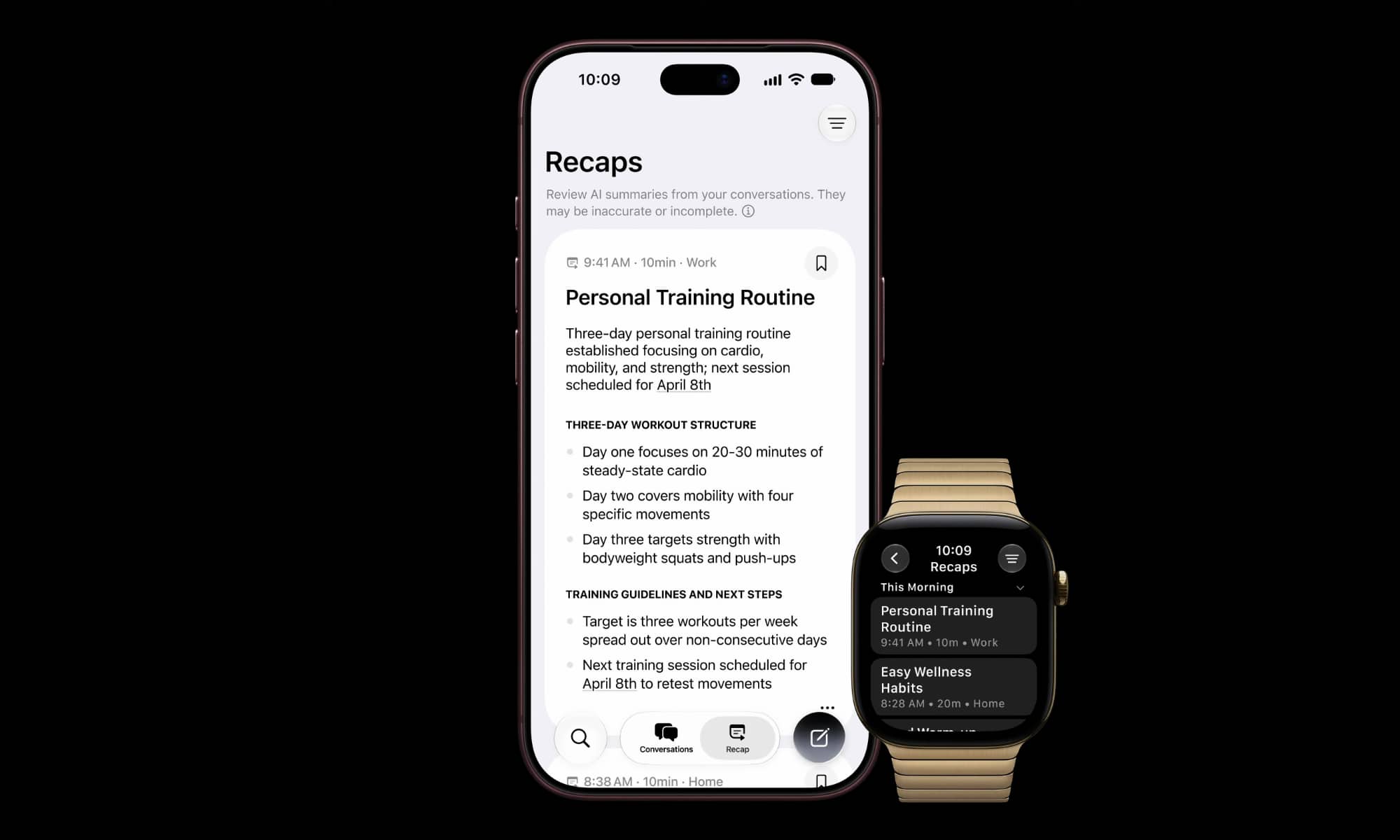
Apple’s other Audio Intelligence feature, Siri Recap, is a little bit trickier, because it’s designed to summarize everything that goes on throughout your day.
However, unlike Live Rewind, Siri Recap doesn’t transcribe anything. It’s designed exclusively to refresh your memory. Here’s how Apple describes it:
Siri Recap summarizes conversations throughout your day and produces high-level Apple Intelligence-generated notes so you can stay present in the moment and catch up later.
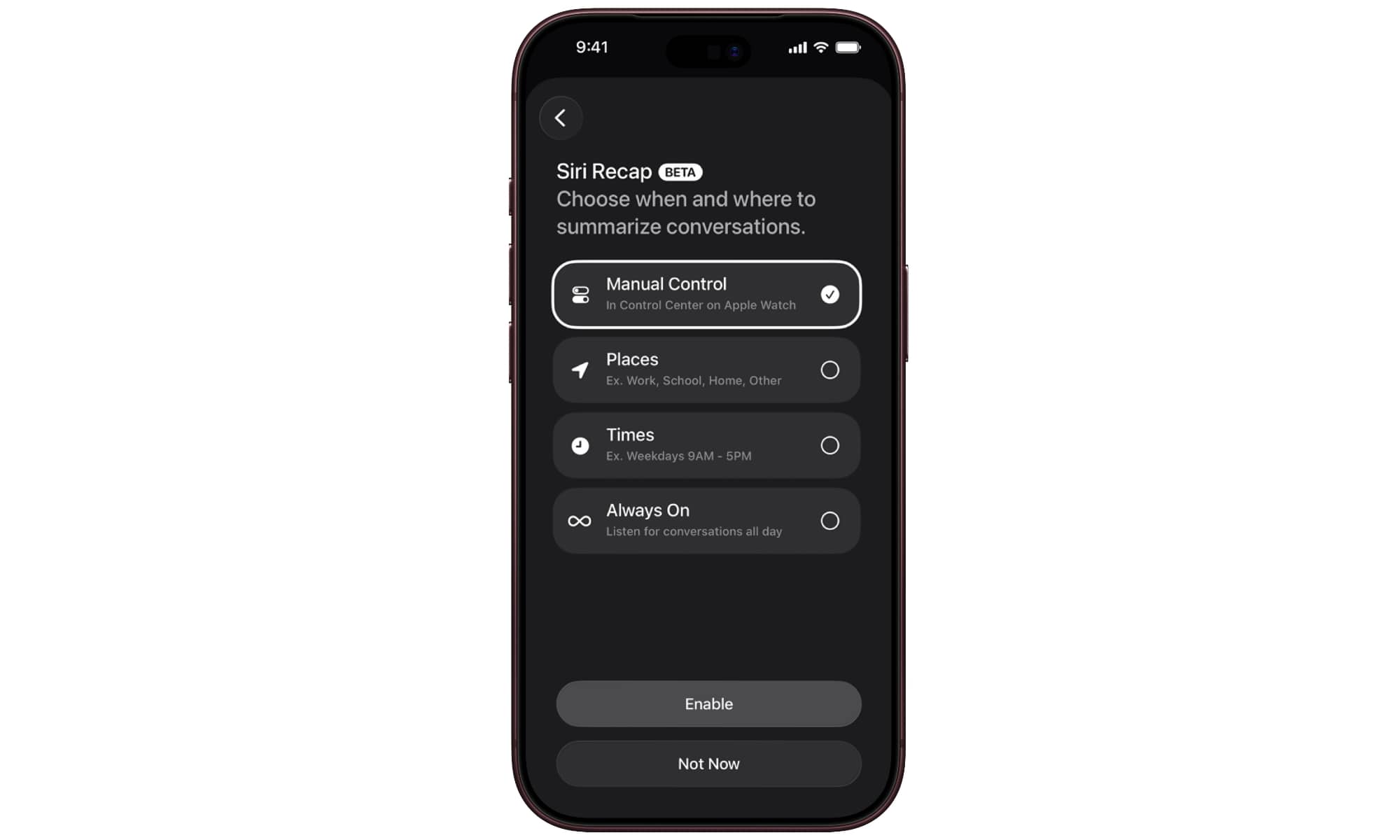
Unlike Live Rewind, Siri Recap needs to be explicitly activated to work. You can toggle it on from Control Center on-demand or choose to have it enabled at specific places or times, or simply leave it on all the time. However, it’s still opt-in from the start, so you can also leave it disabled entirely, in which case even the Control Center option won’t be available.
The audio pipeline for Siri Recap works much like Live Rewind. Data is collected in a protected buffer in the Secure Exclave chip, but it’s also not continuously recording. Instead, Apple says the S11 chip uses “a lightweight AI model to determine whether speech is occurring nearby.” That model isn’t transcribing or recording, merely deciding if there’s anything worth recapping.
If a conversation is detected, then the audio is securely captured into the Secure Exclave, which routes it to the paired iPhone. As the audio is transferred to the iPhone, it’s cleared from the Secure Exclave. If the paired iPhone isn’t in range, the Apple Watch will keep the data for a short period of time to retry when the iPhone reconnects, but it will eventually be discarded as the encryption keys will expire, rendering it useless.
Once the encrypted audio arrives at the iPhone’s Secure Exclave, it’s decrypted inside that chip, transcribed to text, and then fed into an on-device language model to generate a condensed version of the text that’s “designed to distill the conversation to its core meaning, removing content suggestive of conversation tone, non-essential language, filler words, and redundancies, while preserving the topics discussed.“ As soon as that’s done, the raw audio is permanently deleted.
A “safety model” is also applied to the text to screen for and omit “potentially harmful terms,” and then the resulting condensed text is encrypted and sent to Private Cloud Compute, along with contextual information such as Now Playing data, Calendar appointments, and high-level general location labels (e.g. home, work, school, or city), and point-of-interest categories like “grocery store” or “park.” Precise location and specific location names are not included.
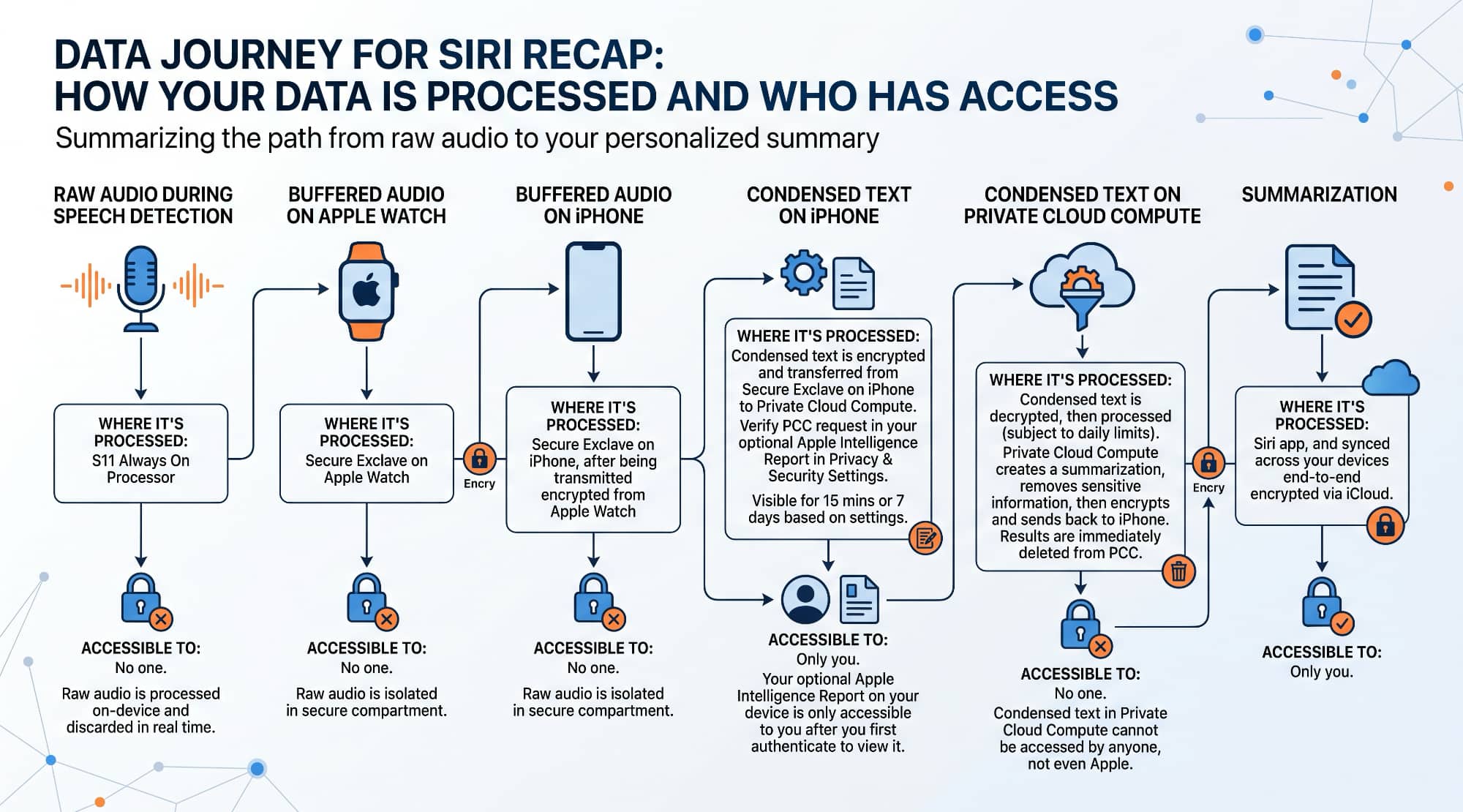
These are designed to help the Apple Foundation Models on Apple’s servers generate a more useful summary by including cues such as music you might be listening to, the topic of a meeting or lecture you’re attending.
Siri Recap is designed so that sensitive information is not included in summaries, such as financial data, government-assigned identifiers, authentication data, and certain personal identifiers.
As the name implies, data in Private Cloud Compute isn’t accessible by anyone — even Apple engineers (we covered Apple’s Private Cloud Compute infrastructure two years ago). The servers are used to generate the summary and then send the data right back to your iPhone and Apple Watch, where it will be stored securely in the Siri app and Recaps tab.
Siri Recaps will be synced across your devices using end-to-end encryption as long as you have a device passcode set and are using two-factor authentication on your iCloud account. However, they’re also automatically deleted after seven days unless you explicitly choose to save them.
While Siri Recap won’t alert anyone around you when it’s active, Apple notes that it doesn’t produce a verbatim transcript, and it won’t identify or attribute speakers. “The output is a brief, high-level summary, comparable to notes a person might write after a conversation.”
When Is Audio Intelligence Coming?
Audio Intelligence will require an Apple Watch Series 12 or Apple Watch Ultra 4 paired with an Apple Intelligence-enabled iPhone 16 or later (excluding the iPhone 16e). That means the iPhone 15 Pro and iPhone 15 Pro Max are also being left out of this one.
However, Audio Intelligence won’t be available when the new Apple Watch models arrive this Friday. Apple notes that Live Rewind and Siri Recap “will be available in beta late in 2026,” which presumably means iOS 27.1 and watchOS 27.1, which should be released next month, but the features may also not happen until the 27.2 versions arrive closer to December.
These features also won’t be available at all for users under 13, and for those under 18 on a Child Account, they’ll need to be enabled by a parent or guardian.
As with most Apple Intelligence features, it’s launching solely in English at first, and it’s not coming to the EU just yet. Apple also adds in the fine print that “Certain Audio Intelligence features that rely on server-side models are subject to daily usage limits,” although it doesn’t go into any additional details.






