
The iPhone 18 Pro Max Has a Hidden Battery Setting — Here’s What It’s For
Toggle Dark Mode
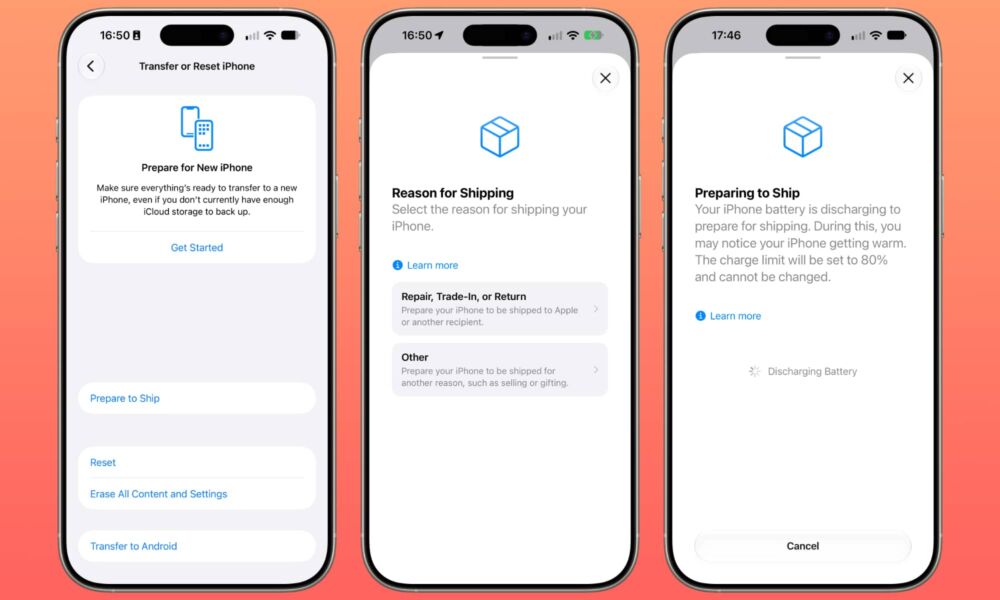
If you’ve just picked up a shiny new iPhone 18 Pro Max and spent any time poking around in the settings, you may have noticed a new option hiding in the “Transfer or Reset” section. Tucked in the normally blank space between the instructions and the other reset, erase, and Android transfer options is a new “Prepare to Ship” button.
It threw me for a momentary loop when I stumbled across it on Friday (I had to reset my new iPhone 18 Pro Max and start over as the first transfer had used a day-old iCloud backup for some reason). It turns out that it’s not a universal iOS 27 feature, or even a function of all the new iPhone models.

It’s actually exclusive to Apple’s largest model, and that’s because it’s there to address a challenge unique to the biggest battery in iPhone history.
Even months before Apple’s September iPhone event, the usual assortment of leakers and analysts were predicting a massive new battery for the iPhone 18 Pro Max. While Apple doesn’t publish these specs, the folks at iFixit did one of their usual teardowns over the weekend and confirmed that we are indeed looking at a 5,567 mAh cell in the larger model.
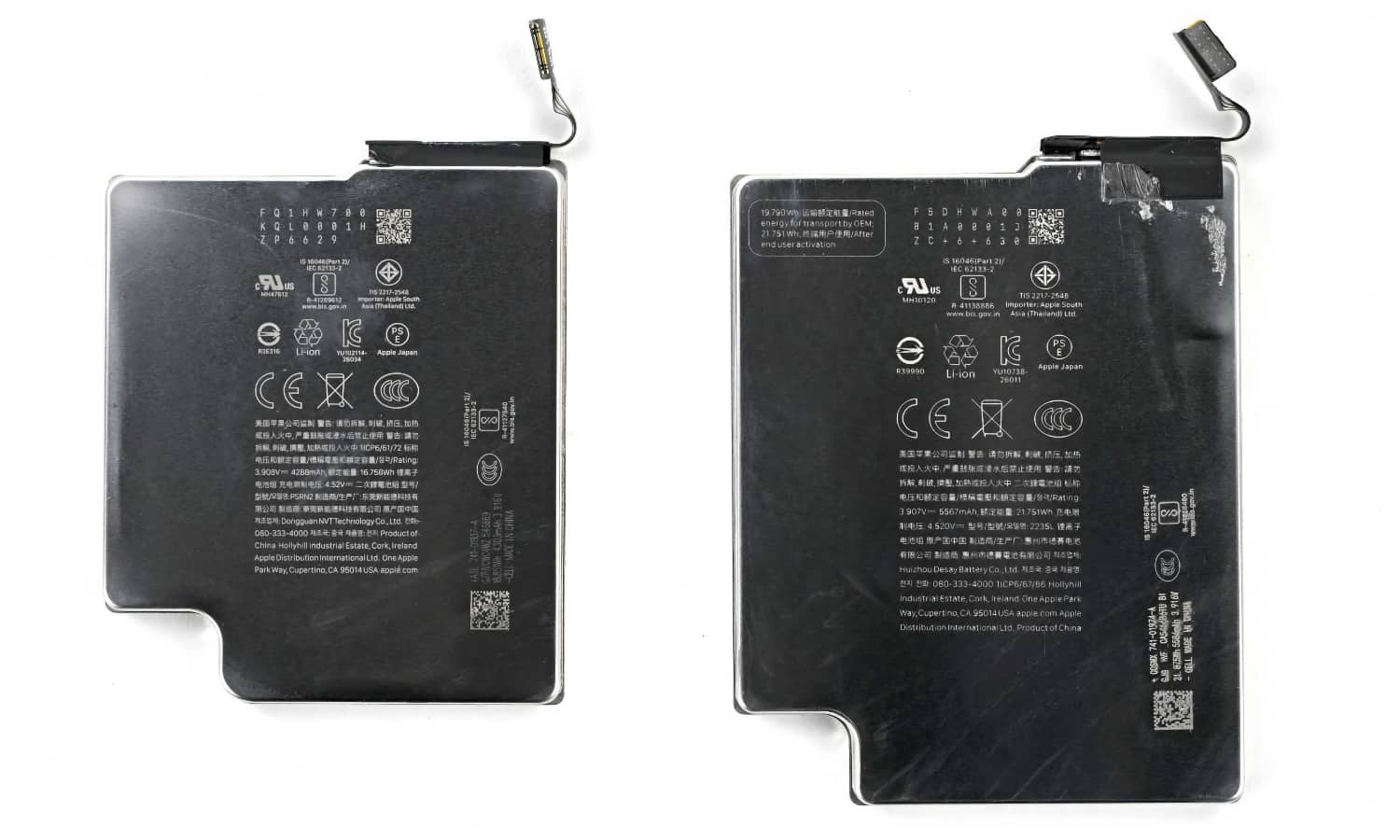
Operating at a nominal 3.9 V, that works out to the 21.751 Wh (watt-hours) that iFixit reported. This creates a challenge for anyone who wants to ship an iPhone 18 Pro Max anywhere. International safety regulations classify single-cell batteries over 20 Wh as Class 9 dangerous goods, triggering heavier regulatory and special packaging requirements — not to mention a whole mess of extra paperwork.
To get around this problem, Apple has added a setting in the battery firmware that limits the cell’s maximum capacity to keep it under 20 Wh (5,128 mAh). That’s roughly 92 percent of its total capacity, but to ensure a healthy margin, Apple actually limits it to 80 percent (around 17.4 Wh).
As Apple explains in a support article, this setting is enabled at the factory, which means every iPhone 18 Pro Max that’s in transit, on a store shelf, or sitting in a warehouse is capped at a lower capacity. That ensures Apple can ship crates of iPhone 18 Pro Max units around the globe without extra paperwork and other hassles.
This limit is removed as soon as you activate your iPhone, so you should never actually notice its impact on your battery, but Apple also recognizes that the time may come when you need to ship your iPhone somewhere. That’s where the “Prepare to Ship” setting comes in. Apple explains it thusly:
After activation, if you need to ship your iPhone 18 Pro Max for a repair, trade-in, return, or as a gift for example, use the Prepare to Ship feature in Settings. This feature discharges your battery to below 20 Wh and sets a charge limit so your iPhone stays below this limit while shipping. This can be reversed and you can reset your charge limit after shipping.

Note that this is strictly a regulatory requirement for commercial shipping. Apple makes it clear that the iPhone 18 Pro Max is perfectly safe for shipping and air travel, whether you’re packing it in your carry-on or your checked bags.
It’s simply a matter of international air transport rules from associations like the IATA mandating a lower threshold above which additional paperwork is required. Passenger aviation rules set a much higher limit of 100 Wh for batteries in personal electronic devices.
At this stage, the only place where you’re likely to need to worry about this new setting is if you’re purchasing an iPhone 18 Pro Max for a friend or family member and setting it up for them before shipping it to them, if you’re sending your new iPhone in for repair, or if you’ve simply changed your mind and plan to return your iPhone 18 Pro Max back to Apple via UPS, FedEx, or another similar commercial carrier.
In this case, you can prepare your iPhone 18 Pro Max for shipment by going to Settings > General > Transfer or Reset iPhone > Prepare to Ship and selecting the reason for shipping.
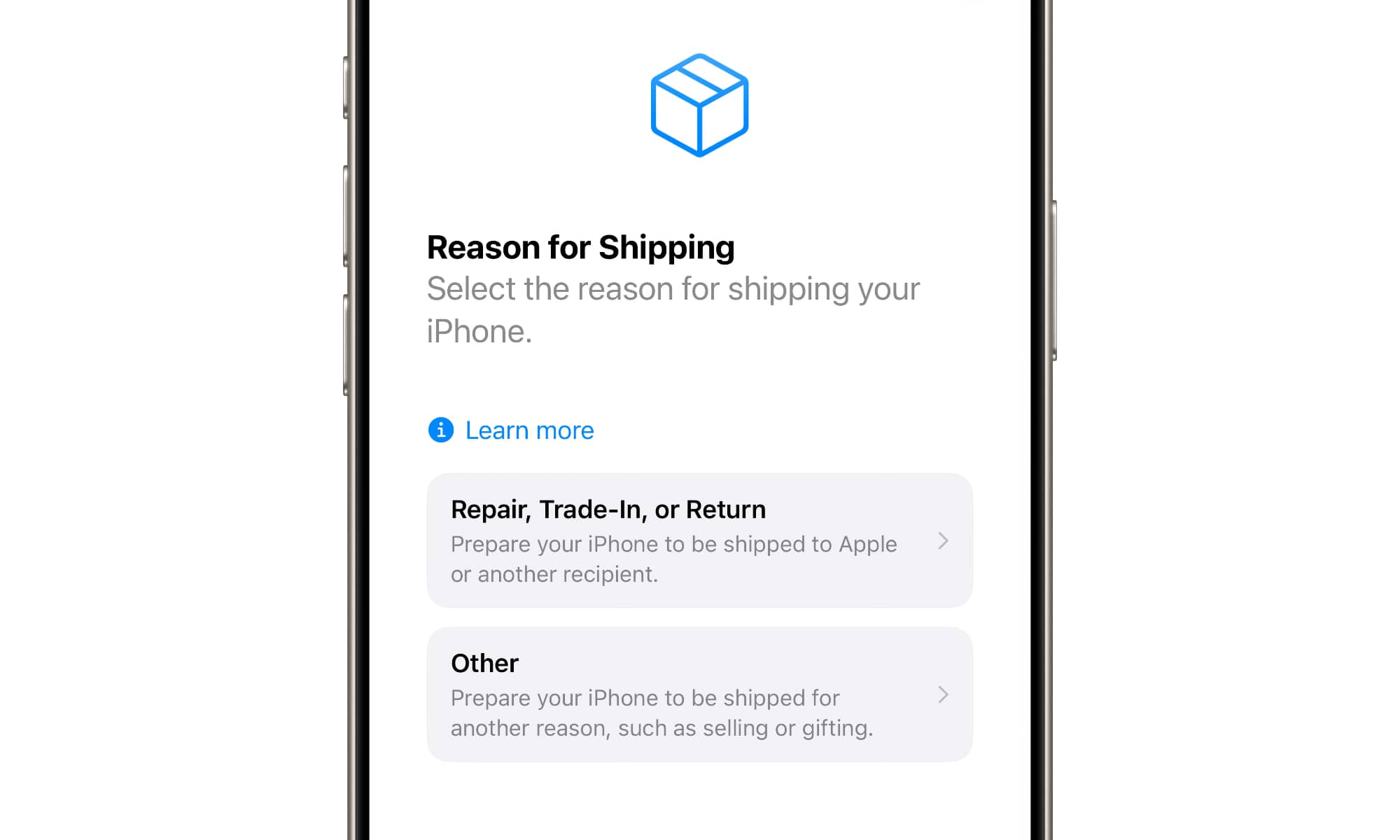
Apple explains that the first option, “Repair, Trade-In, or Return,” will cap the charge limit at 80 percent for 14 days.
If you select “Other,” the cap will remain in place until you manually disable it by following the steps above to return to the “Transfer or Reset iPhone” screen and choosing Ready to Ship (which replaces “Prepare to Ship”) and then selecting Undo Shipping Preparation.
Both options will also walk you through the process of erasing your iPhone and signing out of your Apple Account. You’ll want to do that in most cases, but it’s not required, so you can skip these steps if you’re sending a pre-configured iPhone to someone.
If necessary, this process will also discharge your battery to ensure it’s below 80 percent. Apple notes that it’s normal for your iPhone 18 Pro Max to warm up during this process, and it may take a couple of hours, so it’s best to give yourself some time to prepare things in advance.
You can erase your iPhone while the battery is discharging, and check its status by tapping the “info” button on the initial Hello screen that appears on a fresh iPhone.
Since the iPhone 18 Pro Max is the only model (so far) with a single-cell battery exceeding 20 Wh, you won’t find “Prepare to Ship” on the iPhone 18 Pro or any other iPhone models. While iPads and MacBooks have much higher battery capacities, they use multi-cell batteries, and therefore aren’t subject to the same transport regulations.






